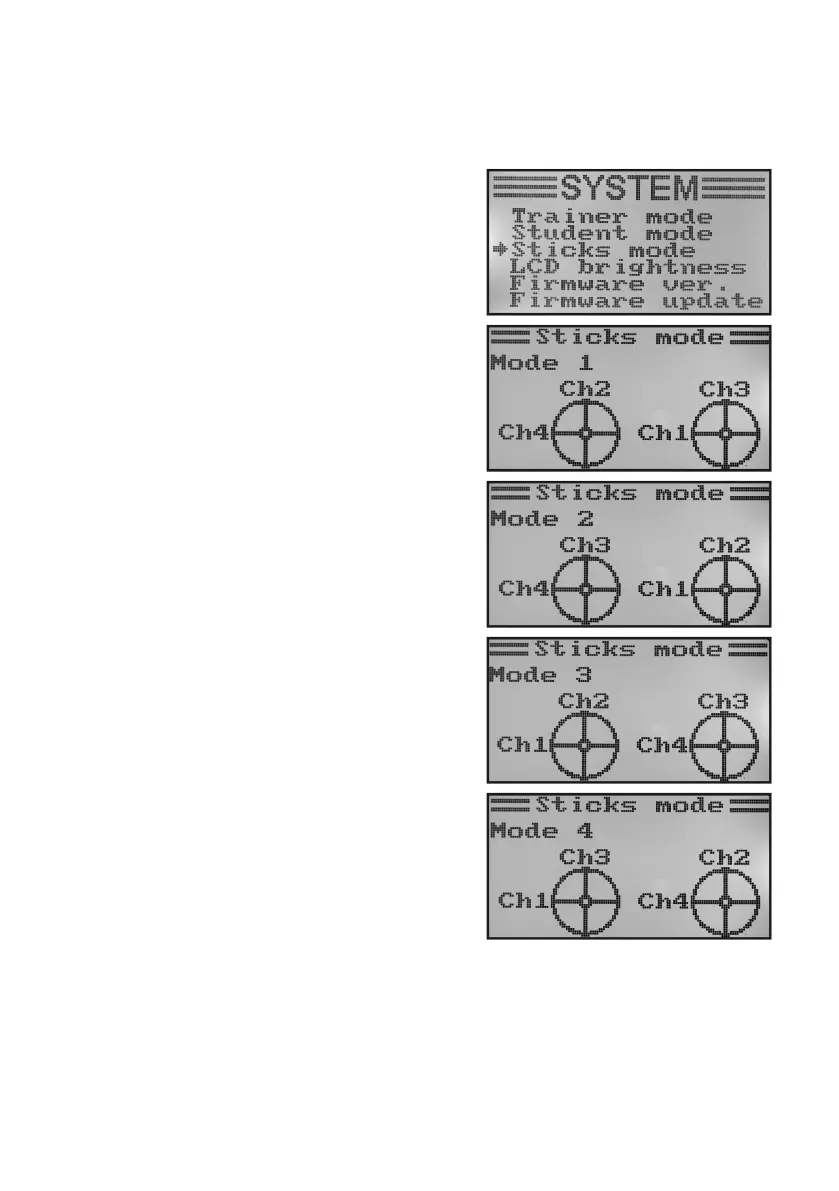
i) Control Stick Assignment „Sticks Mode“
Asdescribedpreviouslyforthereceiverconnection,theindividualreceiveroutlets(channels)havespecicfunctions
orservosassignedtothem.Therstfouroutputsareassignedasfollows:
CH1 = channel 1 (aileron/roll servo)
CH2 = channel 2 (elevator/nod servo)
CH3=channel3(throttleservo/ightcontroller)
CH4 = channel 4 (rudder/tail servo)
When setting the control stick assignment, you can exactly
determine the control stick you want to use to control outputs
1 - 4.
Setting the control stick assignment:
• Switchonthetransmitterandcallthesystemsettingmenu.
• Movethecursorarrowtothemenuitem„Sticksmode“withthe
two buttons „UP“ and „DOWN“.
• Brieypushthebutton„OK“toactivatethemenuitem.
The display shows the currently used control stick assign-
ment. The two circles with the lines offset by 90° are the two
control sticks. Additionally, the control functions are displayed
according to the control stick assignment.
• Pushingthebuttons„UP“or„DOWN“permitssettingthedesi-
red control stick assignment „Mode 1“ to „Mode 4“.
• Keepthebutton„CANCEL“pushedforalongerperiodtosave
the settings. The display then shows the system setup menu
again.
• Pushthebutton „CANCEL“repeatedlyuntilyou getbackto
the operating display.
Please observe that the control sticks are designed for „Mode
2“ or „Mode 4“ ex works. If you prefer „mode 1“ or „mode 3“,
the stick units must be swapped.
Figure 29



 To Next Page