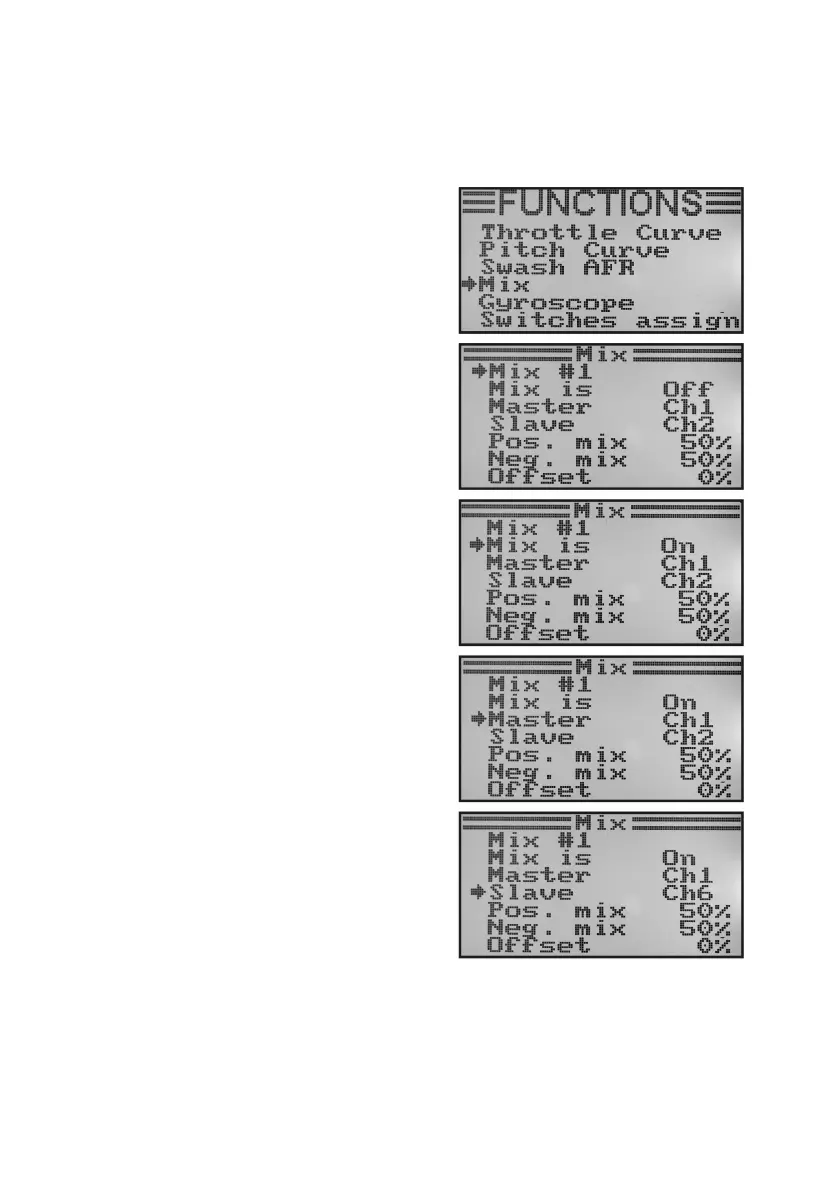
j) Mixer Programming „Mix“
This programing permits controlling a slave channel via a master channel. The slave channel is taken along linearly,
withthetwodeectiondirectionsandthedeectionvaluesoftheslaveservo,aswellastheworkingpointofthemixer
being programmable individually. All in all, 3 freely programmable linear mixers „Mix #1“ - „Mix #3“) are available.
Adjusting the mixers:
• Switchonthetransmitterandcallthefunctionsettingmenu.
• Movethe cursorarrow tothe menuitem „Mix“with thetwo
buttons „UP“ and „DOWN“.
• Brieypushthebutton„OK“toactivatethemenuitem.
The display shows the indication for mixer #1 with the pre-set
mixing values.
• Pushthebuttons„UP“or„DOWN“toselectthedesiredmixer
„Mix #1 - Mix #3“.
• Whenpushingthebutton„OK“,thecursorarrowwilljumpto
the mixer function. Pushing the buttons „UP“ or „DOWN“ can
activate „On“ or deactivate „Off“ the mixing function.
• When pushing the button „OK“, the cursor arrow will jump
to the master channel. Push the buttons „UP“ or „DOWN“ to
select the master channel now.
• When pushing the button „OK“ again, the cursorarrow will
switch to the slave channel. Push the buttons „UP“ or „DOWN“
to select the slave channel now.
Figure 45



 To Next Page