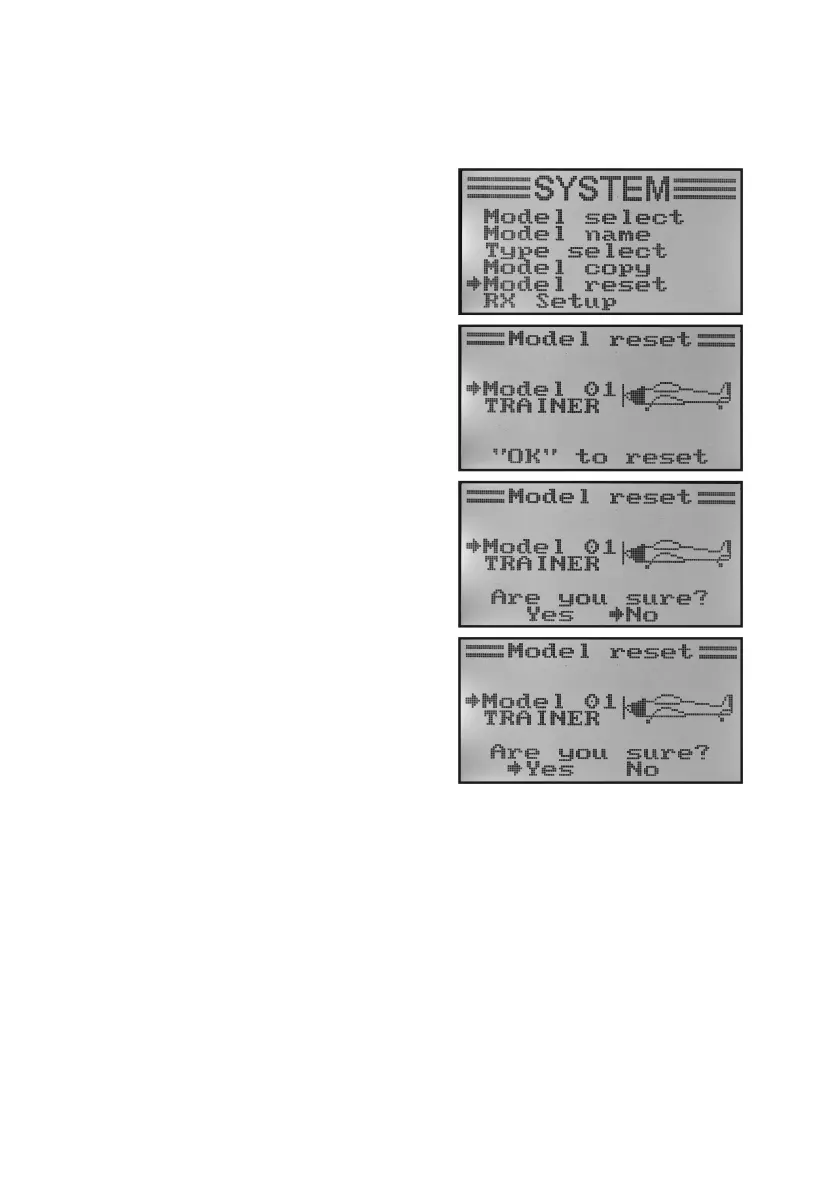
e) Deleting Model Memory „Model Reset“
To remove any present and undesired settings before programming a new model, you can delete individual model
memories targetedly and thus rest them to factory settings.
Deleting model memory:
• Switchonthetransmitterandcallthesystemsettingmenu.
• Movethecursorarrowtothemenuitem„Modelreset“withthe
two buttons „UP“ and „DOWN“.
• Brieypushthebutton„OK“toactivatethemenuitem.
The display shows the currently set model memory with the
modelnameandmodelgure.
• Usethebuttons„UP“or„DOWN“toselectthemodelmemory
to be reset to factory parameters.
• Afterpushingthebutton„OK“,asafetypromptappears.
• Pushingthebuttons„UP“or„DOWN“switchesthecursorar-
row from „No“ to „Yes“. Push the button „OK“ again to delete
the model memory. The display then shows the system setup
menu again.
• Pushthebutton „CANCEL“repeatedlyuntilyou getbackto
the operating display.
Figure 21



 To Next Page