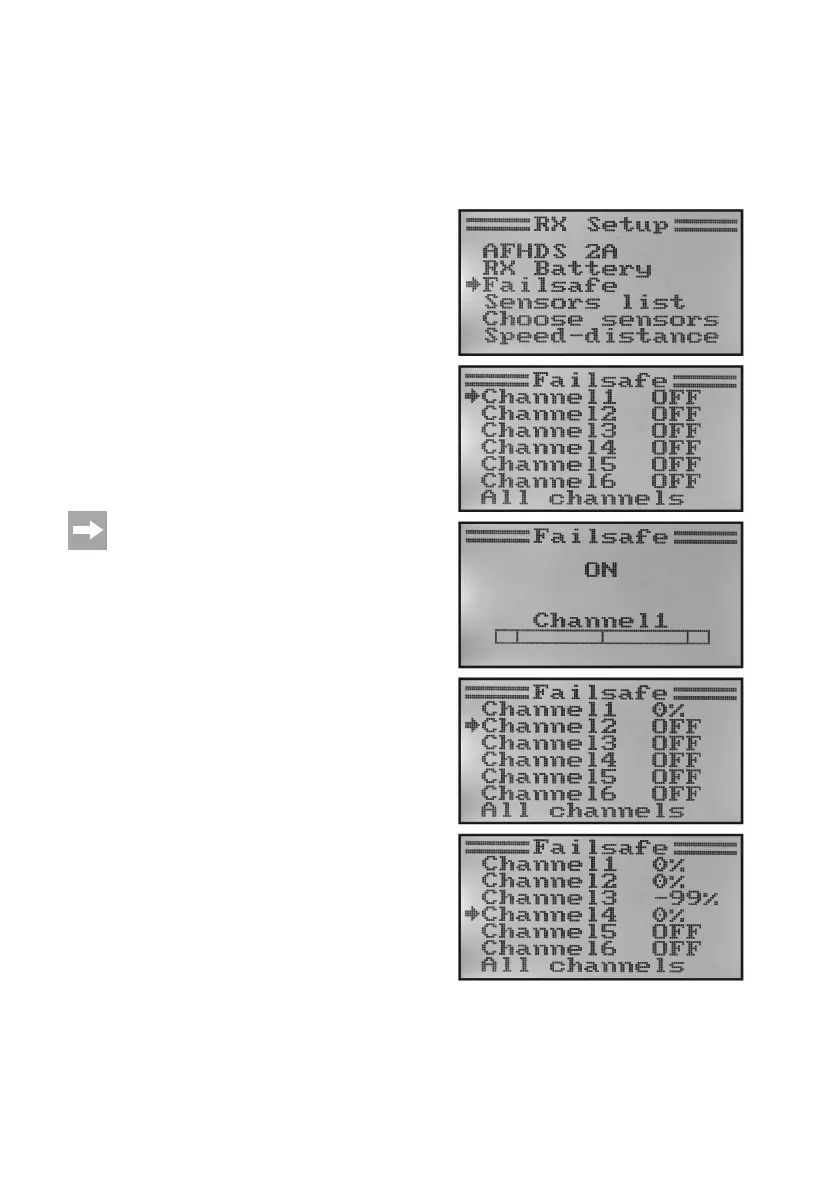
Failsafe setting „Failsafe“
Theremote controlhas theoption ofautomatically movingthe servosto aspecic positionat impairmentof the
reception signal. This way, the drive motor can be switched off, e.g. in an electrical gliding model that is outside of the
transmitter range, and circling can be started.
Proceed as follows to set the fail safe values for all six control channels:
• Callthe„RXSetup“menu.
• Usethebuttons„UP“or„DOWN“toselectthemenuitem„Fail-
safe“ and activate it with the button „OK“. Channel 1 is already
selected and can be set.
• Brieypushthebutton„OK“tocallthesetvaluesforchannel
1. The current activation condition for channel 1 is displayed.
• Usethebuttons„UP“or„DOWN“toswitchtheactivationcon-
dition from „OFF“ to „ON“ or vice versa.
• Ifthefunctionisswitchedon,movethecontrolstickforchan-
nel 1 to the desired failsafe position and push the button
„CANCEL“ a little longer.
• Thedisplayswitchesbacktothechanneloverviewanddis-
plays the percentage set value for channel 1.
If you keep the button „OK“ pushed, the factory setting
is called and the fail safe function is switched off for all
six channels.
• You can now use the buttons „UP“ and „DOWN“ to select
further channels and set them according to the same princip-
le.
• Whenyouhavesetthedesiredvalueforallchannels,push
the button „CANCEL“ until you return to the operating display.
• Switch the transmitter offfor test purposes and check if all
servos move to the fail safe position desired by you
Figure 24



 To Next Page