g) Operation as Teaching Transmitter „Trainer Mode“
Forsafeandcomfortablemodelighttraining,theremotecontrolsystemoffersaplug-insocketforatrainer-student
cable(seegure2,item23).Anoptionalcablepermitsconnectingasecondremotecontroltype„HT-6“(oralterna-
tively„HT-4“)toyourtransmitter.Whenusingtwo„HT-6“transmitters,oneofthemmustbeconguredastheteaching
transmitterandthe otherasthe student transmitter(seefollowing menuitem).Theighttrainer canuseafreely
selectable toggle switch to switch between the control stick signals of the trainer and student transmitter.
Congurationastrainertransmitter:
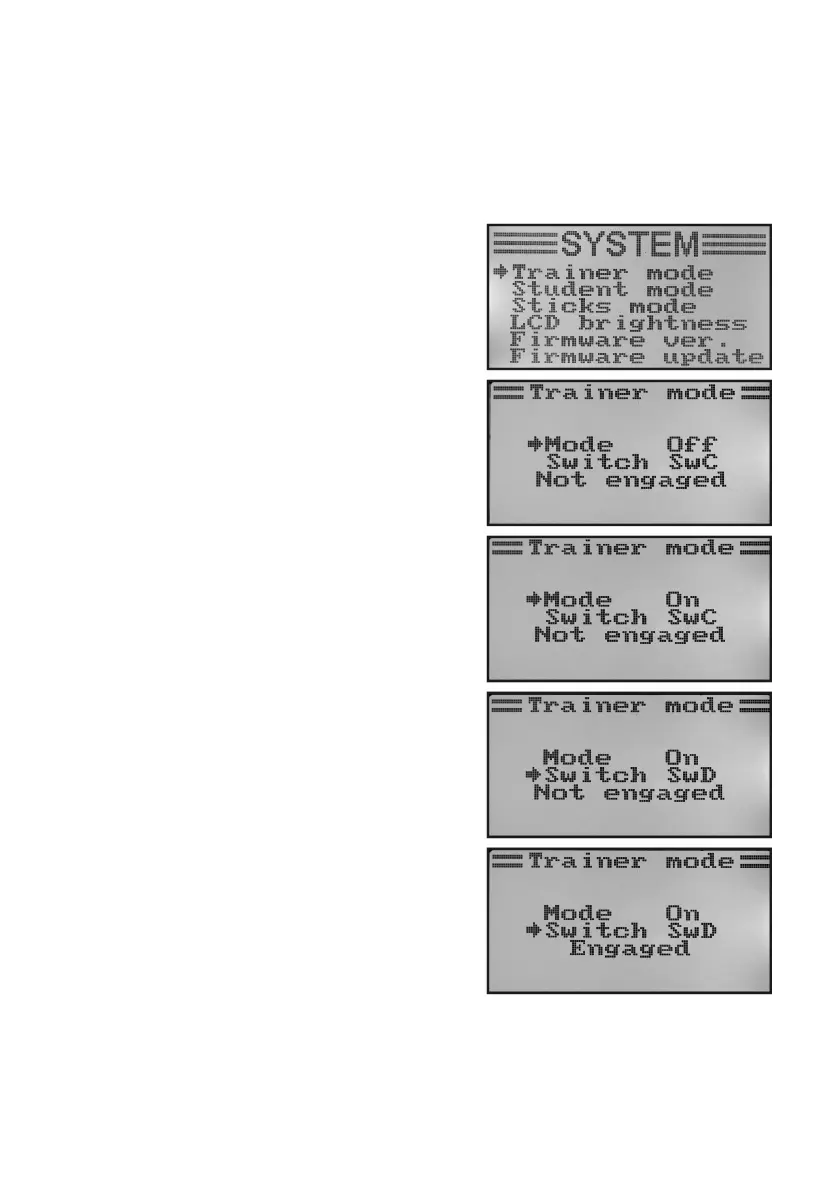
• Switchonthetransmitterandcallthesystemsettingmenu.
• Movethecursorarrowtothemenuitem„Trainermode“with
the two buttons „UP“ and „DOWN“.
• Brieypushthebutton„OK“toactivatethemenuitem.
The display shows the indication Mode, Switch and, depen-
ding on the trainer/student switch „Engaged“ (connected to the
student transmitter) or „not engaged“ (not connected).
• Pushthebuttons„UP“or„DOWN“toselectwhethertoactiva-
te the trainer function and the transmitter „ON“ or to deactivate
it „OFF“.
• Brieypushthebutton„OK“toswitchtotheswitchselection.
• Bypushingthebuttons„UP“or„DOWN“,youcannowchoo-
se which switch you want to use to switch between teaching
andstudenttransmitter.Thenconrmtheselectedswitchand
check if the display changes between „Engaged“ and „Not en-
gaged“.
• Keepthebutton„CANCEL“pushedforalongerperiodtosave
the settings. The display then shows the system setup menu
again.
• Pushthebutton „CANCEL“repeatedlyuntilyou getbackto
the operating display.
Figure 27



 To Next Page