Digital coding „AFHDS 2A“
The remote control transmitter enables you to control receivers with the digital code „AFHDS 2A“ and „AFHDS“. Ex
works, the transmitter is set to the enclosed „AFHDS 2A“-encoded receiver.
IfyouwanttooperateaREELYreceiverwiththedigitalcode„AFHDS“,thetransmittermustbeswitchedrstandthen
the receiver must be bound to the transmitter. More information on binding of transmitter and receiver can be taken
from chapter 16: Binding Function.
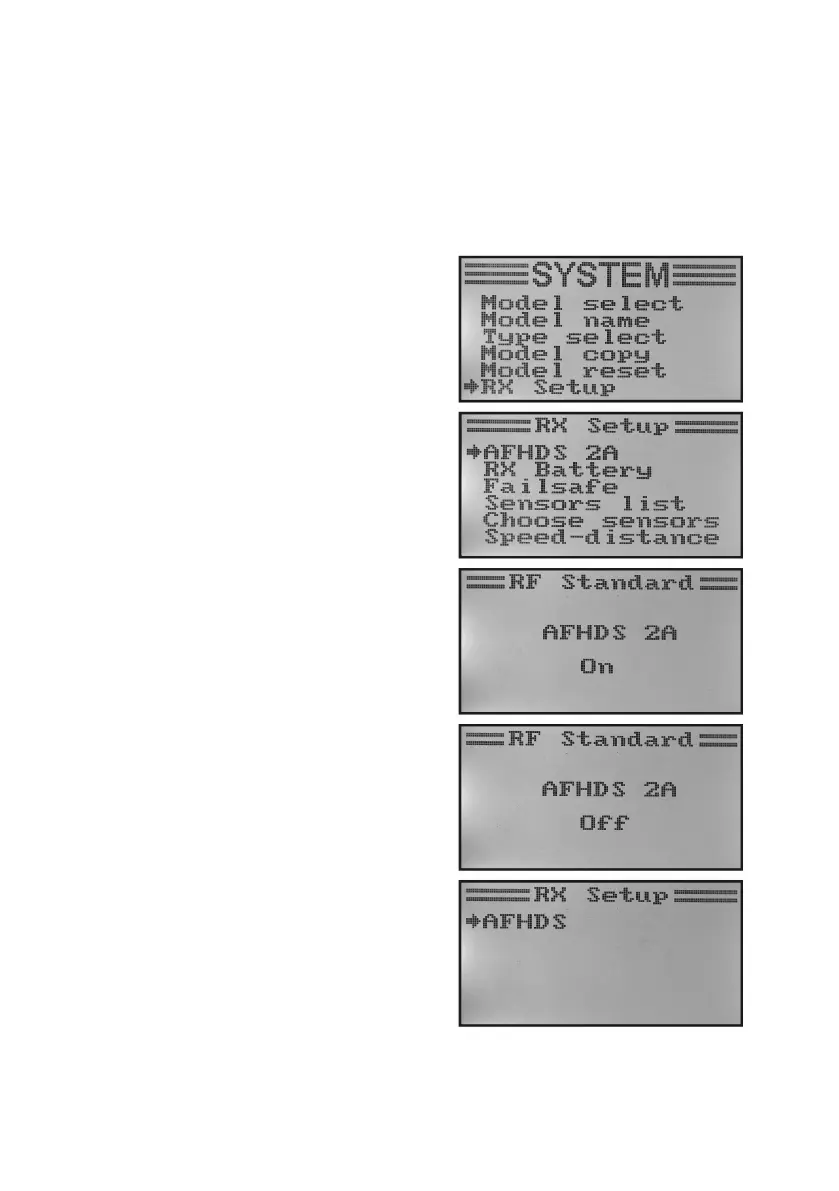
To switch the digital code at the transmitter, proceed as follows:
• Callthe„RXSetup“menu.
• Themenuitem„AFHDS2A“isalreadyselectedandcanbe
activated with the button „OK“.
• The buttons „UP“ or „DOWN“ switch the digital encoding
„AFHDS 2A“ off. The display shows „Off“.
• Pushing the button „OK“ saves the setting and the display
shows the digital code „AFHDS“.
• Pushthebutton „CANCEL“repeatedlyuntilyou getbackto
the operating display.
• Thenperformbinding.
• Switchbackto„AFHDS2A“accordingtothesameprincipleas
described above.
If the transmitter works with the digital code „AFHDS“, the
menu „RX Setup“ only shows the digital code as a setting
option. Only when the transmitter code has been set back to
„AFHDS 2A“ will the menu „RX setup“ have all menu items
available again.
Figure 22



 To Next Page