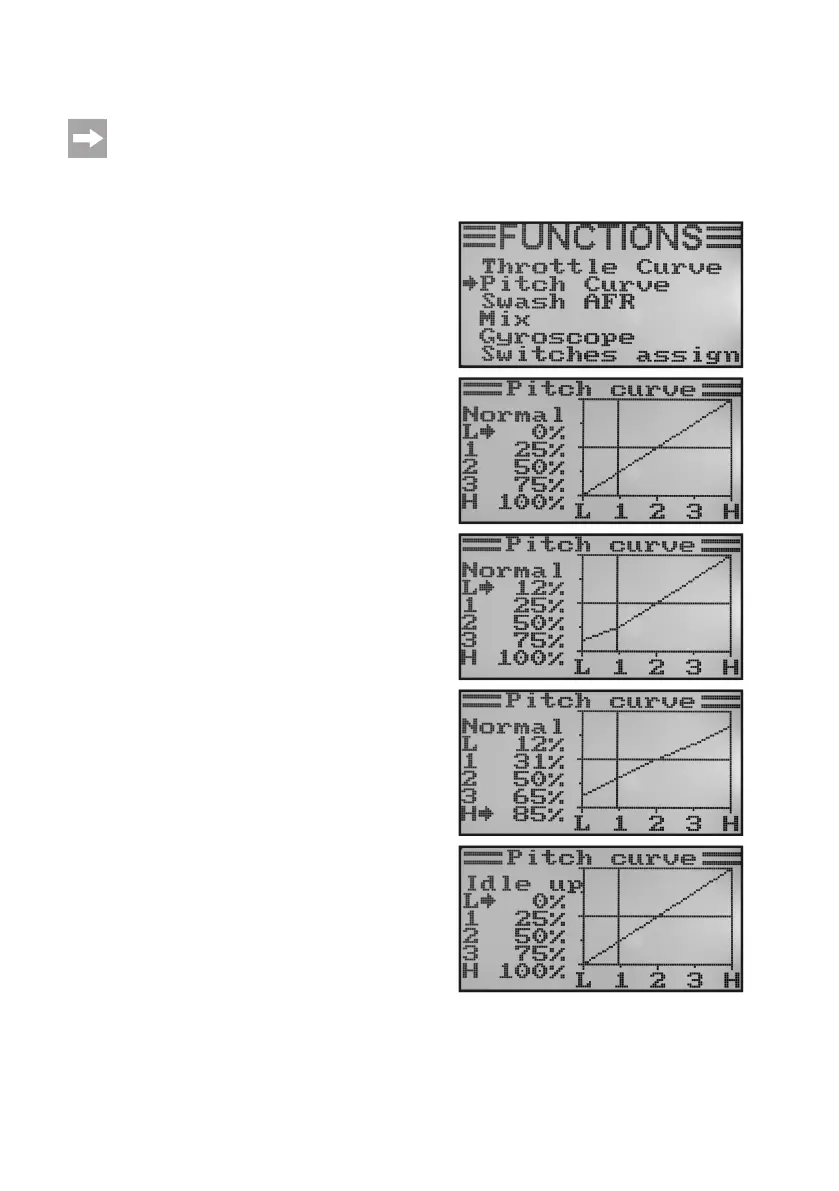
h) Pitch Curve Setting „Pitch Curve“
This menu is only available if a helicopter with variable pitch function or swash 90°, 120° or 140° was
selected in the system settings menu!
Justlikethethrottlecurve,thepitchcurvecanbeindividuallysetinallvepoints.Itisnomatterwhetheryouareusing
a model with only one pitch servo or the swash plate is controlled by three servos at once.
Setting the pitch curve:
• Switchonthetransmitterandcallthefunctionsettingmenu.
• Movethecursorarrowtothemenuitem„PitchCurve“withthe
two buttons „UP“ and „DOWN“.
• Brieypushthebutton„OK“toactivatethemenuitem.
The display shows the indications for the percentage setting
valuesforthevepointsofthepitchcurve(L,1,2,3andH),
thecontrolcurvechartandtheightcondition„Normal“(the
switch „SWB“ has to be in the front position for this).
The vertical dash in the chart marks the position of the pitch
control stick.
In ight condition „Normal“, the values of the pitch curve
shouldbereducedalittletokeepthecurveatter.Themodel
helicopter will thus be controllable more easily and delicately
inhoverightthisway.
• Pushingthebuttons„UP“or„DOWN“selectsthepercentage
inputvalueforthebottompointofthepitchcurveintheight
condition „normal“. If the button „OK“ is pushed and held, the
factory parameters are called.
• When brieypushing the button„OK“, the cursorarrow will
jump to the pitch curve setting point „1“. Push the buttons „UP“
or „DOWN“ to set the percentage input value for this point.
• Repeatthisprocessuntilyouhavesetthedesiredvaluefor
theightcondition„Normal“inallvepoints.
• Nowoperatethetoggleswitch„SWB“tocalltheightcondi-
tion „Idle up“.
Figure 43



 To Next Page