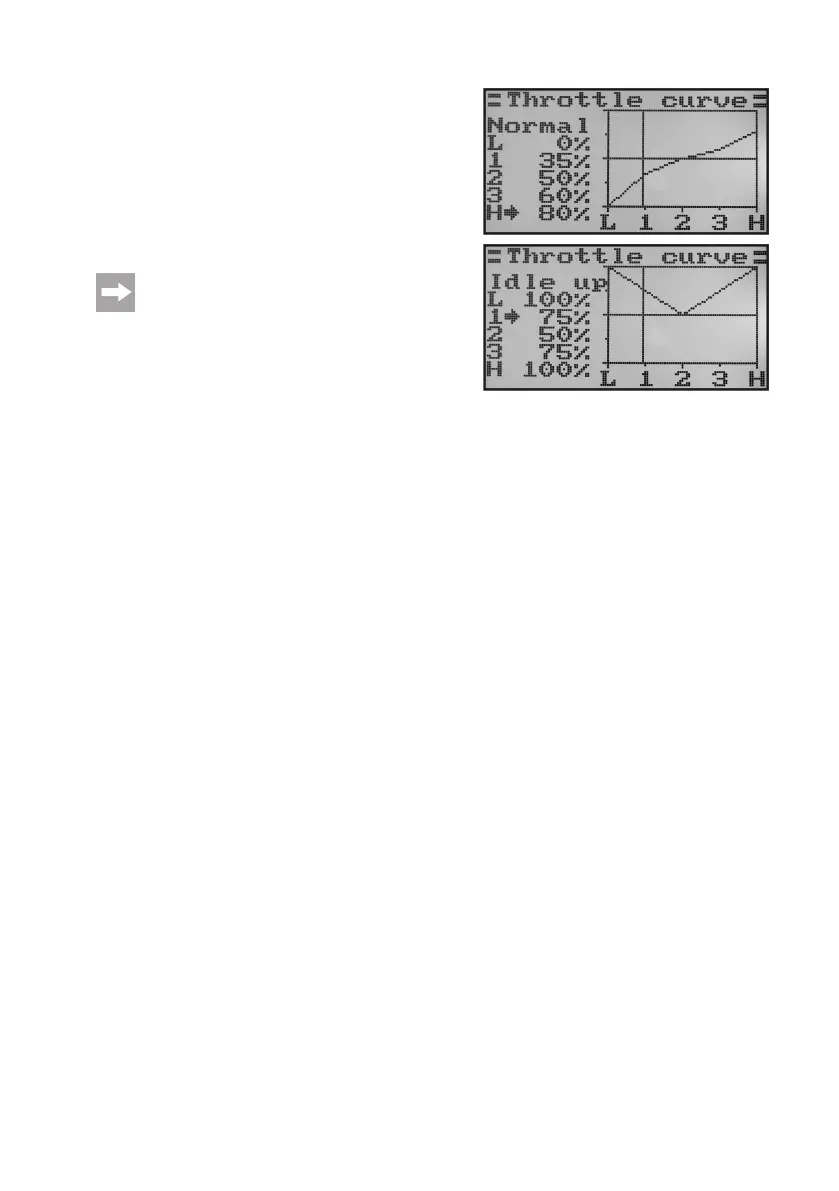
• When brieypushing the button„OK“, the cursorarrow will
jump to the throttle curve setting point „1“.
• Pushthebuttons„UP“or„DOWN“tosetthepercentageinput
value for this point.
• Repeatthisprocessuntilyouhavesetthedesiredvaluefor
theightcondition„Normal“inallvepoints.
• Nowoperatethetoggleswitch„SWB“tocalltheightcondi-
tion „Idle up“.
On demand, another toggle switch for switching the
ightconditionscanbeassignedinthefollowingmenu
switch assignment menu (Switches assign).
Inightcondition„Idleup“,theidlespeedcanbeincreaseda
little to warrant secure running of the engine.
The throttle curve is set in a V-shape in helicopter models to
havesufcientmotorpoweravailableinreverseightaswell.
• Repeattheaboveprocessagainandsetthedesiredvalueof
thethrottlecurveforallvepointsintheightcondition„Idle
up“ as well.
• Keepthebutton„CANCEL“pushedforalongerperiodtosavethesettings.Thedisplaythenshowsthefunction
setup menu again.
• Pushthebutton„CANCEL“repeatedlyuntilyougetbacktotheoperatingdisplay.
Figure 42b



 To Next Page