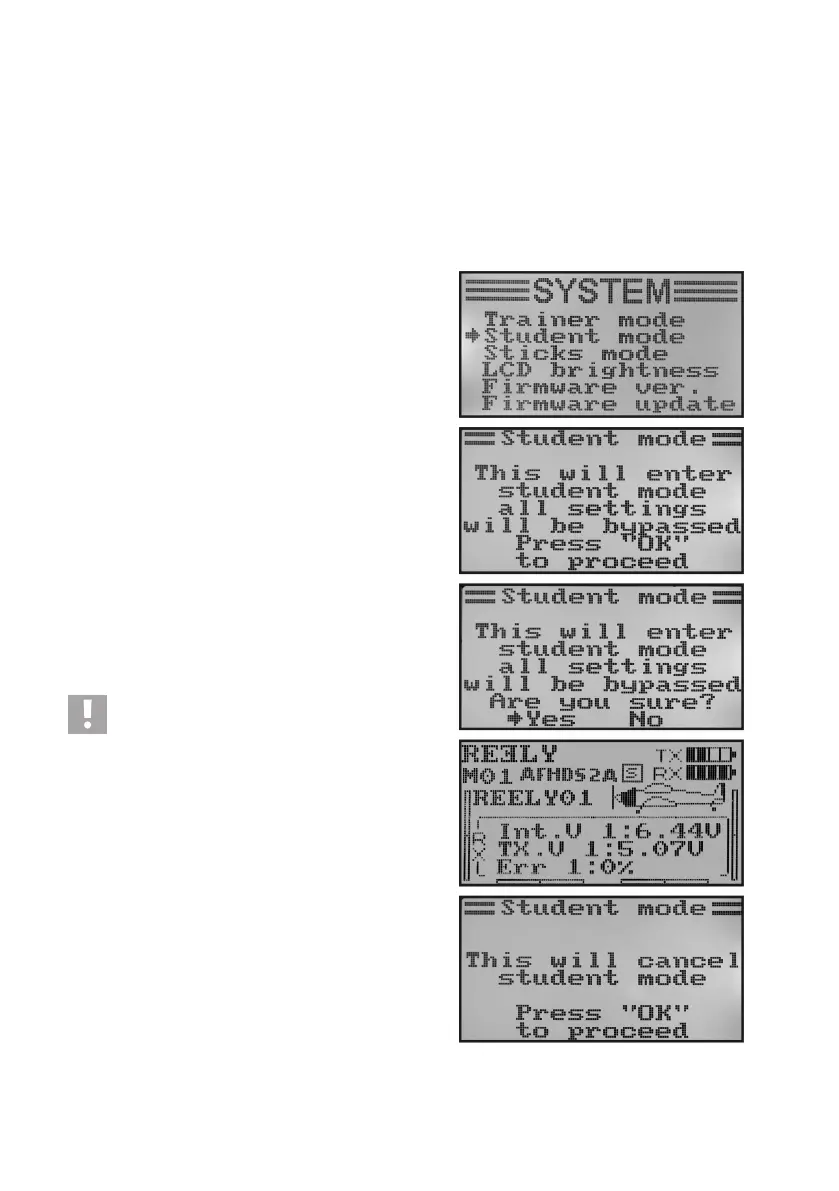
h) Operation as Student Transmitter „Student Mode“
Whenconguringasastudenttransmitter,thesignalsofthecontrolsticksandthecontrolencoderforchannels5
and 6 are sent directly to the teacher/student socket at the rear independently of the set mode and transferred to the
teaching transmitter via the connection cable.
If the student transmitter mode is not activated, the six control signals are branched off at the teacher/student socket
according to the model type set with all programmed settings and mixers. When operating the remote control with a
ightsimulatorinterface,werecommendalsooperatingtheremotecontrolinstudentmode.Themixersorsettings
required for the virtual models are then available in the simulator software.
Congurationasstudenttransmitter:
• Switchonthetransmitterandcallthesystemsettingmenu.
• Movethecursorarrowtothemenuitem„Studentmode“with
the two buttons „UP“ and „DOWN“.
• Brieypushthebutton„OK“toactivatethemenuitem.
The display shows the notice that all transmitter settings are
invalidinthestudentcongurationandthecontrolstickset-
tings are transferred right to the trainer transmitter.
• Afterpushingthebutton„OK“,asafetypromptappears.
• Pushingthebuttons„UP“or„DOWN“switchesthecursorar-
row from „No“ to „Yes“. Push the button „OK“ again to activate
student mode. The display then shows the system setup menu
again.
• Pushthebutton „CANCEL“repeatedlyuntilyou getbackto
the operating display. The student mode is displayed visually
in the operating display by an additional „S“.
• Whencallingthestudentmenuagain,thecongurationcanbe
terminated as student transmitter by pushing the button „OK“.
Important!
Coordinate the trimming of the student transmitter so
that it matches the one of the trainer transmitter. The
rudder of the model plane or the swash plate and the
tail rotor control must have precisely the same neutral
position after switching from trainer to student trans-
mitter when the two systems do not have deected
control sticks.
Figure 28



 To Next Page