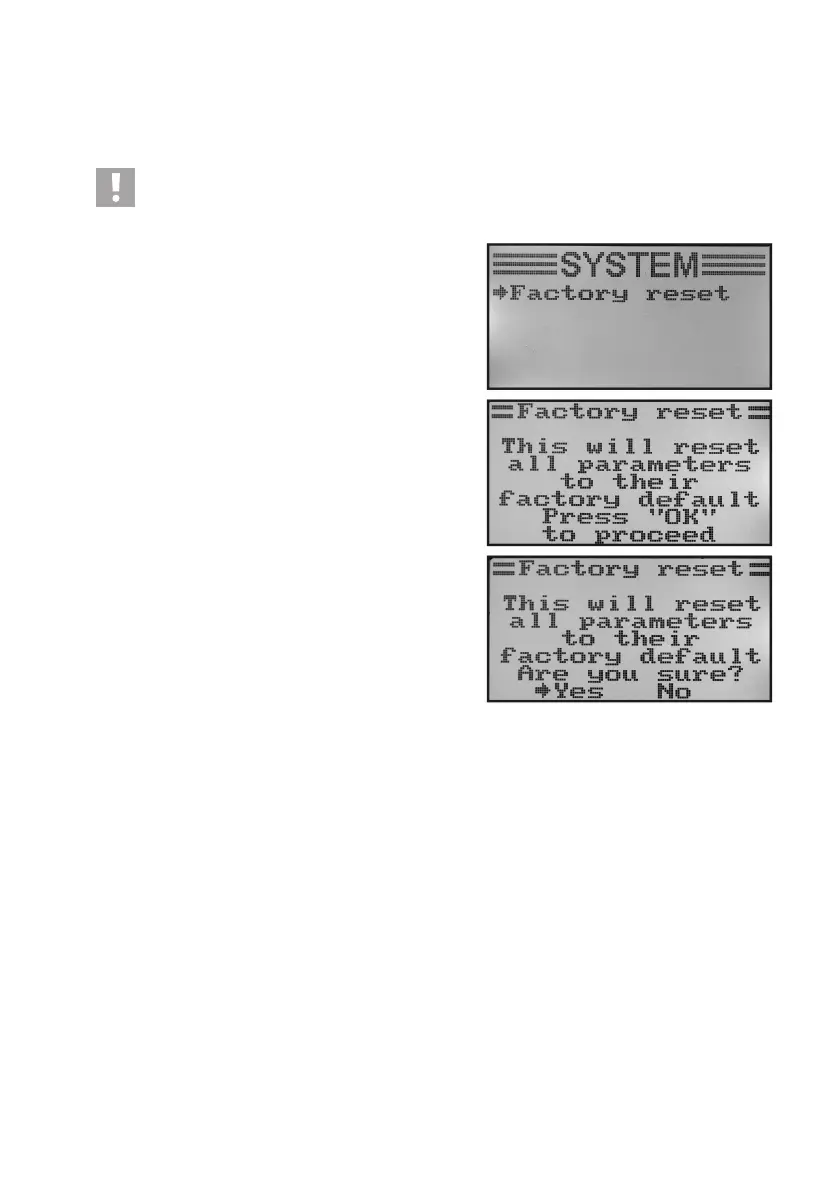
m) Reset to Factory Settings „Factory Reset“
With this function you have the option of deleting all the data of all model memories to their factory settings with a
single command.
Attention!
When you call this function, all previously entered model data and settings are deleted! The remote control
is returned to the delivery condition and all data must be entered again.
Factory reset:
• Switchonthetransmitterandcallthesystemsettingmenu.
• Movethecursorarrowtothemenuitem„Factoryreset“with
the two buttons „UP“ and „DOWN“.
• Brieypushthebutton„OK“toactivatethemenuitem.
The display shows the message that the transmitter deletes
all entered settings when resetting to factory settings. You are
asked to push the button „OK“ to activate the reset function.
• Afterpushingthebutton„OK“,asafetypromptappears.
• Pushingthebuttons„UP“or„DOWN“switchesthecursorar-
row from „No“ to „Yes“. Push the button „OK“ again to activate
the reset function. The display shows the system setup menu
again after a moment.
• Pushthebutton „CANCEL“repeatedlyuntilyou getbackto
the operating display.
• Then check the individual model memories afterwards for
whether the personal setting values in them have been dele-
ted.
Figure 33



 To Next Page