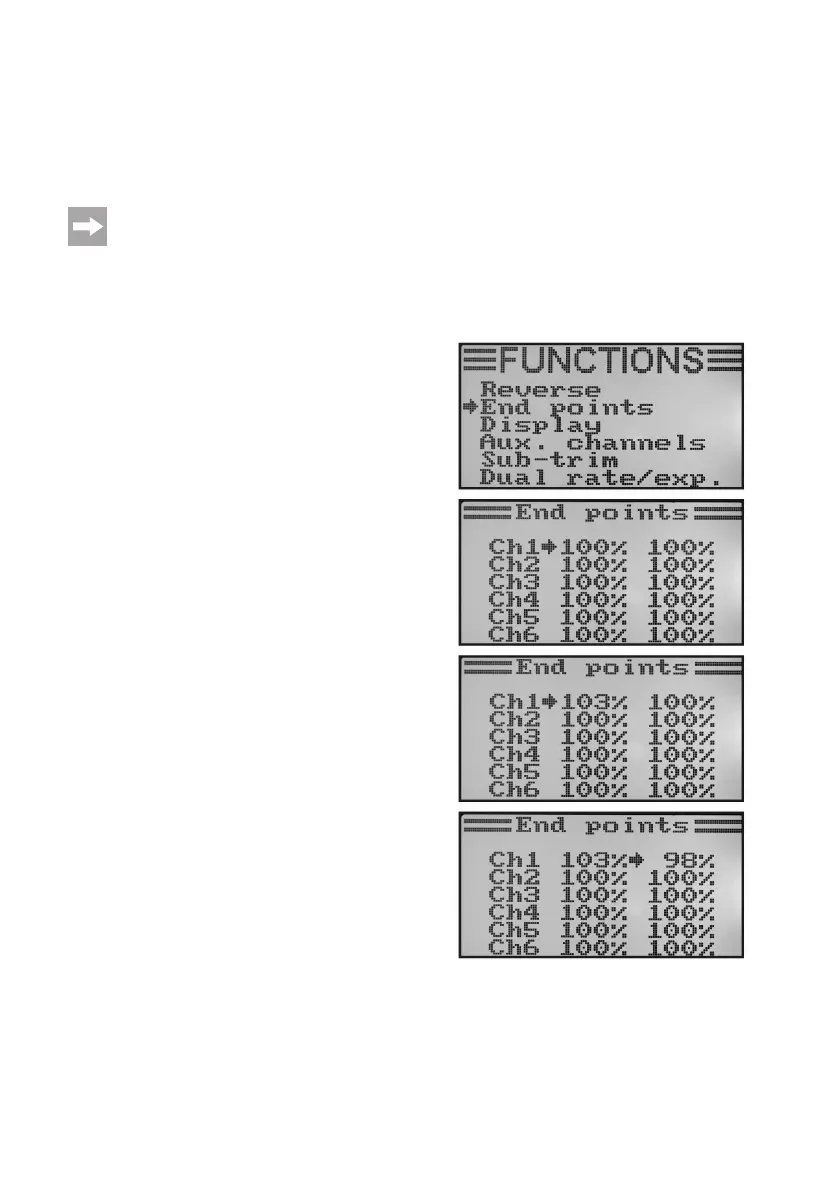
b)ServoEndDeectionSetting„EndPoints“
Usingtheservoenddeectionsettingyoucanpreciselydenethemaximumsizeofservotravelthatispermittedon
eachside.Theservoenddeectionfunctionistypicallyusedtoprotectservosfrommechanicallyhittinganobstacle
whendeectingtothefullextent.Youcansetavaluefrom0to120%.Thesmallerthevalue,theshortertheservo
travel.
Always try to select the linkage points on the servo and the rudder sticks so that they reach maximum rudder
deectionsatthefactorypresetvalueof100%.
The linked rods or sticks should not hit anything or be under any mechanical tension. This ensures that this
function is only required to make minimal adjustments. The rudder travel values given in the model operating
instructions which may be less than the maximum possible rudder travel values can be reduced later on with
the dual rate function.
Settingtheservoenddeection:
• Switchonthetransmitterandcallthefunctionsettingmenu.
• Movethecursorarrowtothemenuitem„Endpoints“withthe
two buttons „UP“ and „DOWN“.
• Brieypushthebutton„OK“toactivatethemenuitem.
In the display you will see display items for the six control func-
tionswiththecurrentlysetservoenddeections.
• Movethecontrolstickforchannel1allthewaytotheleftand
thenadjustthemaximumpossibleservodeectionoftheleft
side with the buttons „UP“ and „DOWN“.
• Thenmovethecontrolstickforchannel1allthewaytothe
rightandthenadjustthemaximumpossibleservodeectionof
the right side with the buttons „UP“ and „DOWN“. If the button
„OK“ is pushed and held, the factory parameters are called.
• When pushing thebutton „OK“ briey, the cursor arrow will
jumptochannel2.Theservodeectionofchannel2issetby
the same principle as in channel 1.
• Repeathisprocessuntilyouhavesetthecorrectservoend
deectionsinallsixchannels.
• Keepthebutton„CANCEL“pushedforalongerperiodtosave
the settings. The display then shows the function setup menu
again.
• Pushthebutton „CANCEL“repeatedlyuntilyou getbackto
the operating display.
Figure 36



 To Next Page