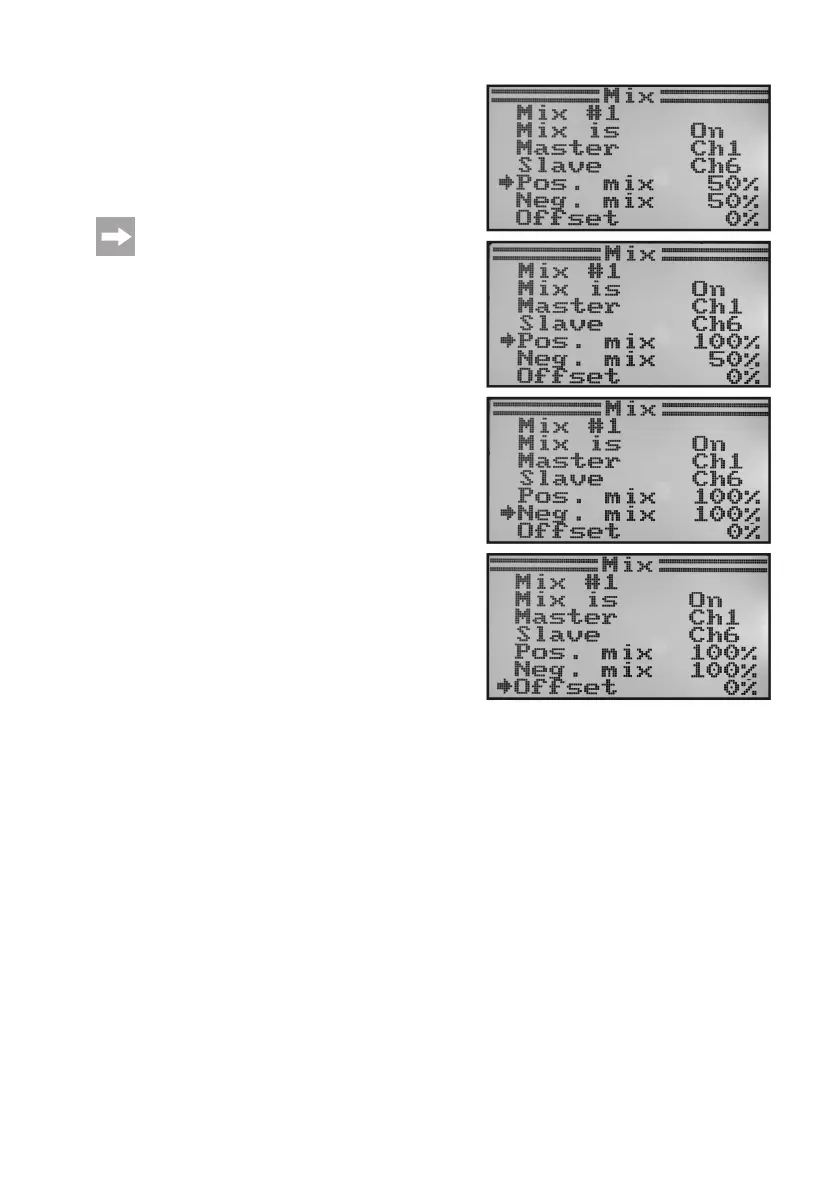
• Whenpushingthebutton„OK“,thecursorarrowwilljumpto
the positive mixed value.
• Deecttheencoderofthemasterchanneltothestoponone
side. Push the buttons „UP“ or „DOWN“ to set the slave servo
deectionsindividuallynow.Ifthebutton„OK“ispushedand
held, the factory parameters are called.
If the slave servo does not react to the changes of the
setvalue,deecttheencoderofthemasterchannel
on the other side to the stop. When the slave servo is
tohavethesamedeectionpathasthemasterser-
vo,the value100%must besethere. Whensetting
anegative%-value,therunningdirectionoftheslave
servo will change.
• Whenpushingthebutton„OK“againbriey,thecursorarrow
will switch to the negative mix value.
• Deecttheencoderofthemasterchannelontheotherside
to the stop. The setting is performed according to the same
principle as with a positive mixing value.
• Pushthebutton„OK“againsothatthecursorarrowwillswitch
to the offset value. Push the buttons „UP“ or „DOWN“ to set
the required offset value (see subsequent explanation). If the
button „OK“ is pushed and held, the factory parameters are
called.
• Keepthebutton„CANCEL“pushedforalongerperiodtosave
the settings. The display then shows the function setup menu
again.
• Pushthebutton „CANCEL“repeatedlyuntilyou getbackto
the operating display.
Figure 46



 To Next Page