MAP
2
38 - Navigation
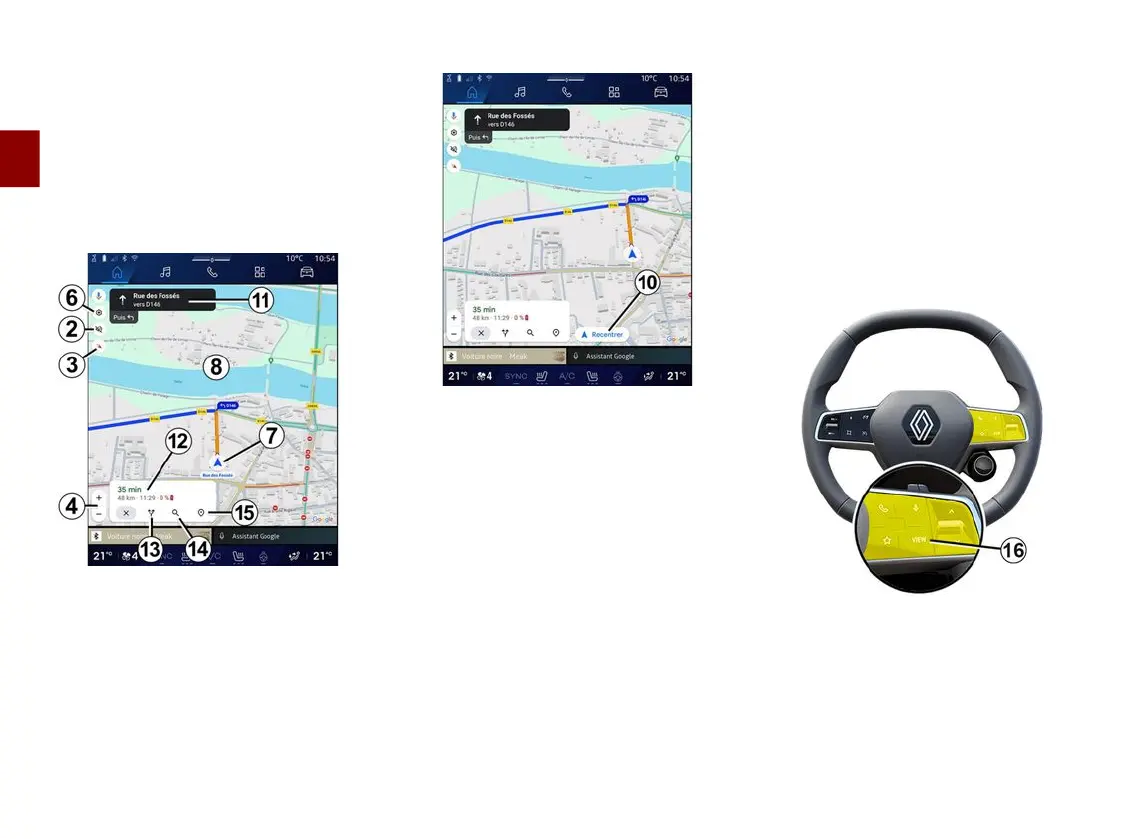
7.
Your current position.
8.
Map.
9.
Destination search bar.
10.
Re-centre map after exploring it.
"Map" screen with a route in
progress
2.
Guidance voice settings.
3.
View mode to display as "North at
the top" (2D/North), "User view" (2,5D)
or "Overview".
4.
Zoom on the map: press the "+"/"˗"
button to zoom in/zoom out on the
map.
6.
Navigation settings.
7.
Your current position.
8.
Map with route display.
10.
Re-centre map after exploring it.
11.
Lane and direction you should
follow to continue on your calculated
route.
12.
Journey information such as the
arrival time, traffic info and the
remaining distance to the next stage or
final destination (depending on the
configuration) etc.
13.
"Choose another route".
14.
"Search along the route".
15.
"Route overview".
Navigation display on the
instrument panel



 To Next Page