MAP
2
Navigation - 39
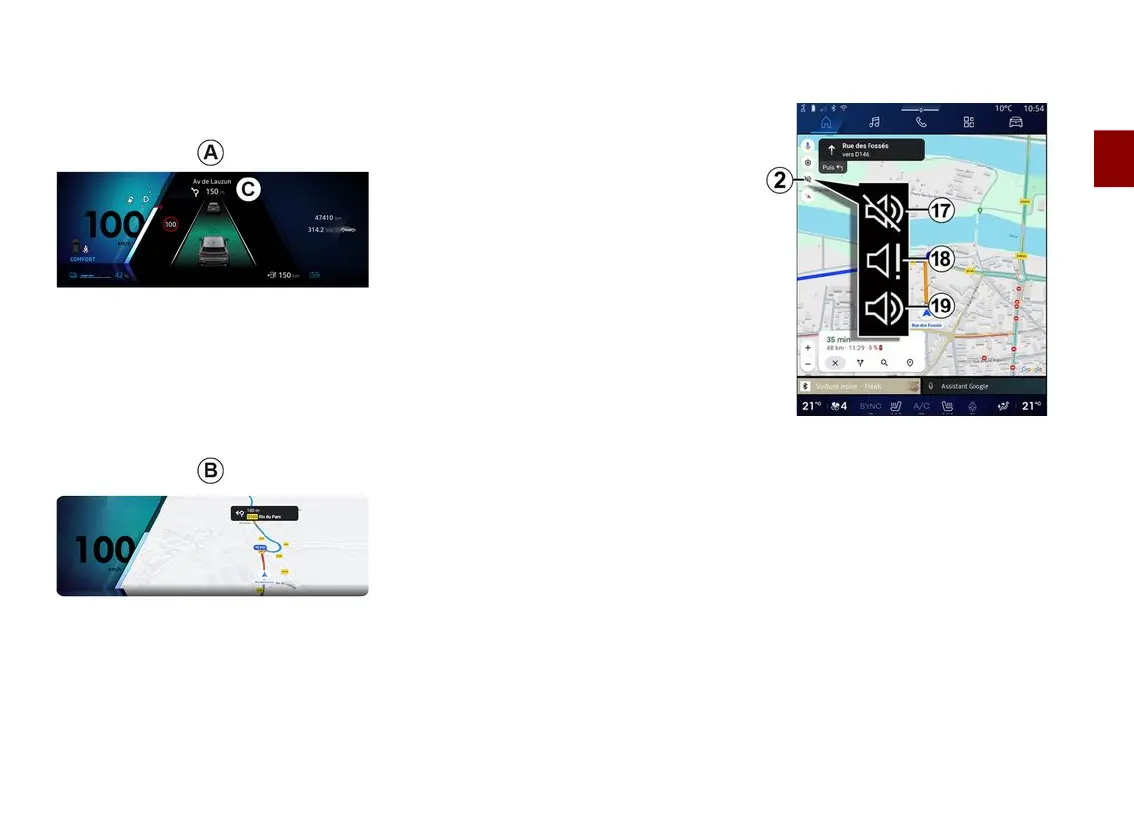
Depending on the view selected via
the steering column control "VIEW"
16
, there are two navigation display
types on the instrument panel:
– the navigation display is reduced in
size on the other displays
A
;
– full screen navigation on the
dedicated display
B
.
You can display navigation information
on the instrument panel screen in two
view modes:
– classic view
A
. The information is
displayed in the upper area of the
instrument panel screen
C
;
– full screen view
B
.
Note: the navigation display on the
instrument panel screen is only
available with the "Google Maps™"
multimedia system navigation.
For more information on the instrument
panel display, please refer to the
vehicle user manual.
Guidance voice settings
To set the guidance voice, press
2
to
select one of the following options:
– "Deactivated"
17
;
– "Alerts only"
18
;
– "Reactivated"
19
.
Note: if you select the "Deactivated"
function, no voice guidance
instructions will be emitted by the
multimedia system.



 To Next Page