2.5.7 CONNECTIONS TO FIBER OPTIC MASTER AND REMOTES
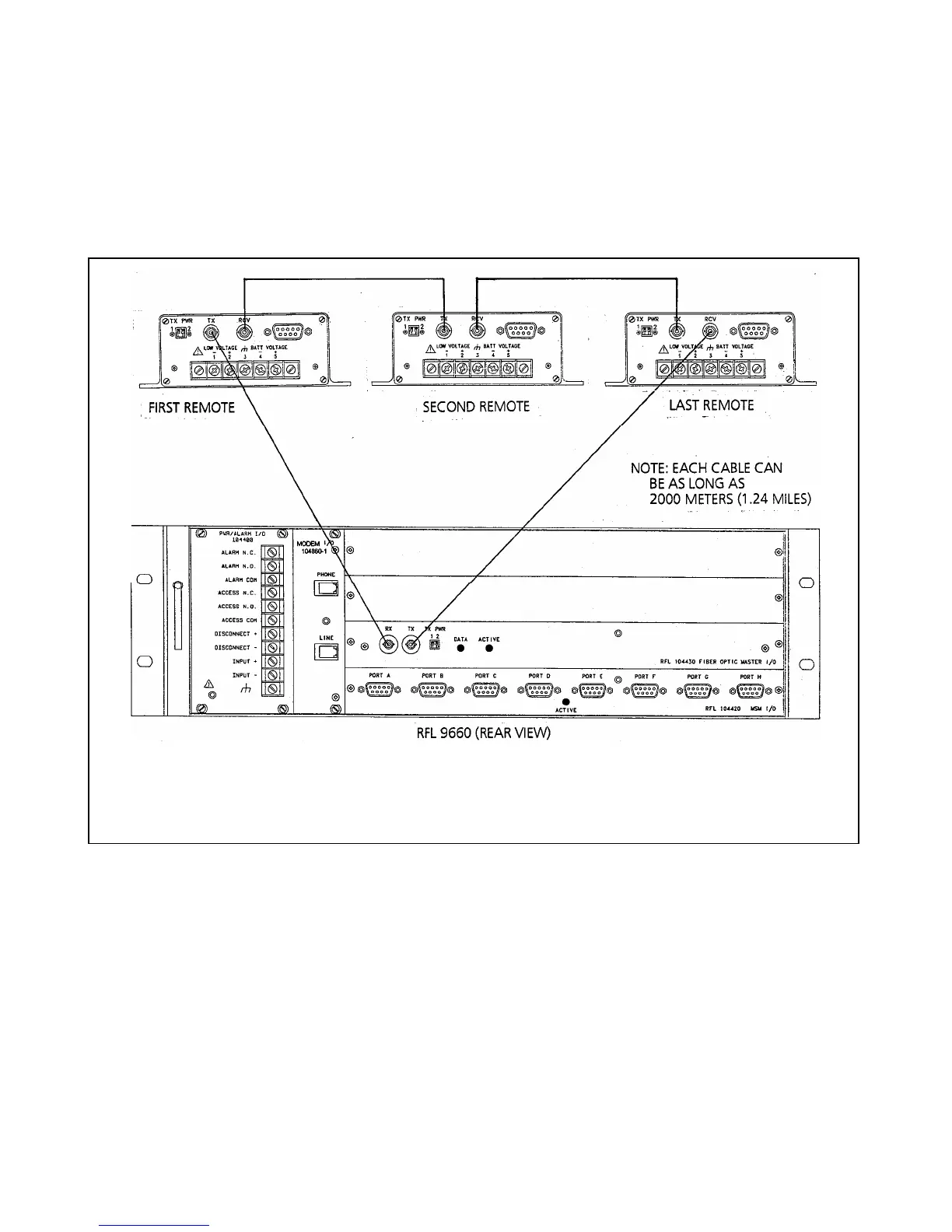
If your RFL 9660 is equipped with a fiber optic master I/O module (Part Number 104430), you will have to
connect fiber optic cables between it and the fiber optic remotes. This forms the fiber optic ring, as shown in
Figure 2-9. Each fiber optic cable in the ring can be as long as 2000 meters (1.24 miles).
Figure 2-9. Fiber optic connections between master and remotes in fiber optic ring
At each fiber optic remote in the ring, power connections are made and cables are connected between the fiber
optic remotes and the RS-232 devices that are being connected to the fiber optic ring. To make these
connections, proceed as follows:
1. At the RFL 9660, connect the outgoing fiber optic cable to the TX fiber optic connector on the fiber
optic master. Connect the incoming fiber optic cable to the RX fiber optic connector.
2. Make the following connections and DIP switch settings at each fiber optic remote:
a. Connect the outgoing fiber optic cable to the TX fiber optic connector on the back of the fiber
optic remote. Connect the incoming fiber optic cable to the RX fiber optic connector.
RFL 9660 RFL Electronics Inc.
April 24, 2007 2-11 (973) 334-3100



 To Next Page