Wrist Camera Instruction Manual
3.4.1. Combo of 2-Finger Adaptive Gripper and Wrist Camera for Universal Robots
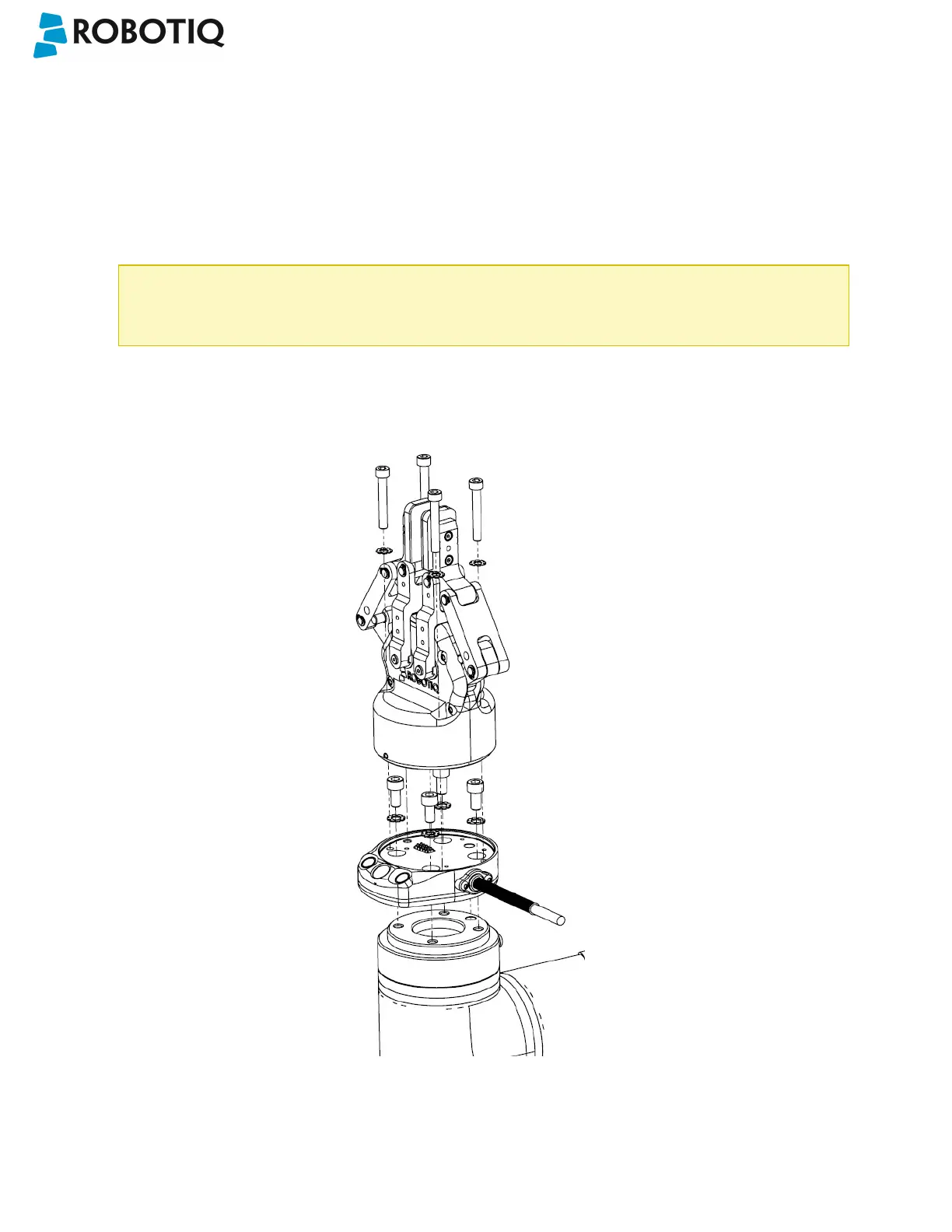
For mechanical installation of a Wrist Camera on a UR robot along with Robotiq's 2-Finger Gripper, follow these
instructions, and refer to the figure below:
l Place the Wrist Camera (RWC-CAM-001) on the robot arm. Align the camera's indexing (dowel) pin properly in
Universal Robots' bolt pattern.
l Fix the camera on the robot arm using the provided M6 X 12 LHCS screws and lock washers.
When mounting only the Wrist Camera on the robot, the spring pins that would ensure connection to a
Robotiq 2-Finger Gripper are exposed. Be careful not to harm them.
l Mount the gripper directly on the Wrist Camera using the provided M5 X 35 SHCS and lock washers.
l Fix the cable along the robot arm; please refer to the Cable Management section.
Fig. 3-2: Mechanical installation of the Combo of 2-Finger Gripper and Wrist Camera for Universal Robots.
©Robotiq inc. 2016-2018
20



 To Next Page