Wrist Camera Instruction Manual
5.2.1.4. Refine Model
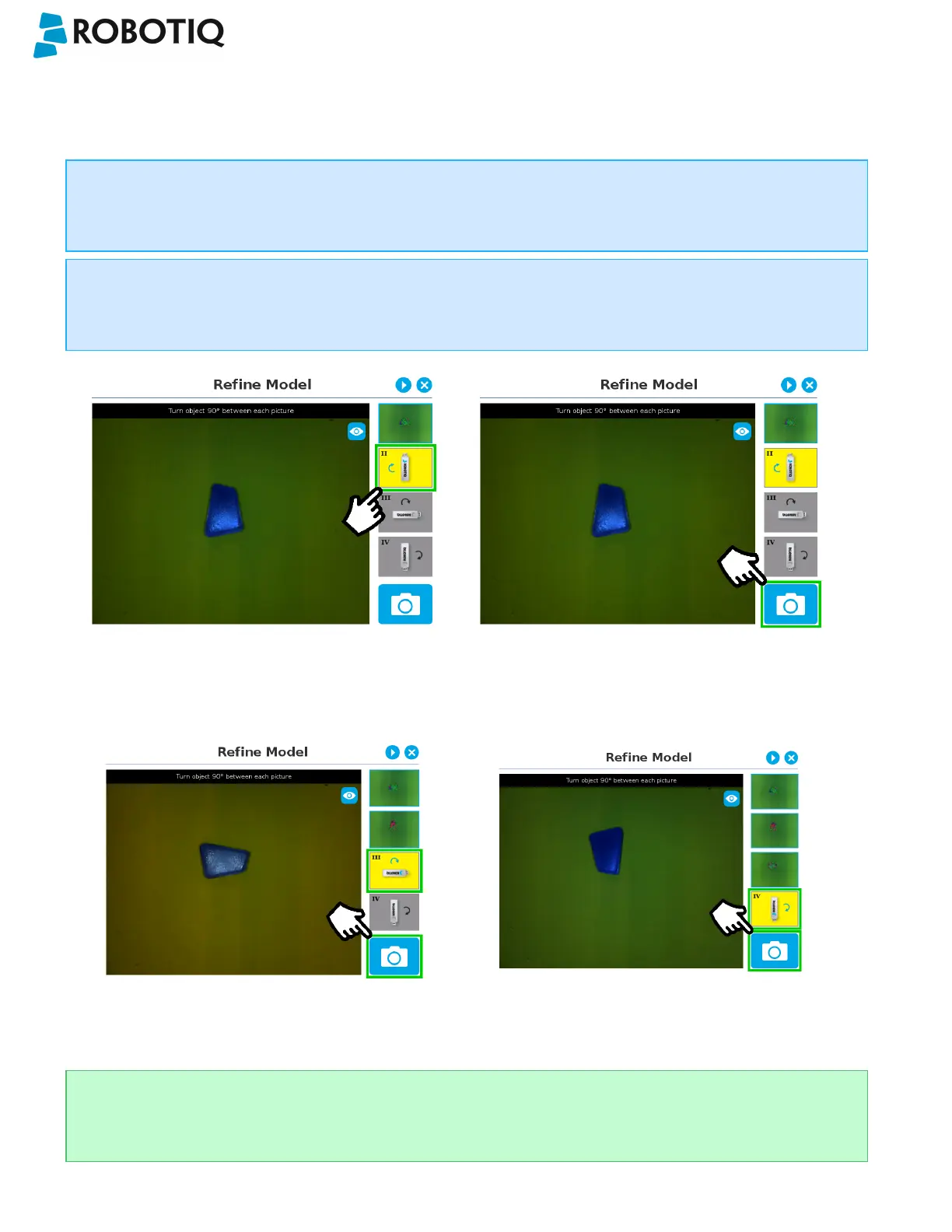
The Refine Model step prompts the user to take photos of the model in four different orientations. The purpose of this
step is to remove shade effects associated with the edges of the object in order to refine the model.
Info
The first photo is automatically generated at the end of the Edit Model step.
Info
Tap the camera icon to take a photo between each step. An error will pop up if the object has not been rotated.
1. The user is prompted to turn the object 90 degrees
clockwise. Note that the first picture is already taken,
in the upper right corner.
2. The user is prompted to take the second picture of the
object.
3. Object turned another 90 degrees clockwise. The
user is prompted to take the third picture.
4. Object turned another 90 degrees clockwise. The user is
prompted to take the fourth picture.
Tip
Tap on any snapshot taken in the object teaching wizard to enlarge it.
©Robotiq inc. 2016-2018
61



 To Next Page