"HYDRIVE" - ELECTRO-HYDRAULIC SHUTTLE CONTROL
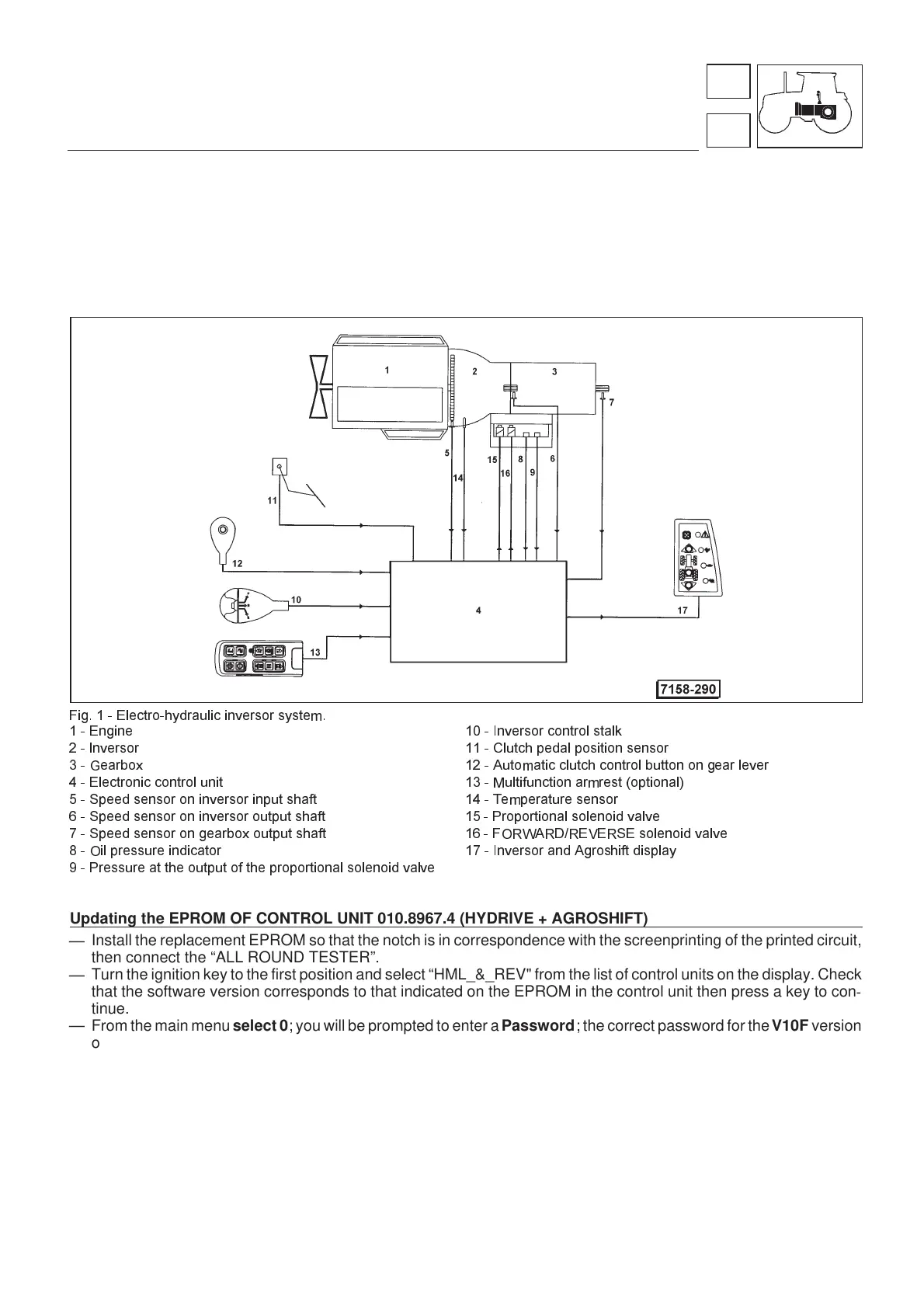
All types of gearbox may be equipped on request with an electro-hydraulic "HYDRIVE" instead of the mechanical
reverse shuttle (see operating diagram in Fig. 1).
This consists of a multi-disc oil bath clutch which allows forward and reverse gears to be selected without use of the
clutch pedal.
The HYDRIVE control lever is located on the left under the steering wheel (Fig. 2)
The direction of travel is displayed on a LED display panel on the right of the control panel.
Fig. 1 - Electro-hydraulic inversor system.
1 - Engine 10 - Inversor control stalk
2 - lnversor 11 - Clutch pedal position sensor
3 - Gearbox 12 - Automatic clutch control button on gear lever
4 - Electronic control unit 13 - Multifunction armrest (optional)
5 - Speed sensor on inversor input shaft 14 - Temperature sensor
6 - Speed sensor on inversor output shaft 15 - Proportional solenoid valve
7 - Speed sensor on gearbox output shaft 16 - FORWARD/REVERSE solenoid valve
8 - Oil pressure indicator 17 - Inversor and Agroshift display
9 - Pressure at the output of the proportional solenoid valve
Updating the EPROM OF CONTROL UNIT 010.8967.4 (HYDRIVE + AGROSHIFT)
—
Install the replacement EPROM so that the notch is in correspondence with the screenprinting of the printed circuit,
then connect the “ALL ROUND TESTER”.
—
Turn the ignition key to the first position and select “HML_&_REV" from the list of control units on the display. Check
that the software version corresponds to that indicated on the EPROM in the control unit then press a key to con
-
tinue.
— From the main menuselect 0; you will be prompted to enter aPassword; the correct password for theV10F version
of the control unit is 12345.
—
From the main menu select 1-Calibration and from the calibration menu select 0; you will now be prompted to re-
enter the password (i.e. 12345).
—
From the “Calibration” menu select 1- Clutch pedal and check that 0% pedal value (pedal in rest position) is = 95
and that 100% pedal value (full travel position) is = 190; The control unit is now initialised with the new EPROM.
—
If the pedal % values differ from those indicated above, turn the ignition key to position 0 and then repeat the proce
-
dure from step 2.
—
Return the key to position 0 and then turn back to position 1. Calibrate the clutch pedal selecting the options relevant
to the tractor in question.
Warning: on tractors with HARD-SOFT, the option “Rg.Mot.El.” must be kept disabled (-).
III
31
3
Transmission
Hydrive
www.maskinisten.net
www.classicmachinery.net



 To Next Page