SATEL INTEGRA 109
3. Define whether the function is to be available at all times, or only when selected partitions
are armed (function ANSWER IF PARTITIONS ARE ARMED).
4. Program the telephone codes for the users who are to use the function (see: USER
MANUAL).
14.3 Activation of the remote control
1. Activate the call answering function.
2. Enable the REMOTE CONTROL option.
3. Program the selected outputs as the REMOTE SWITCH.
4. Assign the REMOTE SWITCH type outputs to the users who are to use the function.
15. SMS control only INTEGRA 128-WRL
The parameters and options for SMS control via the INT-GSM / INT-GSM LTE module
are described in the INT-GSM / INT-GSM LTE module manual.
The INTEGRA 128-WRL control panel can be operated using the SMS messages which
contain suitable control commands.
You can program the SMS control parameters:
• using the keypad, in the service mode, by means of the functions available in the SMS
CONTROL
submenu
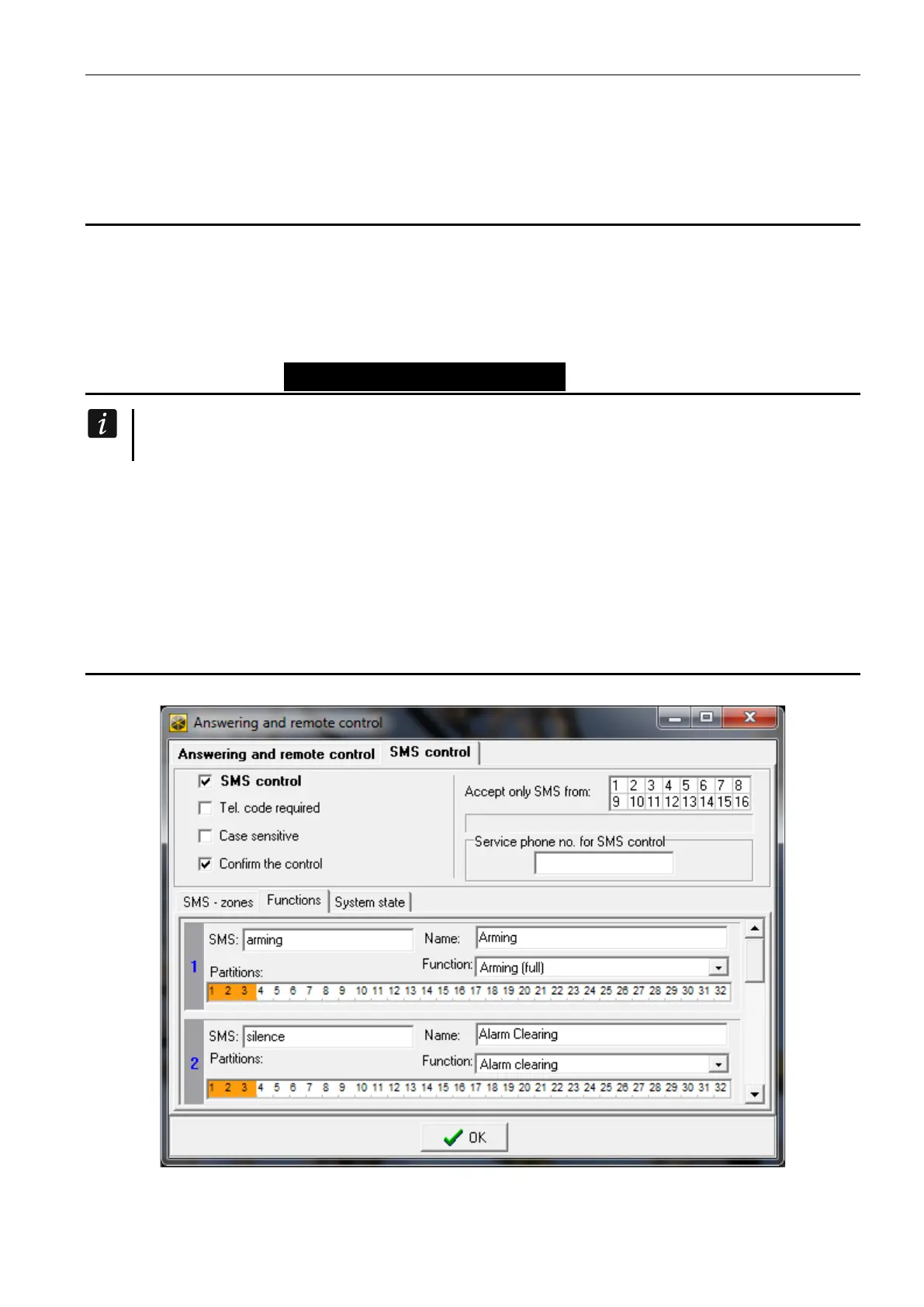
• using the DLOADX program, in the “Answering and remote control” window, “SMS control”
tab.
15.1 Parameters and options of SMS control
Fig. 15. An example of SMS control settings.
Shown in square brackets are the names used in keypads.











 To Next Page