Page 48 of 86 SCHÄFER IT-Systems
Industriestraße 41 D-57518 Betzdorf
Phone: +49 (0) 2741/283-770 sales@schaefer-it-systems.de www.schaefer-it-systems.de As
amended on 16/8/2019 (subject to technical changes)
6.1. Installation
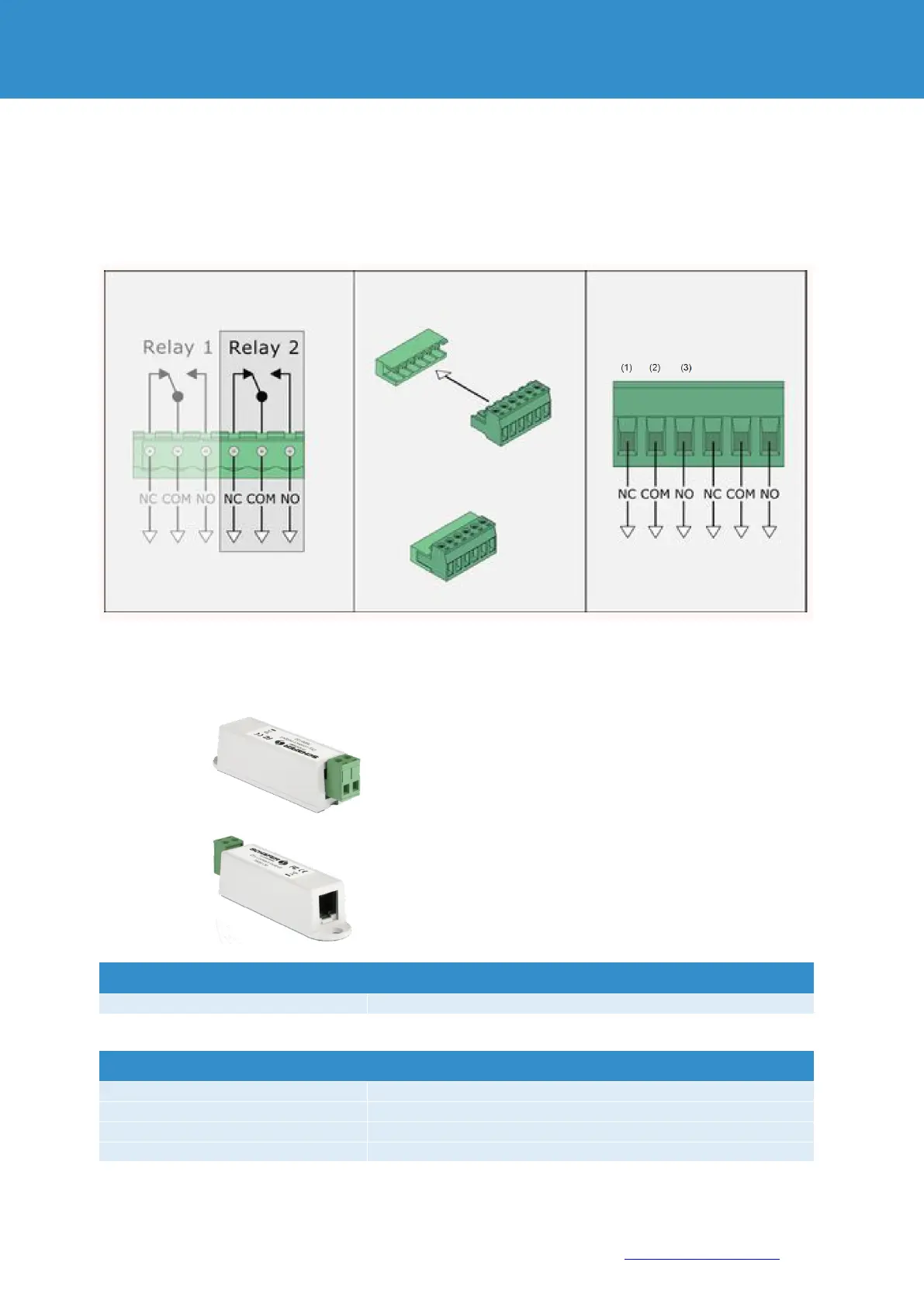
To connect an external load, connect the cables from the external power supply to the corresponding connections
(2) of the relay terminal block. The load on the left (1) or right (3) of the connections. Plug the relay terminal block
into the relay base terminal RLY1 or RLY2. Plug the relay terminal block into the relay base terminal RLY1 or RLY2.
The relay switches the load on or off on command. . The maximum possible power output of the relay is 10A.
7. Dry output
This sensor has a potential-free contact which can be
switched by the RMS system, if the alarm or warning
values are exceeded.
This makes it possible to activate external systems and
switch on an air circulation cooling device via a digital input
in the event of excess temperature.
The sensor is mounted on a free 12V DC alarm output on
the RMS.


 To Next Page