Page 70 of 86 SCHÄFER IT-Systems
Industriestraße 41 D-57518 Betzdorf
Phone: +49 (0) 2741/283-770 sales@schaefer-it-systems.de www.schaefer-it-systems.de As
amended on 16/8/2019 (subject to technical changes)
11.7.2. Notification of SNMP trap
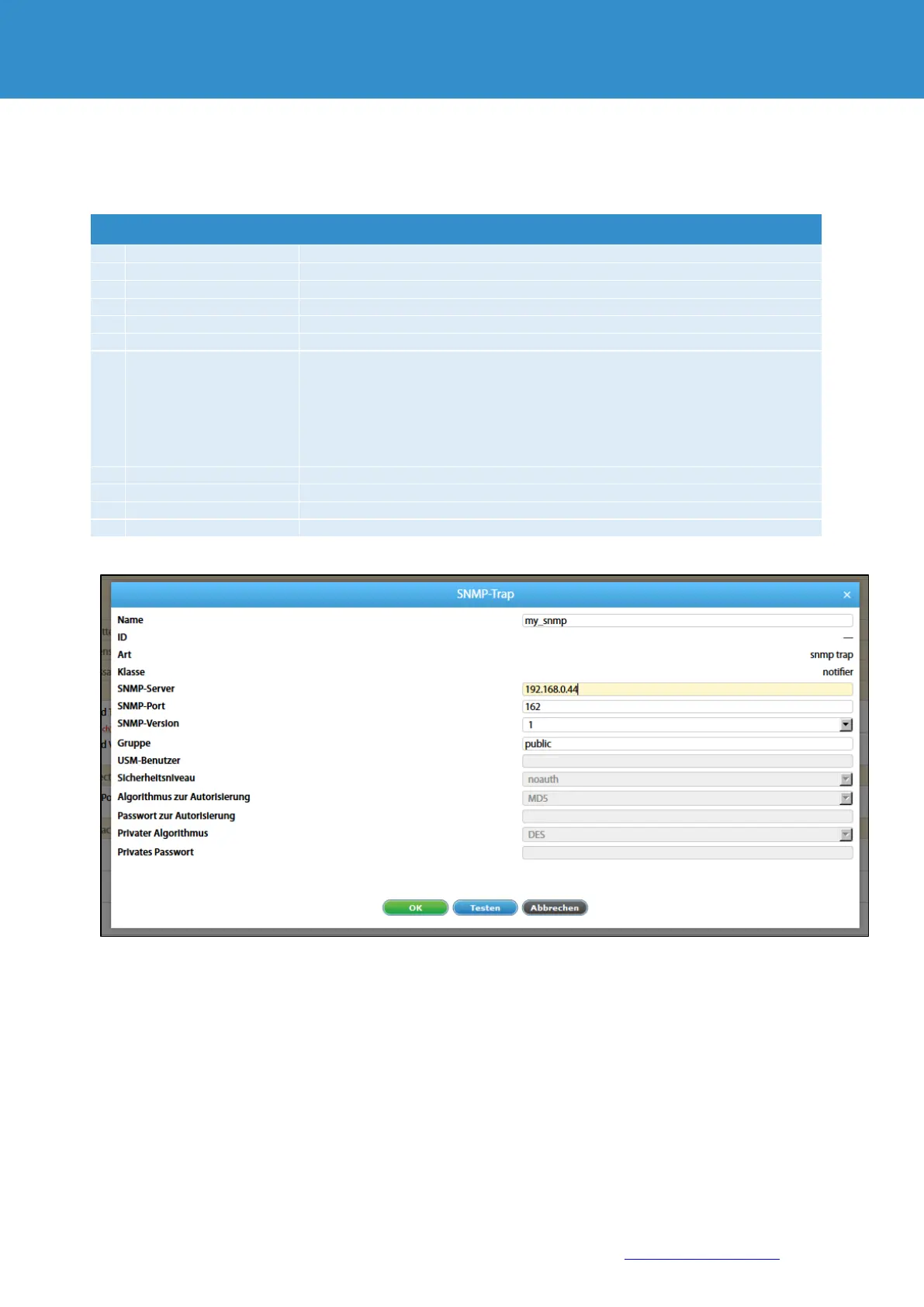
To create an email notification via SNMP-Trap, you need to specify the following parameters:
The name of the element in the system
Name or IP-address of the SNMP-server (192.168.1.10)
SNMP server port number. (e.g. 162)
Security level for version
v3, mobile version
Level of security
"noauth" - no authorization, only username required
"auth" - with Authorisation, must fill in "algorithm for Authorisation" and "password
for Authorisation"
"priv" - with Authorisation and data encryption, must complete "Authorisation
algorithm", "Authorisation password", "private algorithm" and "private password".
Authorisation algorithm for version v3 with security levels "priv" and "auth".
Authorisation algorithm for version v3 with security levels "priv" and "auth".
Authorisation algorithm for version v3 with security levels "priv".
Authorisation algorithm for version v3 with security level "priv".


 To Next Page