Page 60 of 86 SCHÄFER IT-Systems
Industriestraße 41 D-57518 Betzdorf
Phone: +49 (0) 2741/283-770 sales@schaefer-it-systems.de www.schaefer-it-systems.de As
amended on 16/8/2019 (subject to technical changes)
11.2. Network settings
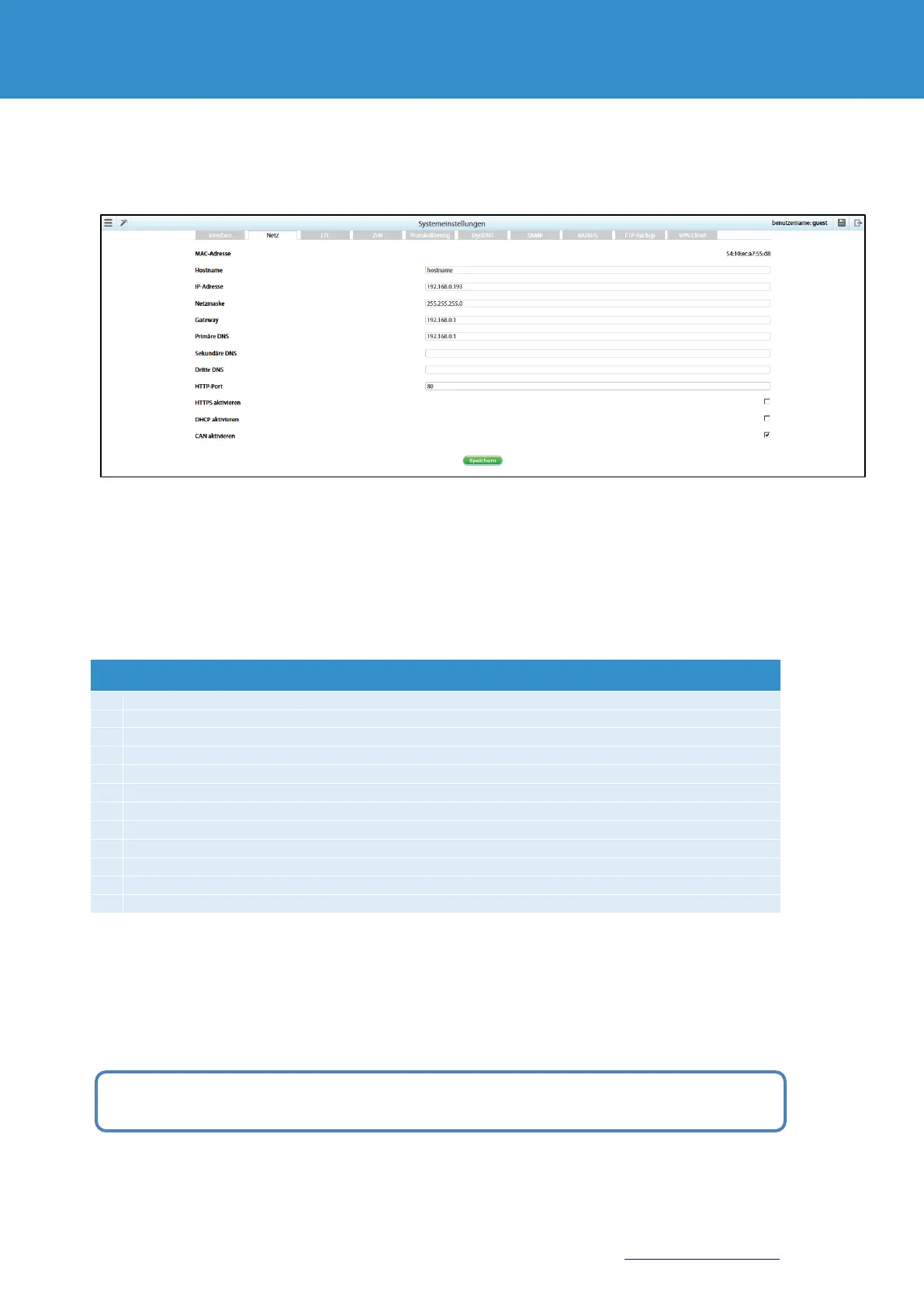
The standard network settings can be found under point 10.1.1.
The standard network settings can be found here: Connection of the device. To configure the network settings, go
to "Menu" >> "System Settings" >> "Network">>
Change the settings to the desired values and click "Save".
Change the settings to the desired values and click "Save".
If the default gateway is not known, use the computer's IP address on the machine's network, which is normally
included.
The device uses the standard gateway to test the network with little traffic.
If the user works with the monitoring unit via the HTTPS interface, a self-signed certificate is created.
Please note that when the monitoring system uses encryption codes, the speed of the system drops
proportionally to the length of the encryption code!


 To Next Page