Page 50 of 86 SCHÄFER IT-Systems
Industriestraße 41 D-57518 Betzdorf
Phone: +49 (0) 2741/283-770 sales@schaefer-it-systems.de www.schaefer-it-systems.de As
amended on 16/8/2019 (subject to technical changes)
8.1. Installation
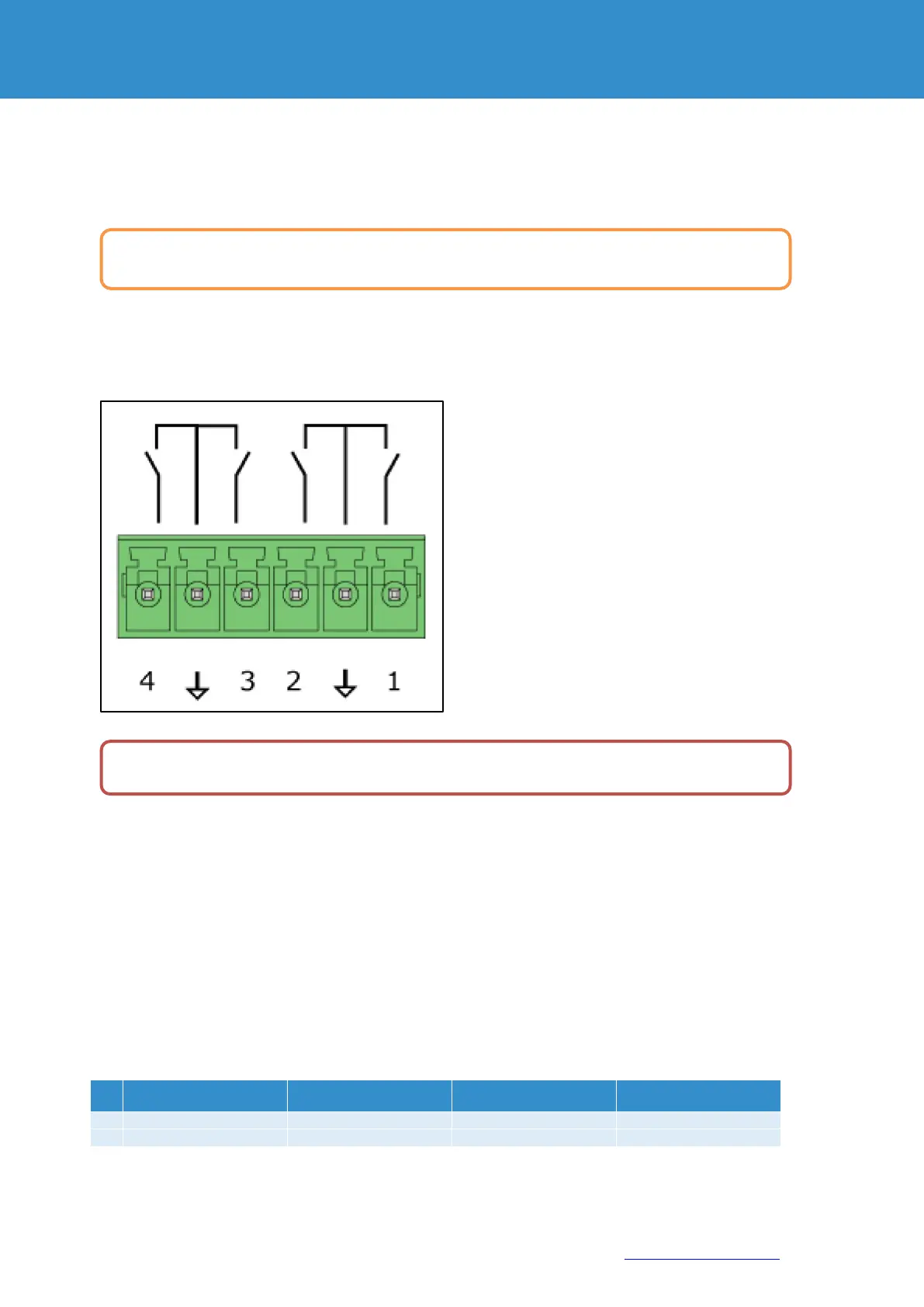
Connect the wires of the contacts to the corresponding terminals of the connector, two contacts each have a
common ground connection. (GND)
Insert the clamp into the contact socket. After connecting, configure the trigger logic in the system interface.
9. AC / DC-Measurement
Connect the AC, DC transceiver with any supplied RJ-11 (6P4C) or RJ-12 (6P6C) cable to any analogue port "A1 ..
A8 "or" Sensor "port.
The sensor type and connection on the device are determined automatically. Connect the transceivers to AC and
DC meters using any 2/4 system.
This procedure applies to the-, which are supported by the device and connected to the appropriate ports:
To avoid damage, do not connect the load when the monitoring unit is on.
To install extensions, switch the device off, disconnect it from the socket or at the voltage input.


 To Next Page