Page 64 of 86 SCHÄFER IT-Systems
Industriestraße 41 D-57518 Betzdorf
Phone: +49 (0) 2741/283-770 sales@schaefer-it-systems.de www.schaefer-it-systems.de As
amended on 16/8/2019 (subject to technical changes)
All sensors have the following data:
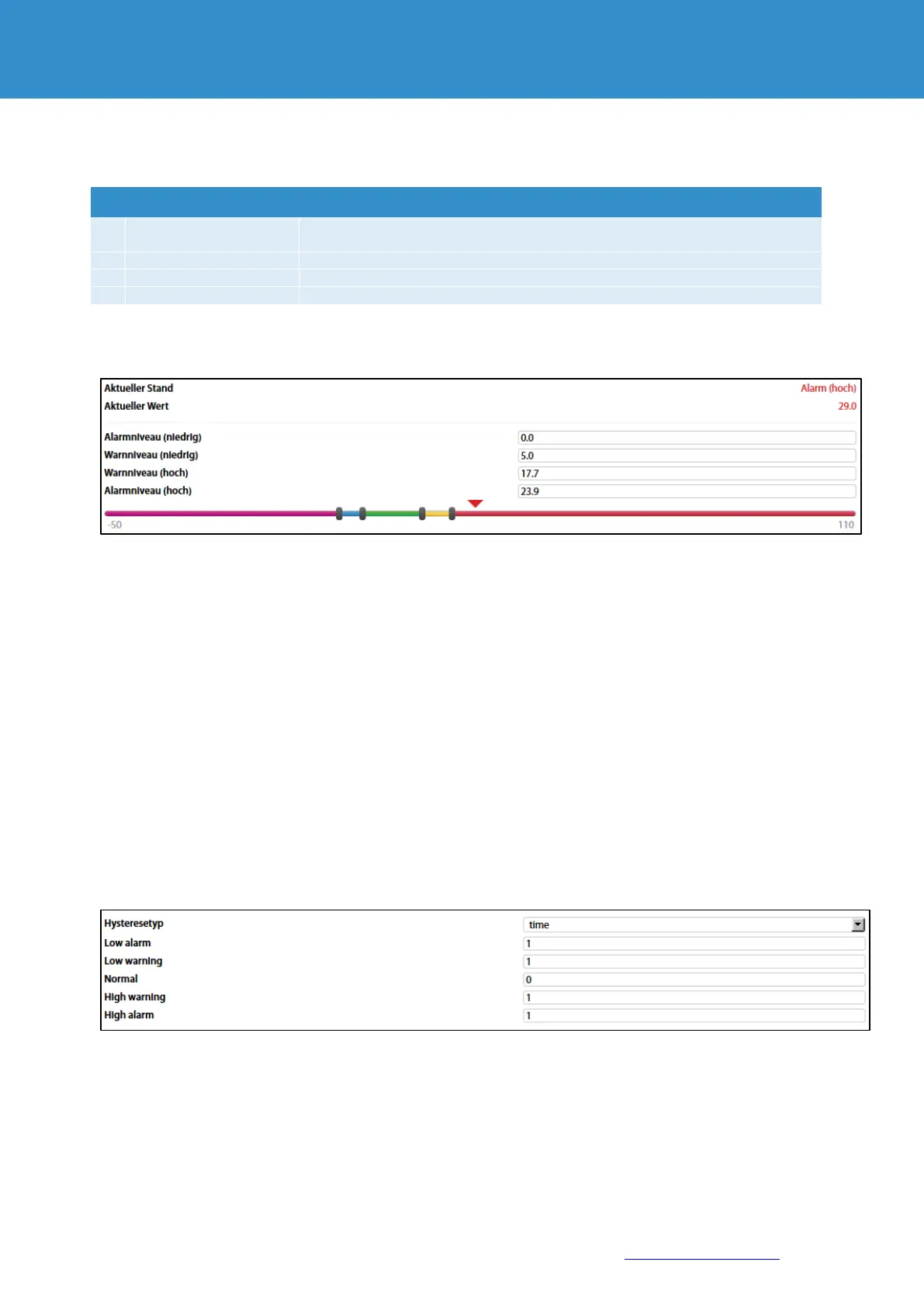
All sensors have threshold settings:
In the picture above, "Current value" corresponds to 29.0 and is represented by the small triangle.
The triangle is currently red because it is above the "Alarm level (high)" area, which corresponds to
23.9.
The sensor indicates that the "Current status" is "Alarm (high)".
This value is used by the system's "Logic Diagram" menu to notify the administrator of the status of the
sensor
Sensors have the option of setting the hysteresis state. The hysteresis can be a time, a value or a
deactivation.
If the hysteresis is set as "time", the sensor changes to a new state in the corresponding field with a
delay of the specified number of seconds.
The time count starts from the point in time at which the measured value of the sensor is outside the
threshold value range.
The name is automatically assigned by the system and can be changed at any
time.
Example: temperature, humidity, vibrations
Examples: analogue, CAN, discrete


 To Next Page