© 2019 Safe Fleet | All rights reserved | Part #: 700-1123 R4
p. 8
TH8 Installation and Conguration Guide
4. Use the mounting plate to mark the desired
position of the DVR and drill the four mounting
holes.
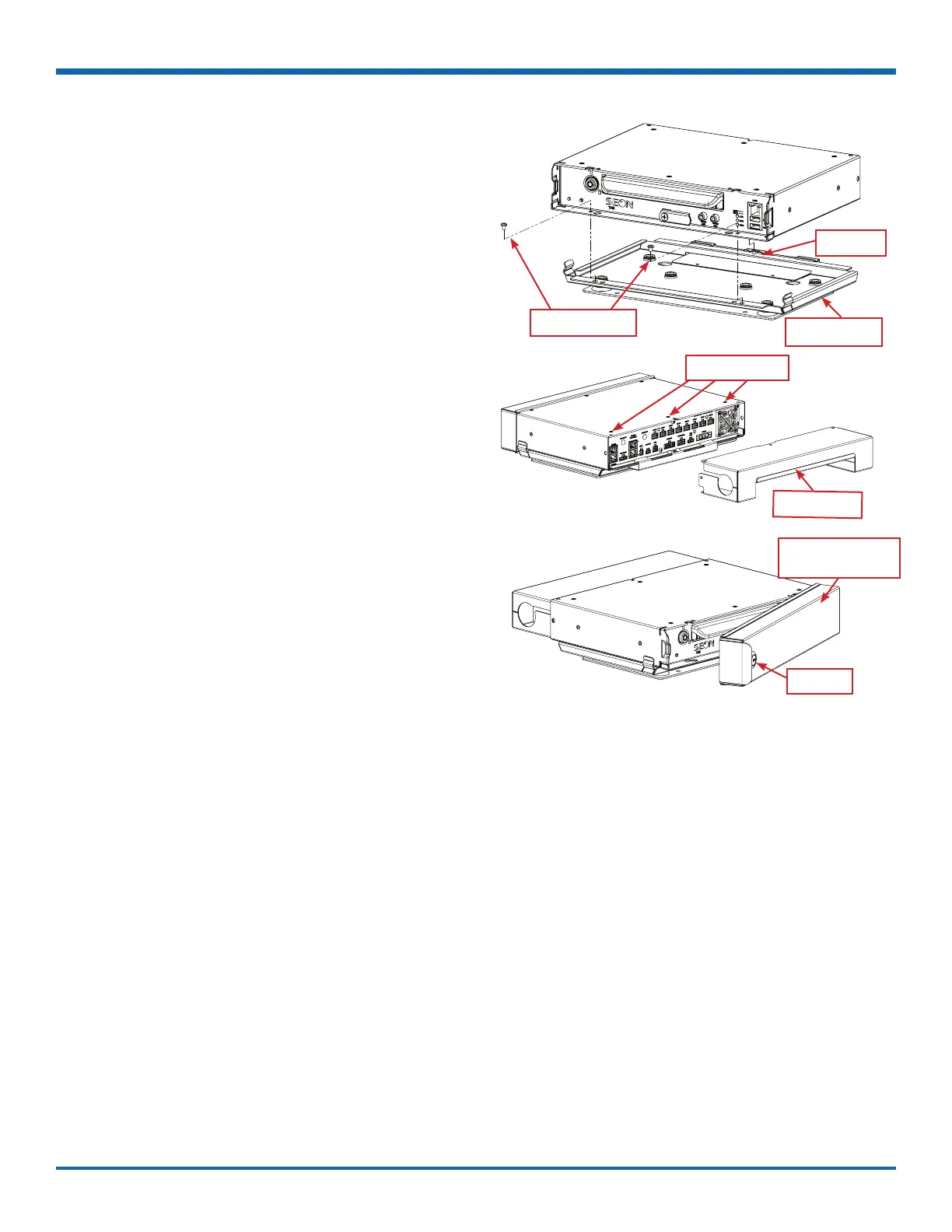
5. Fasten the mounting plate to the mounting
surface with the four self-drilling screws.
6. Slide the rear bottom edge of the DVR into the
spring tab on the back edge of the mounting
tray.
7. Attach the front bottom edge to the front of the
DVR using the two pan-head Phillips screws.
8. Connect the necessary cables and components.
For more information, see "DVR Front Panel
Features" on page 20 and "DVR Back Panel
Features" on page 21.
9. Attach the cable cover to the DVR using the
thumb screws provided.
10. When DVR installation is complete, attach the
front door by hooking the door along the top
edge and turning the key to the locked position.
Pan head screws
Spring tab
Mounting plate
Mounting holes
Cable cover
Locking front cover
(reversible)
Door lock



 To Next Page