MN.00356.E - 003 95
System Version Download
1. Unzip files N50052 XXX.zip in a suitable directory of the PC used to performed the upgrade.
2. Connect to the equipment using the WebLCT (login as “Admin”)
3. Open the Software Download window:
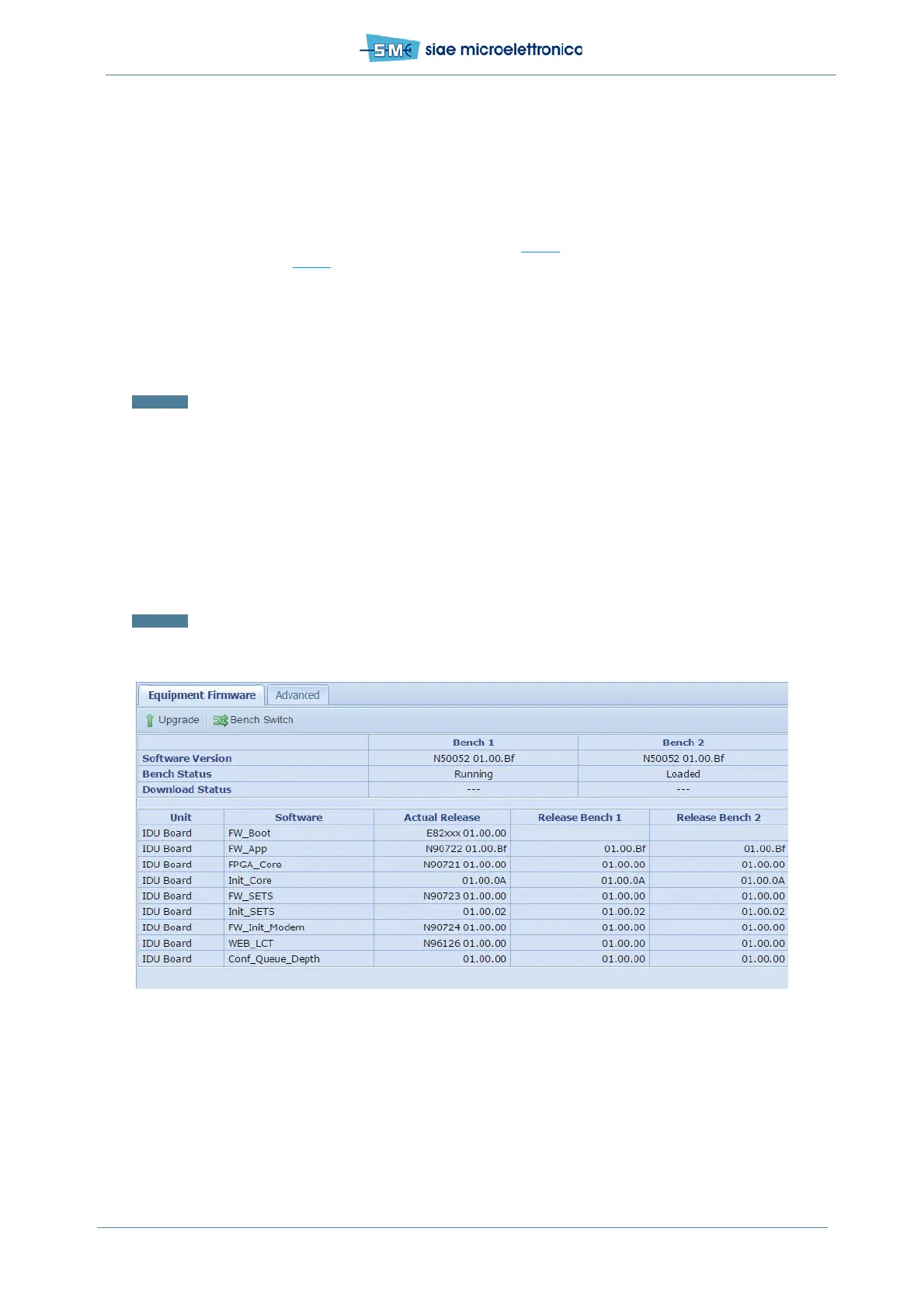
- using WebLCT select Software Info&Maint (see Fig.67
) from Equipment Menu and press
Upgrade (see Fig.68
)
4. Select the file N50052.dwl (system version) from the directory bin
5. Select Forced as download mode
6. Start the download and confirm by clicking on the window that pops-up
7. At the end of the system version download, to activate the new system version a bench switch is
required: click on Bench switch confirm by clicking on the window that pops-up.
Warning: The bench switch affects Ethernet traffic during device re-configuration.
WebLCT Download
1. Connect to the equipment using the WebLCT (login as “Admin”)
2. In Equipment menu - Software Info&Maint - WebLCT - Upload Manager press Browse and
select the file “N96126_XXYYZZ”
3. Press the button Upload and Confirm
4. After the update it is recommended to clear temporary internet files, cookies and history of the used
browser.
Warning: WebLCT can be uploaded from the IP Address/Uploader.html.
Fig.67 - Software download procedure


 To Next Page