SMARTRG INC. PROPRIETARY AND CONFIDENTIAL. ALL RIGHTS RESERVED. COPYRIGHT © 2014 13
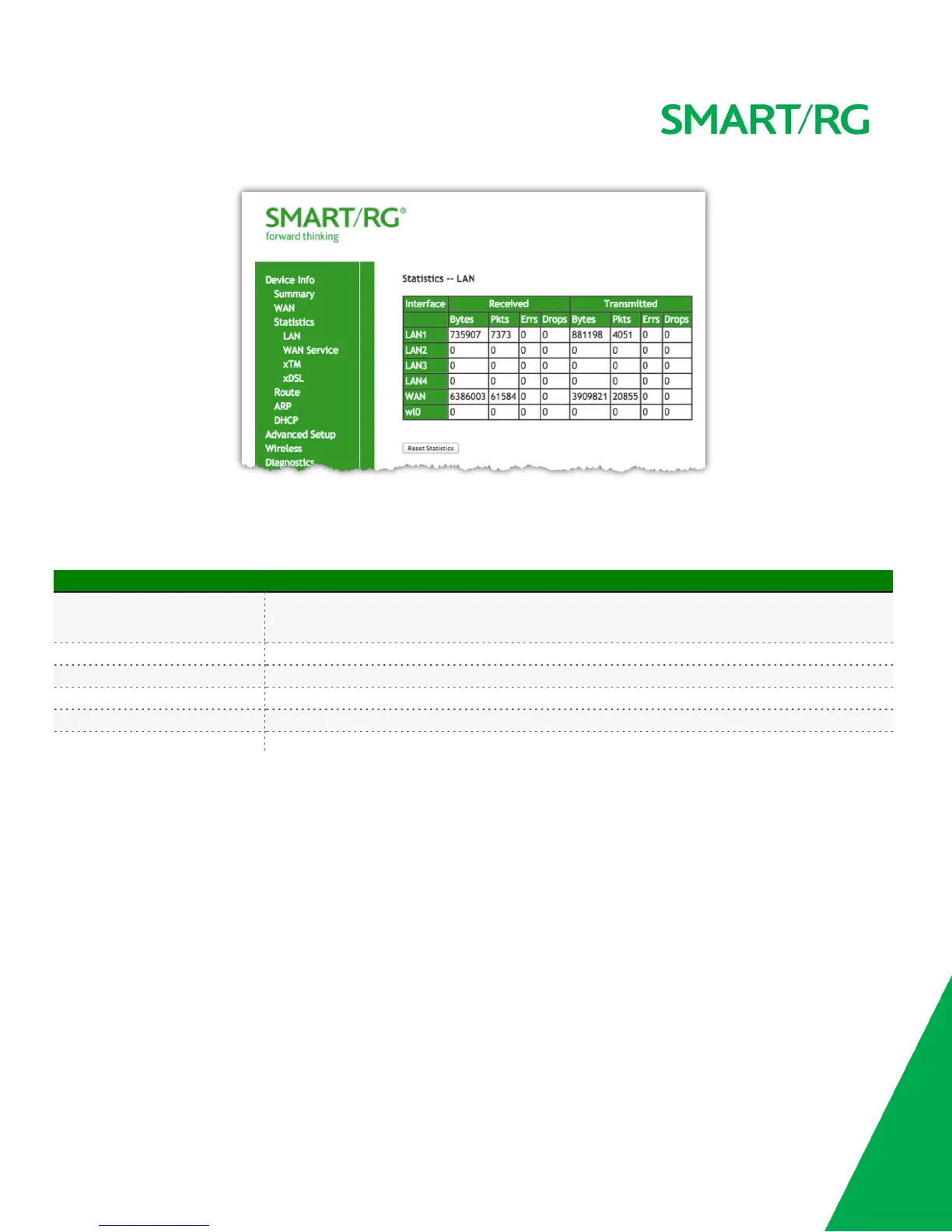
Use the Reset Statistics button near the bottom of the screen to reset these counters.
NOTE: Not all SmartRG gateway models support the SmartPort feature wherein a LAN port can be re-purposed to function as a WAN port (as
displayed in the Interface column below note, LAN3, LAN2, LAN1, WAN.) Only models SR5xxn and SR360n support this functionality.
The individual fields on this screen are defined as follows:
Field Name Description
Interface
(Received/ Transmitted)
LAN1, LAN2, LAN3, LAN4
Ethernet WAN if configured on your device
Wl0 is the Wireless LAN side Interface
Interface Displays available LAN interfaces
Bytes Bytes - (RX/ TX) total quantity of packets in Bytes
Pkts Pkts - (RX/ TX) total quantity of packets
Errs Errs - (RX/ TX) total quantity of error packets
Drops Drops - (RX/ TX) total quantity of dropped packets
WAN Service
Device Info -> Statistics -> WAN displays the TX/RX Bytes, Packets, Error and D rops for each WAN interface for your SmartRG Gateway. All
WAN interfaces configured for your SmartRG gateway are included.
Use the Reset Statistics button near the bottom of the screen to reset these counters.



 To Next Page