SMARTRG INC. PROPRIETARY AND CONFIDENTIAL. ALL RIGHTS RESERVED. COPYRIGHT © 2014 56
The individual fields on this screen are defined as follows:
Field Name Description
Available Routed WAN Interfaces Choose from the list of available WAN interfaces identify as the Default Gateway.
Selected Default
Gateway Interfaces
When populated, this becomes a prioritized list of Default Gateways selections.
Selected WAN Interface
Select the WAN interface for this route from the drop-down list. (NO CONFIGURED INTERFACE is
default)
Static Route
Static Route is one form of manually configured, fixed route for IP data.
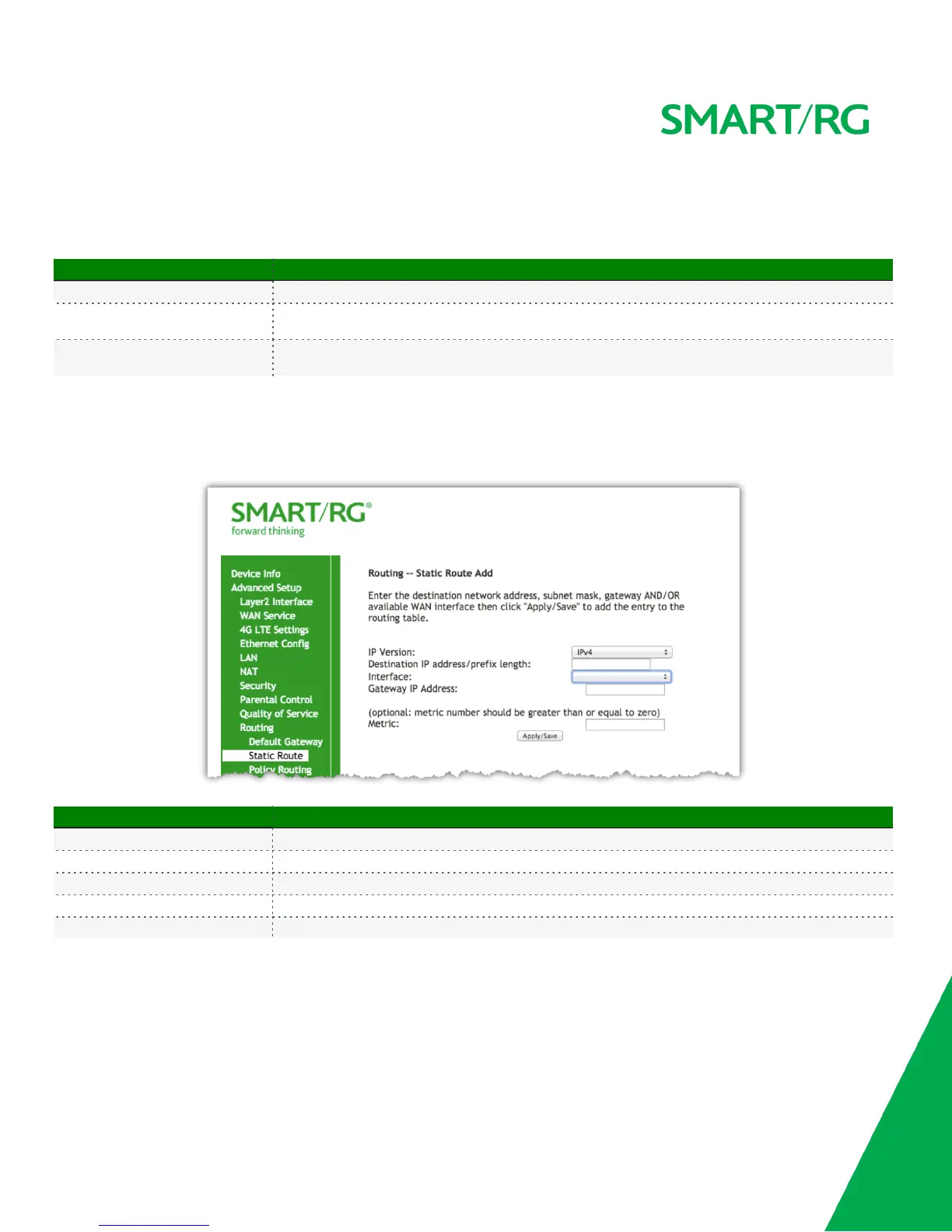
After selecting Advanced Setup -> Routing -> Static Route, click the Add button and the following screen will appear. Click the Apply/Save button
to commit the changes entered. Up to 32 entries may be added.
The individual fields on this screen are defined as follows:
Field Name Description
IP Version [IPv4, IPv6] Select the IP version associated with the static route you wish to create.
Destination IP address/prefix length Enter the destination network address / subnet mask for route
Interface WAN Interface(s) available for selection. This list filtered by to IP Version set in the first drop-down list.
Gateway IP Address Destination IP address desired (/prefix length if needed)
Metric (optional) [>=0] Establishes traffic priority/weighting.
Policy Routing
Policy routing makes somewhat automated routing choices based on net admin dictated policies. For example, a network administrator might



 To Next Page