SMARTRG INC. PROPRIETARY AND CONFIDENTIAL. ALL RIGHTS RESERVED. COPYRIGHT © 2014 57
want to deviate from standard routing based on destination markers in the packet and instead, forward a packet based on the source address. Use
this feature to establish similar policies.
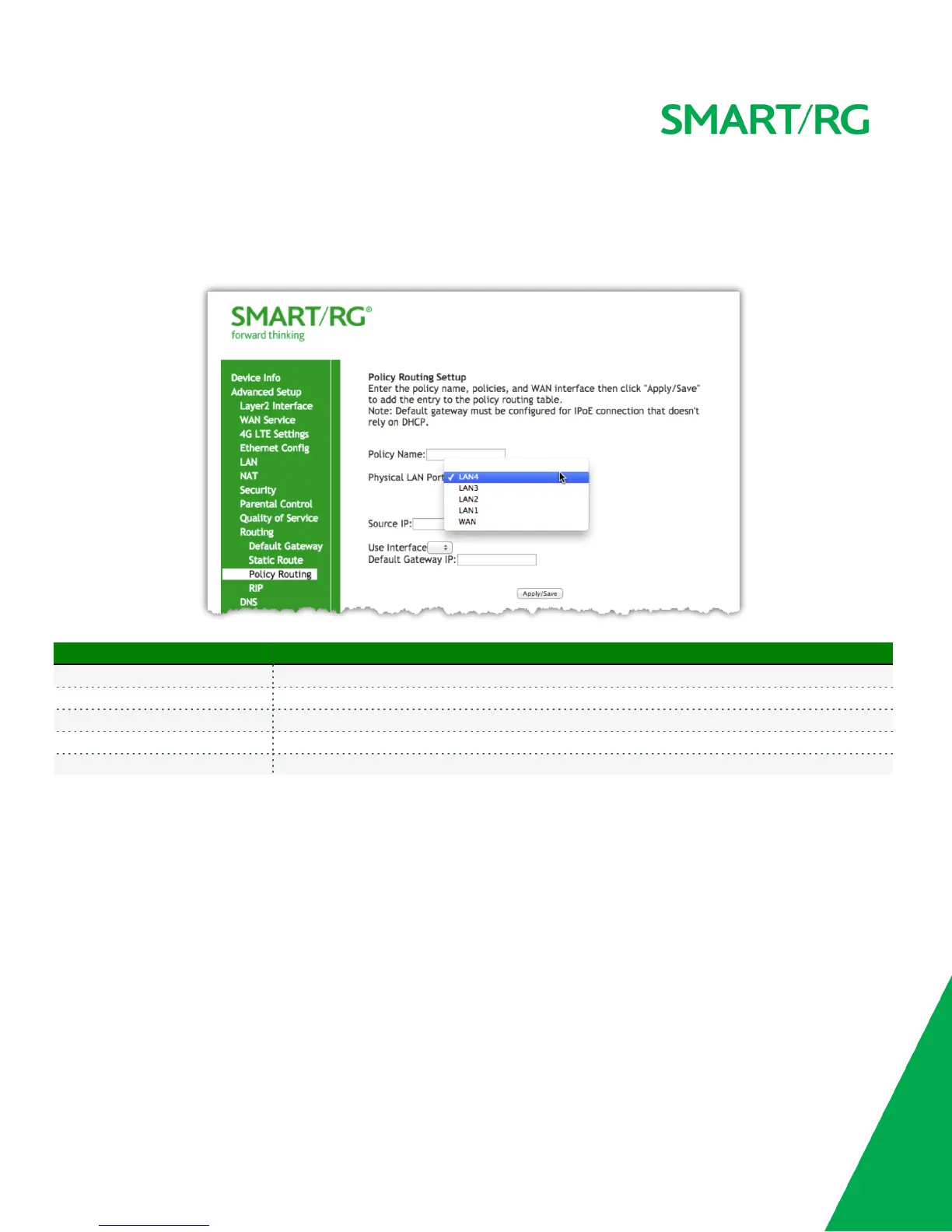
After selecting Advanced Setup -> Routing -> Policy Route, click the Add button and the following screen will appear.
Click the Apply/Save button to commit the changes entered.
The individual fields on this screen are defined as follows:
Field Name Description
Policy Name A free-form text field. Enter a descriptive name for this entry to the policy routing table.
Physical LAN Port Select a physical LAN interface for the policy route from the drop-down list.
Source IP Enter the IP address for source of this policy route.
Use Interface Drop-down field selection providing choice of the WAN Interface desired for the policy route
Default Gateway IP The IP address of the Default Gateway.
RIP (Routing Information Protocol)
RIP is a type of distance-vector routing protocol, which leverages hop count as a metric for routing. RIP puts a limit on the number of hops (max
15) allowed in order to prevent routing loops. This can sometimes limit the size of networks that RIP can be successfully employed.
After selecting Advanced Setup -> Routing -> RIP, click the Add button and the following screen will appear.
Click the Apply/Save button to commit the changes entered.



 To Next Page