SMARTRG INC. PROPRIETARY AND CONFIDENTIAL. ALL RIGHTS RESERVED. COPYRIGHT © 2014 60
Dynamic DNS
Dynamic DNS (DDNS) automatically updates a name server in the DNS with the active DNS configuration of its configured hostnames,
addresses or other data. Often this update occurs in real time.
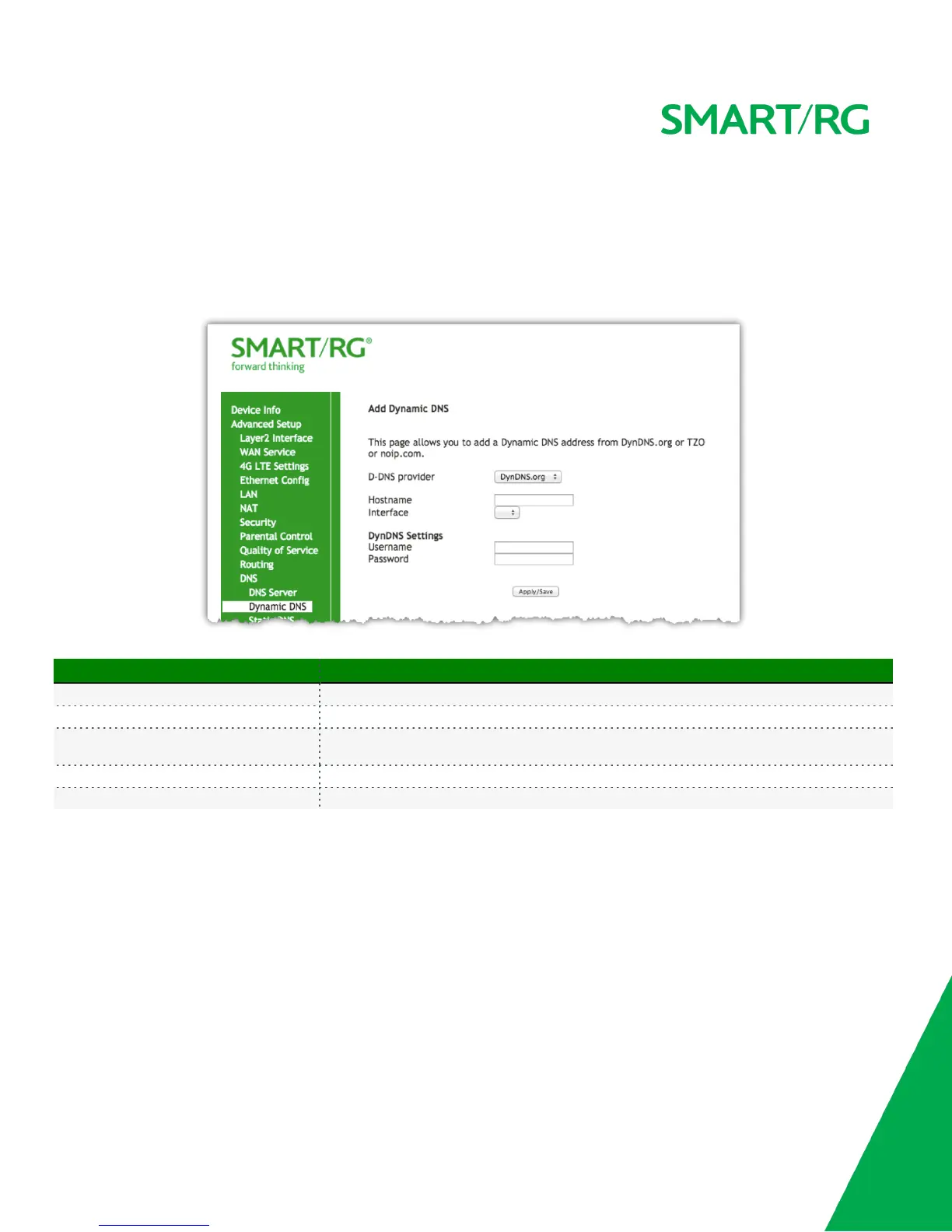
After selecting Advanced Setup -> DNS -> Dynamic DNS from the left navigation bar, click the Add button. The following screen will appear.
Enter your desired settings then click Apply/Save to commit your changes.
The individual fields on this screen are defined as follows:
Field Name Description
D-DNS provider Select a dynamic Domain Name Server provider from the drop-down menu.
Hostname Enter the name of the dynamic DNS server.
Interface
Select the gateway WAN interface whose traffic will be pointed at the above specified Dynamic
DNS provider
Username Enter the username of the dynamic DNS server
Password Enter the password of the dynamic DNS server
Static DNS
The Static DNS service allows you to resolve DNS queries on the Broadband Router by adding static Host Name to IP Address mappings.
After selecting Advanced Setup -> DNS -> Static DNS from the left navigation bar, click the Add button. The following screen will appear.
Enter your desired settings then click Apply/Save to commit your changes.
A maximum of 10 static DNS entries can be added.



 To Next Page