SMARTRG INC. PROPRIETARY AND CONFIDENTIAL. ALL RIGHTS RESERVED. COPYRIGHT © 2014 71
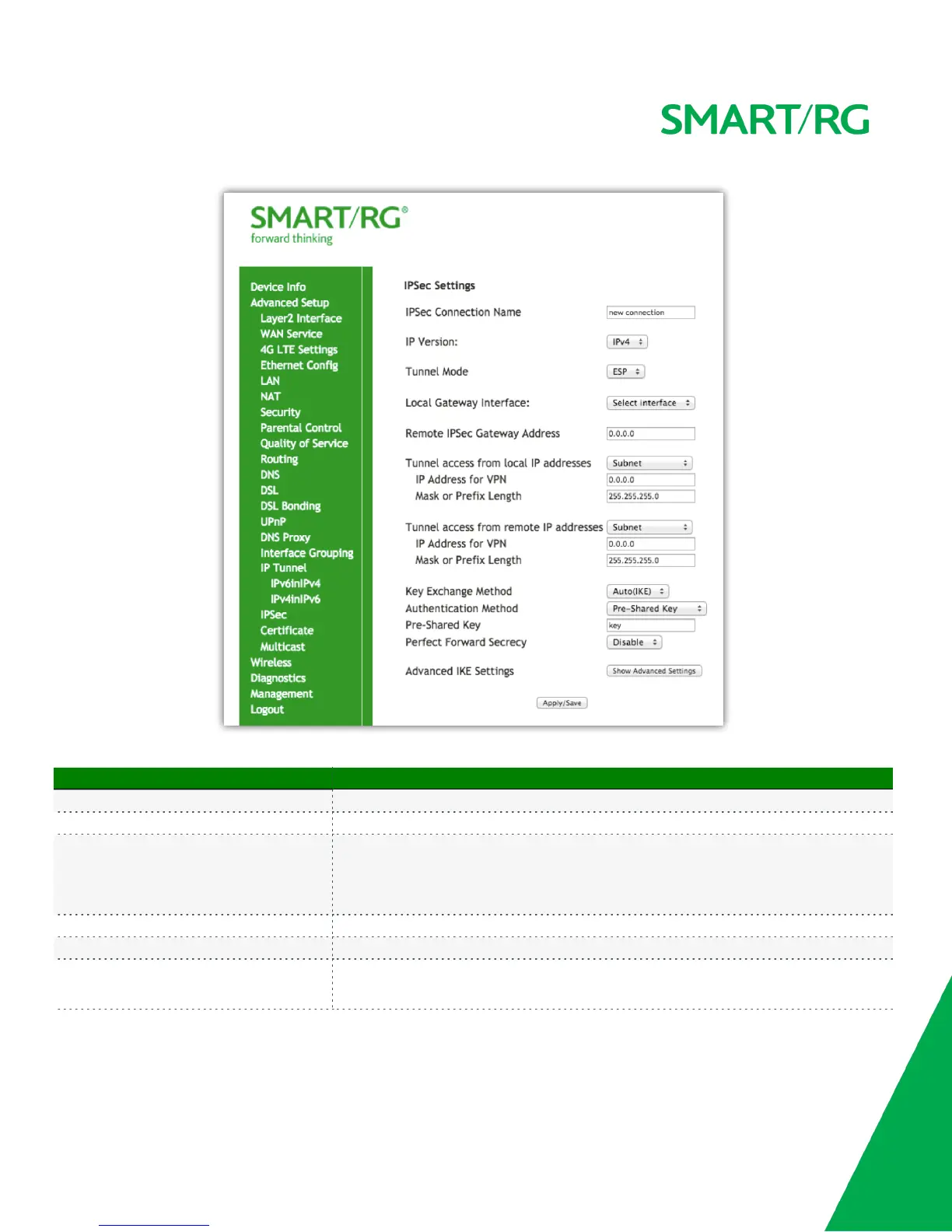
The individual fields on this screen are defined as follows:
Field Name Description
IPSec Connection Name A free form text field. Enter a descriptive name for this connection
IP Version [IPv4, IPv6] Select the IP version environment associated with your infrastructure.
Tunnel Mode
[ESP, AH] Select encapsulation method to be used.
Use AH tunnel mode to encapsulate a packet with AH and IP headers. For authentication, the
entire packet is signed.
Use ESP tunnel mode to encapsulate a packet with ESP and IP headers. An ESP trailer is added
to the packet for authentication and integrity.
Local Gateway Interface Select the WAN connection from the drop-down list to be associated with this tunnel.
Remote IPSec Gateway Address Enter the WAN IP for tunnel.
Tunnel Access From Local IP Addresses
[Subnet, Single Address] Select IP information for site A and B.
Subnet indicates entire LAN.
For single host, select Single Address.



 To Next Page