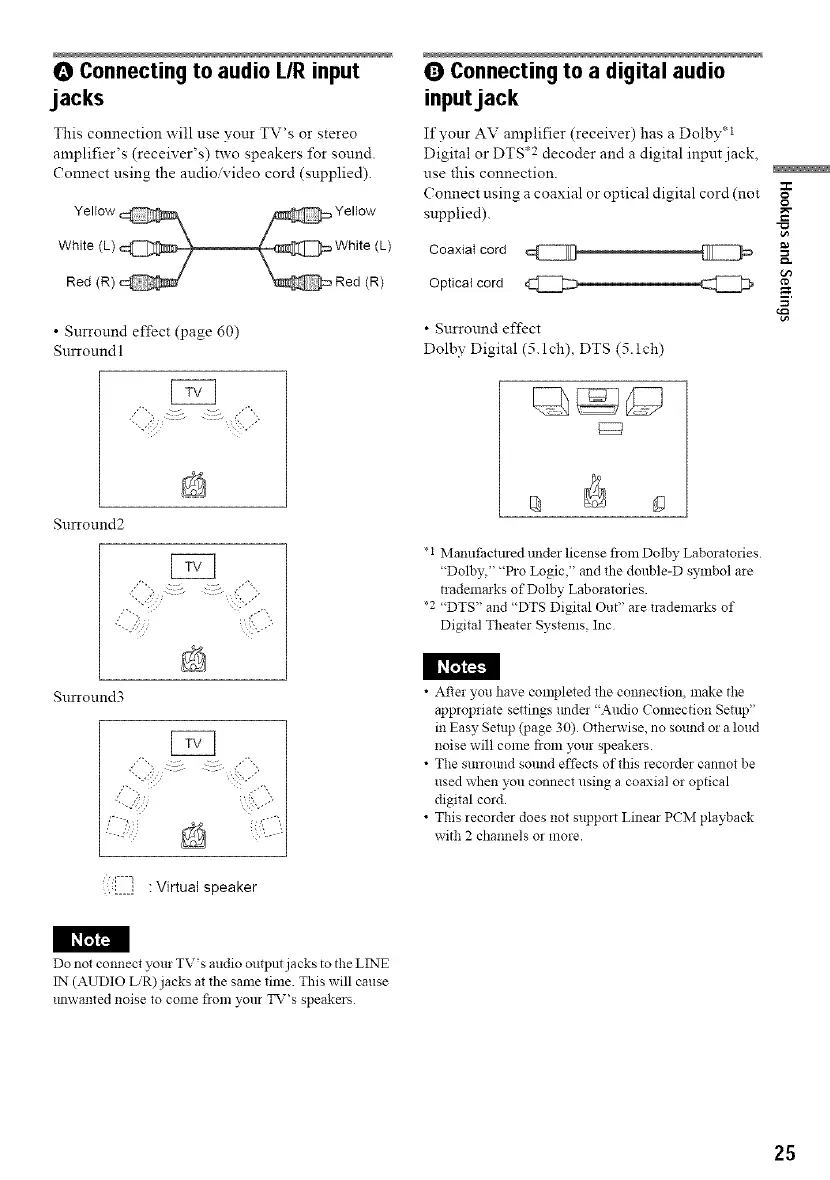
O Connecting to audio L/R input
jacks
This connection will use your TV's or stereo
amplifier's (receiver's) two speakers for sound.
Connect using the audio'video cord (supplied).
• Surround effect (page 60)
Snrround I
Surround2
,% .... ,,,
Q Connecting to a digital audio
inputjack
If your AV amplifier (receiver) has a Dolby q
Digital or DTS .2 decoder and a digital input .jack,
use this connection.
Connect using a coaxial or optical digital cord (not
supplied).
Coaxial cord
Optical cord _
• Surround effect
Dolby Digital (5. lch), DTS (5. lch)
*i Manufactmed under license from Dolby Laboratories
"Dolby," "Pro Logic," and the double-D symbol are
trademarks of Dolby Laboratories.
*2 "DTS" and "DTS Digital Out" are trademarks of
Digital Theater Systems, Inc
212
o
g
I _L_!
Surround3
:i7==]]]]1: Virtual speaker
• After you have completed the connection, make the
appropriate settings trad!! "Audio Cotmection Setup"
in Easy Setup (page 30) Othmavise, no sound or a loud
noise will come from your speakers.
• The surloluld sound effects of this recorder cannot be
used when you connect using a coaxial or optical
digital cord.
• This recorder does not support Linear PCM playback
with 2 channels or more.
I I_r_
Do not connect your TV's audio output jacks to the LINE
IN (AUDIO L/R)jacks at the same time. This will cause
tmwanted noise to come fiom your TV's speakers
25



 To Next Page