Dubbingfrom a Video to a
DVD
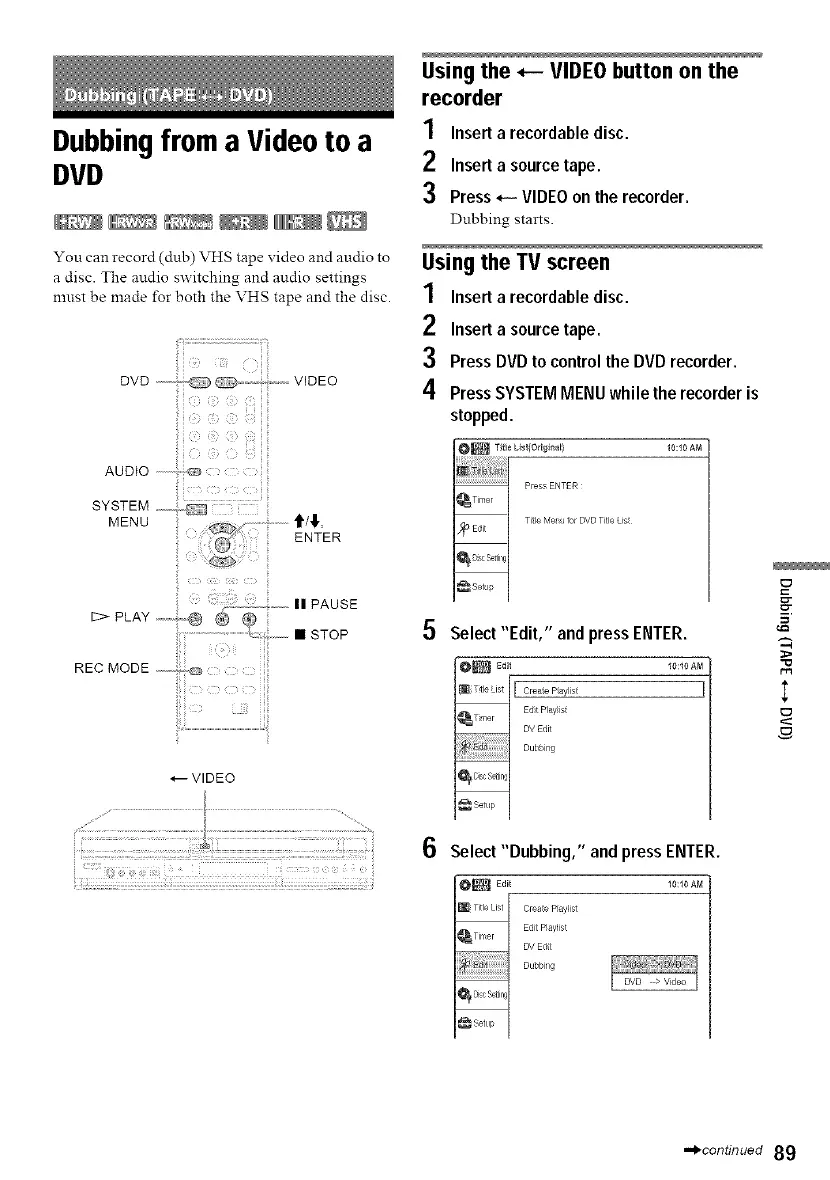
You can record (dub) VHS tape video and audio to
a disc. The audio switching and audio settings
nmst be made for both the VHS tape and the disc.
lily:i:i;:i i i i ii;i
DVD ,,,,,,,:,; O " ....... VIDEO
i i
ii iii
*---VIDEO
Using the _-- VIDEO button on the
recorder
1 Inserta recordabledisc.
2 Insert a source tape.
3 Press *-- VIDEOon the recorder.
Dubbing starts.
Usingthe TV screen
1 Inserta recordabledisc.
2 Insert a source tape.
3 PressDVDto controlthe DVDrecorder.
4 PressSYSTEMMENUwhile therecorderis
stopped.
10:10 AM
5
6
Select "Edit," and pressENTER.
[ Creae Paylist
Edt Play_st
DV Edit
Dubbng
Select "Dubbing," and pressENTER.
I0_ EdE_ _o:_oaM
[_ Title List Create Playlist
Edit P_aylist
DV Edt
Dubbi g
I
,.,_continued 89



 To Next Page