8
Press REC MODE repeatedly to select the
tape speed, "SP" or "EP."
"EP" (Extended Play) provides recording
time three times as long as "SP" (Standard
Play). However, "SP" produces better picture
and audio quality.
Press • REC.
"RE(" appears in the front pane! display and
recording starts.
Recording continues until you stop the
recording or the tape reaches the end.
Tostop recording
Press • STOP.
Usingthe On-ScreenMenus
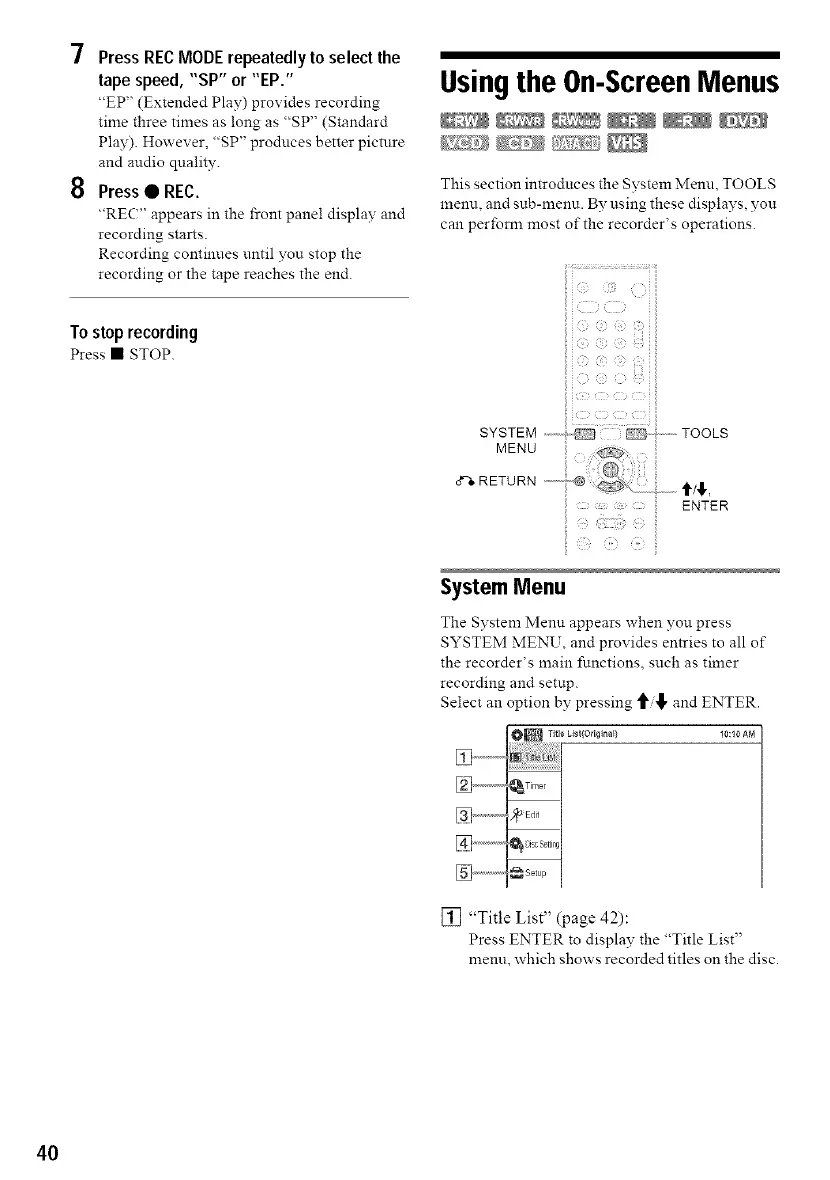
This section introduces the System Menu TOOLS
menu, and sub-menu. By using these displays, yon
can perfomr most of the recorder's operations.
I¸i_ ...........................?ii
SYSTEM ,---,_,_ TOOLS
MENU
o"%RETURN ...........
ENTER
SystemMenu
The System Menn appears when you press
SYSTEM MENU, and provides entries to all of
the recorder's main functions, such as timer
recording and setup.
Select an option by pressing and ENTER.
O_ Title Cisl/Originall 10:10 AM
[] ................._,iner
%..............._it
[] .................._ set,_
[] "Title List" (page 42):
Press ENTER to displav the "Title List"
menn, which shows recorded titles on the disc.
40



 To Next Page