Checking/Changing/
Canceling VCRTimer
Settings (Timer List)
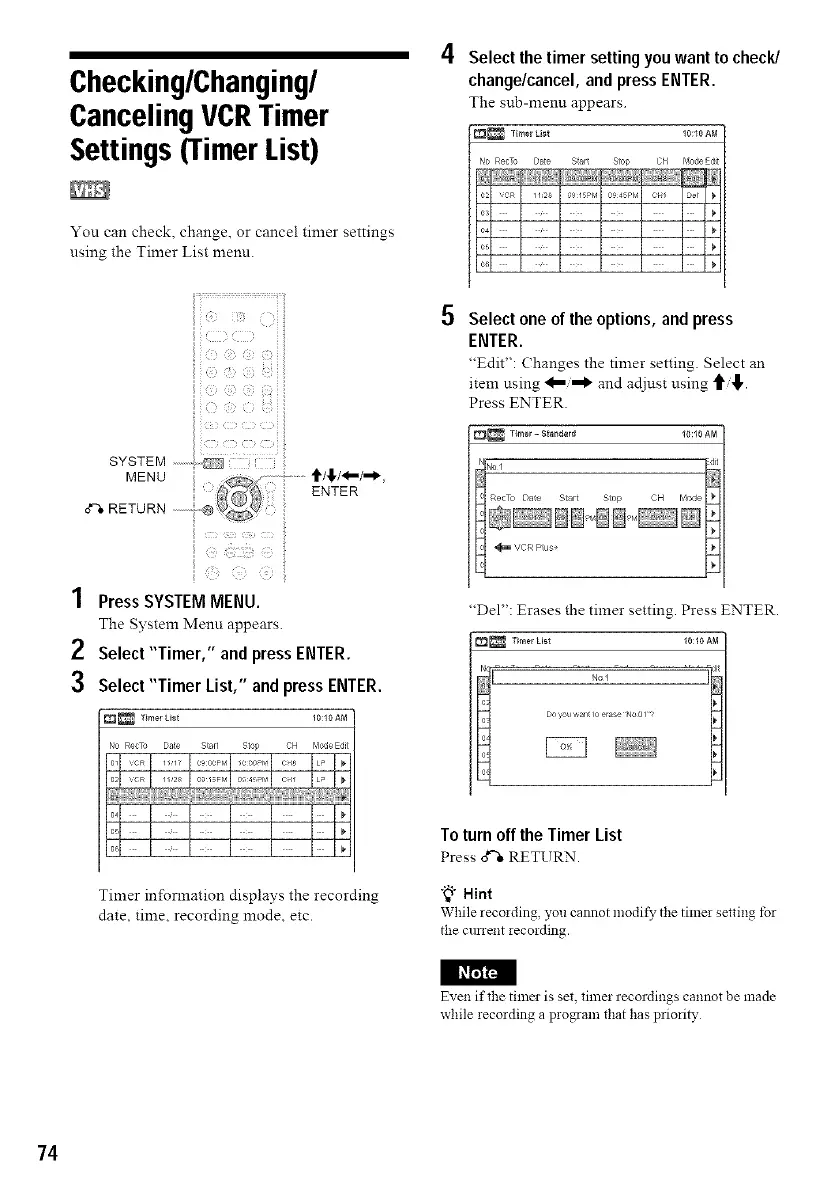
You can check, change, or cancel timer settings
using the Timer List menu.
SYSTEM ..........
MENU
ENTER
o"%RETURN
r
1 Press SYSTEM MENU.
The System Menu appears.
2 Select"Timer," and press ENTER.
3 Select "Timer List," and press ENTER.
_ Timer Ust 10:10 AM
NO Rec_ Date Skirt Stop CH Mode Edt
Tinier information displays the recording
date, time, recording mode, etc.
4 Select the timer setting you want to check/
change/cancel, and press ENTER.
The sub-menu appears.
_ Timer List 10:10 AM
No RecTo Date b'o_leE(It
S{arL Stop CH
0915Pr,_ 0945P_¢ cN/
5 Select one of the options, and press
ENTER.
"Edit": (-hanges the tinier setting. Select an
item using and adjust using _,!1".
Press ENTER.
_ T{mer- 8_endard 10:10 AM
"Del": Erases the timer setting. Press ENTER.
_ Timer Ust 10:10 AM
No]
Do_ou aan_to erase No 017
?
Toturnoff the Timer List
Press o*%RETURN.
"_1"Hint
While lecoiding, you cannot lnodi_, the timei setting tbr
the cunent iecording.
Even if the timer is set, timer recordings cannot be made
while iecording a piogram that has priorib,
74



 To Next Page