Usingthe DVDDiscSetting
Displays
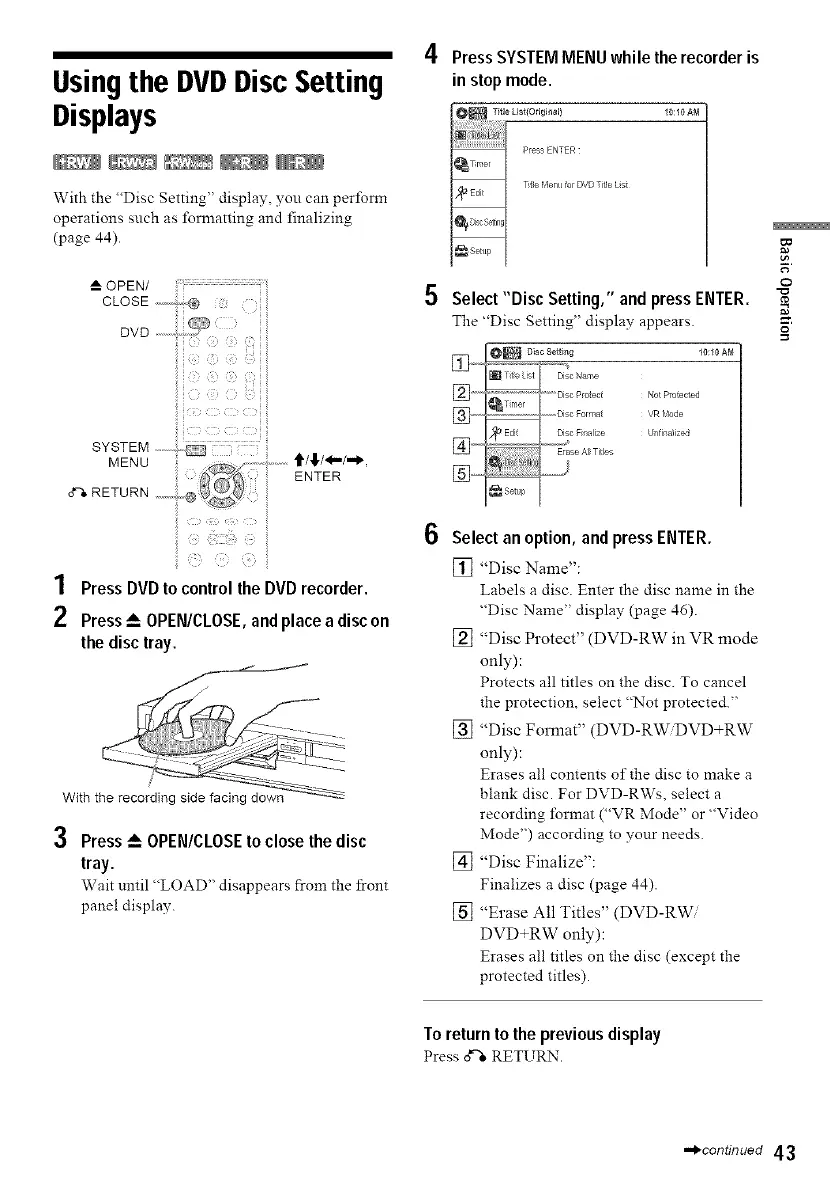
With the "Disc Setting" display, you can perform
operations such as lbrmatting and finalizing
(page 44).
OPEN/ ................................
CLOSE ....;v,, ®
!i! :i: i!iii:::i!ii!ii¸¸_:i ii
1 Press DVD to control the DVD recorder.
2 Press _-- OPEN/CLOSE, and place a disc on
the disc tray.
With the recording side facing down
3 Press_ OPEN/CLOSEto close thedisc
tray.
Wait until "LOAD" disappears from the front
panel display.
Press SYSTEM MENU while the recorder is
in stop mode.
O_ Title Lis_(Originall 10:10 AM
Press ENTER
_Timer
Etle Henu for DVD Ttle Lst
_Edit
_Sett_p
Select "Disc Setting," and press ENTER.
The "Disc Setting" display appears.
_"_'_'] _'" Disc Protect Not Protected
Select an option, and press ENTER.
[] "Disc Name":
Labels a disc. Enter the disc name in the
"Disc Name" display (page 46).
[] "Disc Protect" (DVD-RW in VR mode
only):
Protects all titles on the disc. To cancel
the protection, select "Not protected."
[] "Disc Format" (DVD-RW_VD+RW
only):
Erases all contents of the disc to make a
blank disc. For DVD-RWs, select a
recording format ("VR Mode" or "Video
Mode") according to your needs.
[] "Disc Finalize":
Finalizes a disc (page 44).
[] "Erase All Titles" (DVD-RWi
DVD+RW only):
Erases all titles on the disc (except the
protected titles).
t_
o
To return to the previous display
Press o*"_RETURN.
-*_continued 43



 To Next Page