Editing a Playlist
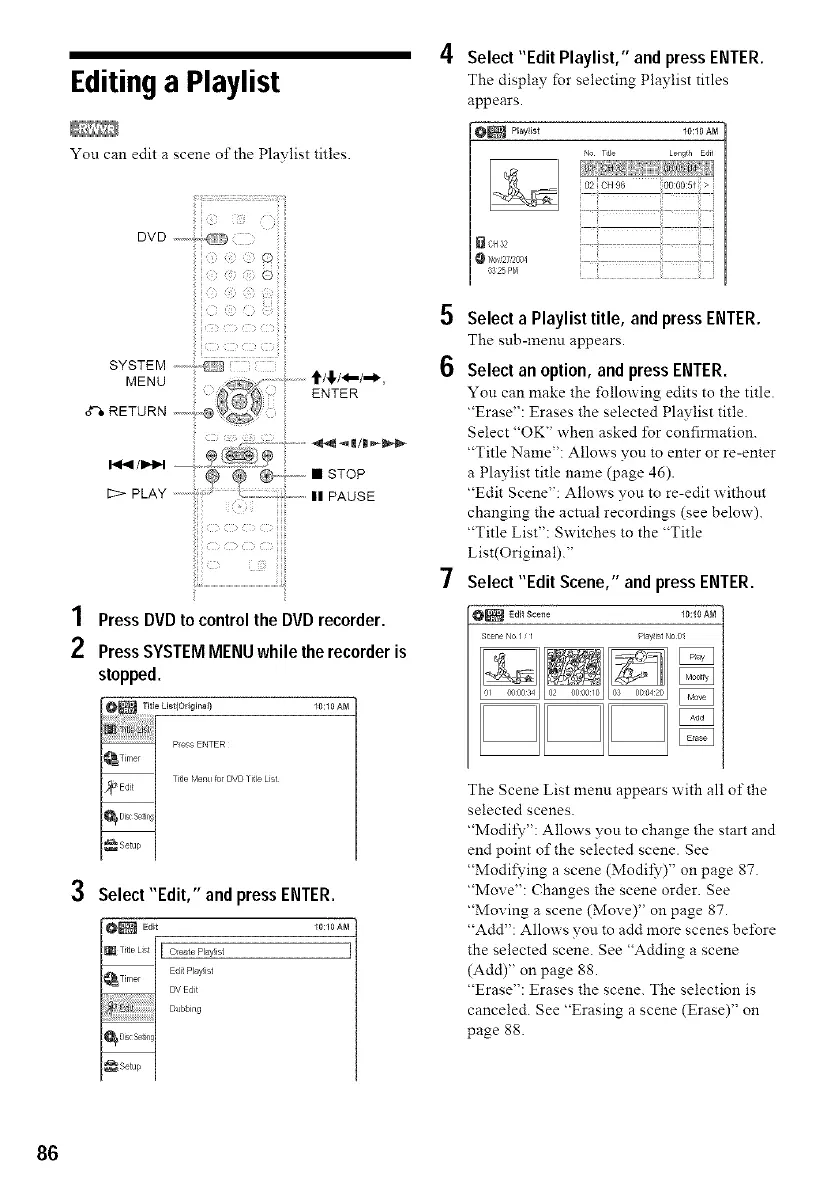
You can edit a scene of the Playlist titles•
DV D ...4._,
@
i
i
SYSTEM ,-----;,_ i
z: ...........tt/!/_/-*,
MENU
('_ ENTER
RETURN ,,,,,- ,@
/I_IIH ...................._: ::::::.
@ @,-,-.,.,.• STOP
1::>PLAY .......... II PAUSE
iiiii
1 Press DVD to control the DVD recorder.
2 Press SYSTEM MENU while the recorder is
stopped.
10:10 AM
3
Select "Edit," and press ENTER.
_Edit 10:10 AN
Title Lst I I Create Playist I
--i
EdiJ P_ayist
DV Edt
Dubbing
_DiscSe Rgl
:_ Setup j
4 Select "Edit Playlist," and press ENTER.
The display for selecting Playlist titles
appears•
O_ Playlist 10:10 AM
Lengfh Edif
5
6
[]CH32
0325 Pr_
ii ii i
Select a Playlist title, and press ENTER.
The sub-menn appears•
Selectan option,andpressENTER.
Yon can make the following edits to the title•
"Erase": Erases the selected Playlist title•
Select "OK" when asked lbr confirmation.
"Title Name": A!lows you to enter or re-enter
a Playlist title name (page 46).
"Edit Scene": Allows you to re-edit without
changing the actual recordings (see below).
"Title List": Switches to the "Title
List(Original)."
Select "Edit Scene," and press ENTER.
O_ Edi_Scene 10:10 AN
Sc_ne No I P ay ist No 0
The Scene List menu appears with all of the
selected scenes•
"Modil_7": A!lows you to change the start and
end point of the selected scene• See
"Modifying a scene (Modil?)" on page 87.
"Move": Changes the scene order• See
"Moving a scene (Move)" on page 87.
"Add": Allows you to add more scenes before
the selected scene. See "Adding a scene
(Add)" on page 88.
"Erase": Erases the scene. The selection is
canceled. See "Erasing a scene (Erase)" on
page 88.
86



 To Next Page