Playing
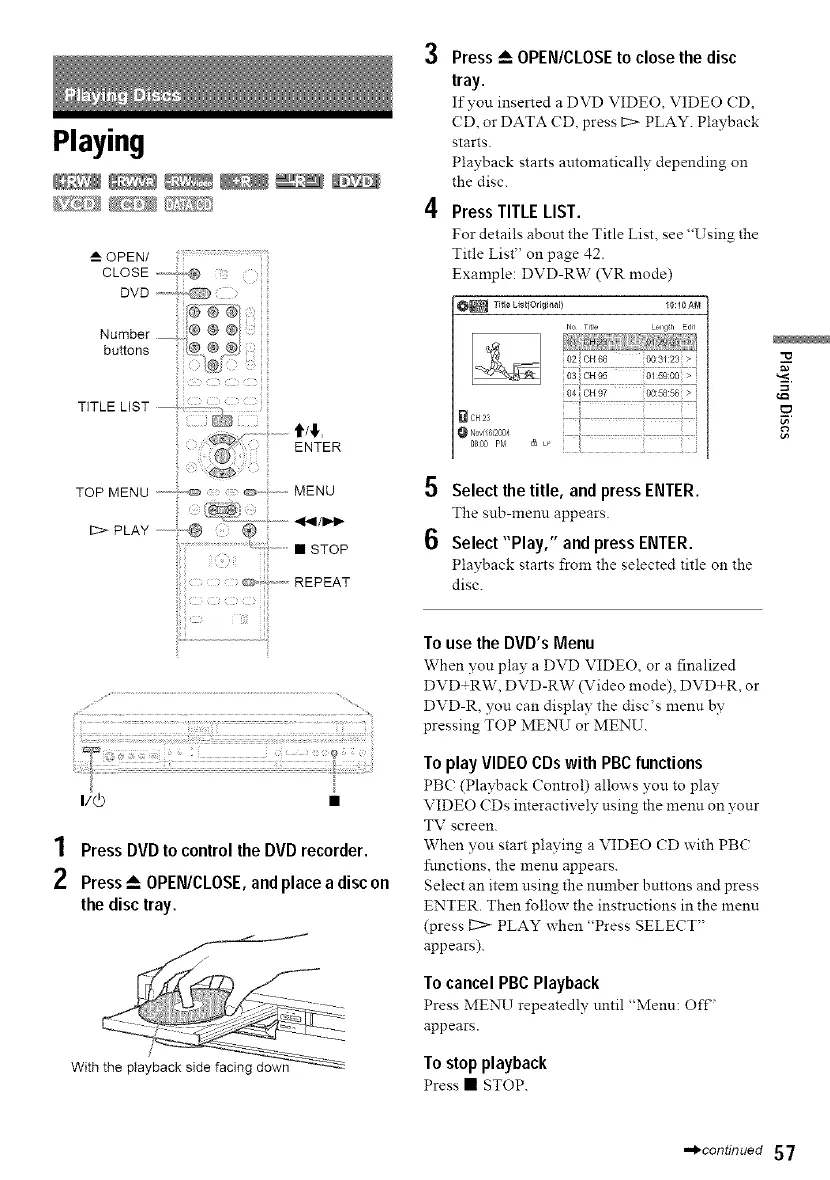
--_OPEN/ .....................
buttons
i i i iii
TITLE LIST .....
...... t/! .
ENTE.
TOP MENU """- '"_ _ .............MENU
I::::>-PLAY @
Press _-- OPEN/CLOSE to close the disc
tray.
Ifyou inserted a DVD VIDEO, VIDEO (D,
CD, or DATA CD, press I::> PLAY. Playback
starts.
Playback starts automatically depending on
the disc.
Press TITLE LIST.
For details about the Title List, see "Using the
Title List" on page 42.
Example: DVD-RW (VR mode)
OR TitI_ List{Original) 10:10AN
Lengih EdJi
io2cH66 oo3_:23>i
_CH23
0_00,_, _
5 Select the title, and press ENTER.
The snb-menn appears
6 Select "Play," and press ENTER.
Playback starts from the selected title on the
disc.
i
=
€:3
i,e
1 Press DVDto controlthe DVDrecorder.
2 Press_--OPEN/CLOSE,andplace a discon
the disctray.
To use the DVD's Menu
When yon play a DVD VIDEO, or a finalized
DVD+RW, DVD-RW (Video mode), DVD+R, or
DVD-R, you can display the disc's menu by
pressing TOP MENU or MENU.
To play VIDEO CDs with PBC functions
PB( (Playback Control) allows yon to play
VIDEO (Ds interactively using the menn on your
TV screen.
When you start playing a VIDEO CD with PBC
functions, the menu appears.
Select an item using the number buttons and press
ENTER. Then follow the instructions in the menu
(press L::> PLAY when "Press SELECT"
appears).
To cancel PBC Playback
Press MENU repeatedly nntil "Menn: Off,
appears.
To stop playback
Press • STOP.
,.,_continued 57



 To Next Page