Checking/Changing/
Canceling DVDTimer
Settings (Timer List)
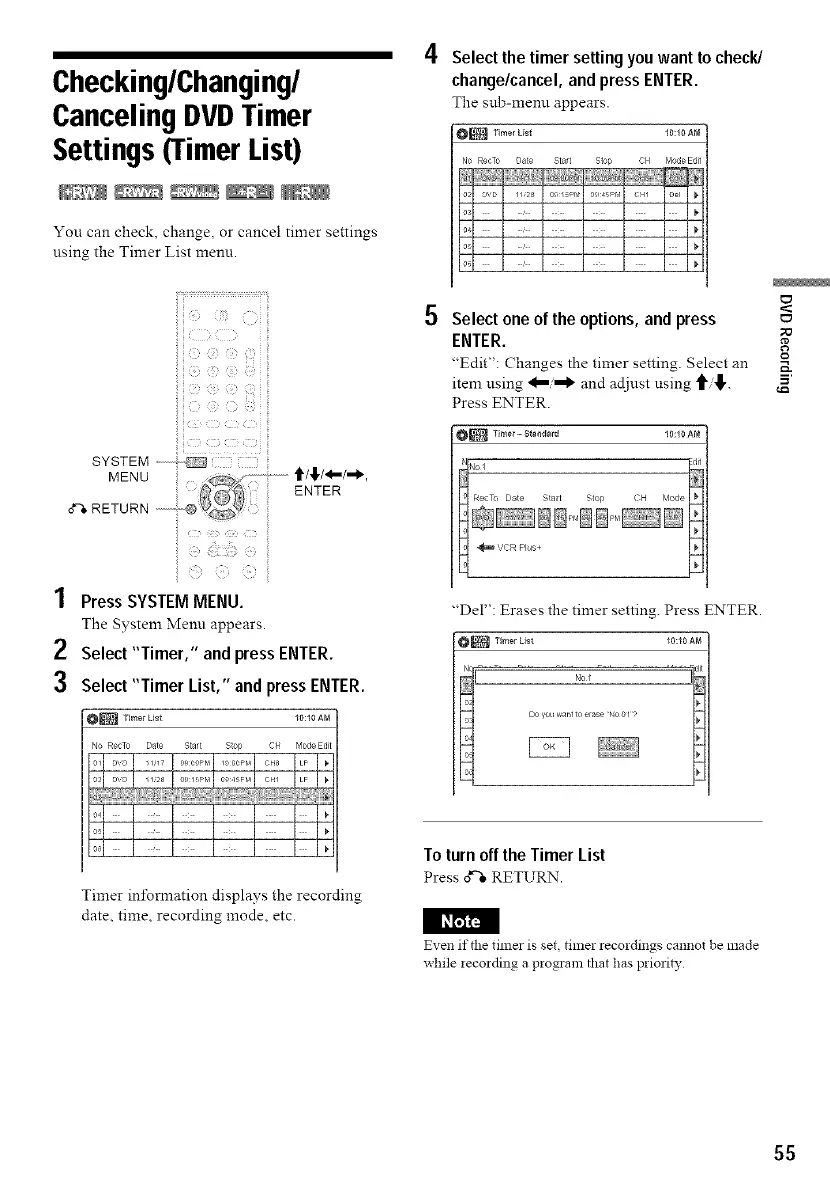
You can check, change, or cancel timer settings
using the Timer List menu.
iii::i:i¸::33:il;iii
i!ic,: c i_,i _< :_iiii
: _ z(( ¸ D
'_ :_i__{{_)::i!,i_i!,)_,_S_,!i
1 PressSYSTEM MENU.
The System Meml appears.
2 Select"Timer," and pressENTER.
3 Select "Timer List," and pressENTER.
_ Timer Lisi I0:I0AM
No RecTo Date Star{ Stop CH Mo(le Edit
Timer infomration displays the recording
date, time, recording mode, etc.
Select the timer settingyouwant to check/
change/cancel,and pressENTER.
The sub-memt appears.
_ TimerLis_ I0:I0AM
No Re@o Da_e Start Stop CH Motle Edit
1128 0 5PP 01 5pM OH1
Select oneof the options,and press
ENTER.
"Edit": Changes the timer setting. Select an
item using and acljnst using "_'
Press ENTER.
I0:I0AM
"Del": Erases the timer setting. Press ENTER.
_ Timer List I0:I0AM
No t
Toturnoff theTimer List
Pressd'-"eRETURN
I I_
Even if the timer is set, timer recordings cannot be made
while iecording a program that has priori b,
55



 To Next Page