Dubbingfrom a DV Format
Tape to a DVD
You can record a DV fore, at tape onto a disc. The
recorder controls the digital video camera. You
can fast forward, rewind, play in slow motion, and
stop the tape to select the scenes using the
recorder's remote contro!.
4)How chapters are created
The recorder divides the title in either 5 or 15-
minute intervals, according to the setting in "DVD
Auto Chapter" in "Features" setup (page 104).
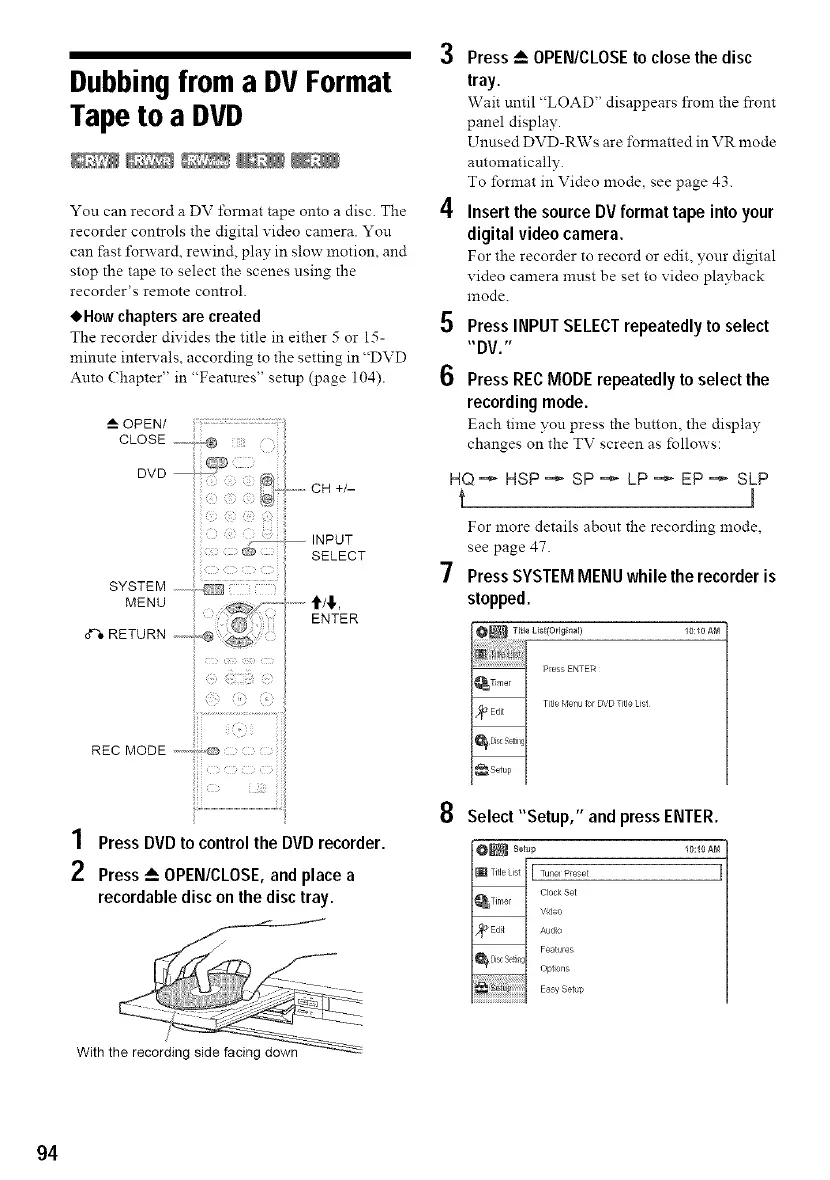
_A OPEN/
CLOSE ............@
DVD ; /_
SYSTEM
MENU ":::............'i'/'!',
RETUR. E.TE
i
?
EOMOOE.........-,o:....................................................................
1 Press DVD to control the DVD recorder.
2 Press _-- OPEN/CLOSE, and place a
recordable disc on the disc tray.
/
With the recording side facing down
3
4
5
6
Press _ OPEN/CLOSE to close the disc
tray.
Wait until "LOAD" disappears from the front
panel display.
Unused DVD-RWs are formatted in VR mode
automatically.
To format in Video mode, see page 43.
Insert the source DV format tape into your
digital video camera.
For the recorder to record or edit, your digital
video camera must be set to video playback
mode.
PressINPUTSELECTrepeatedlyto select
"DV."
PressRECMODErepeatedlyto select the
recordingmode.
Each time you press the button, the display
changes on the TV screen as follows:
HQ ='_ HSP ==_SP =_ LP =* EP =_ SLP
t J
For more details about the recording mode,
see page 47.
Press SYSTEM MENU while the recorder is
stopped.
Press ENTER
Tide Menu 1orDVD Ttle List
8
Select "Setup," and press ENTER.
_ setup 10:10 AM
[ TuFel Pese/
Cock Set
Vd÷o
Audo
Features
Optons
Easy Set@
94



 To Next Page