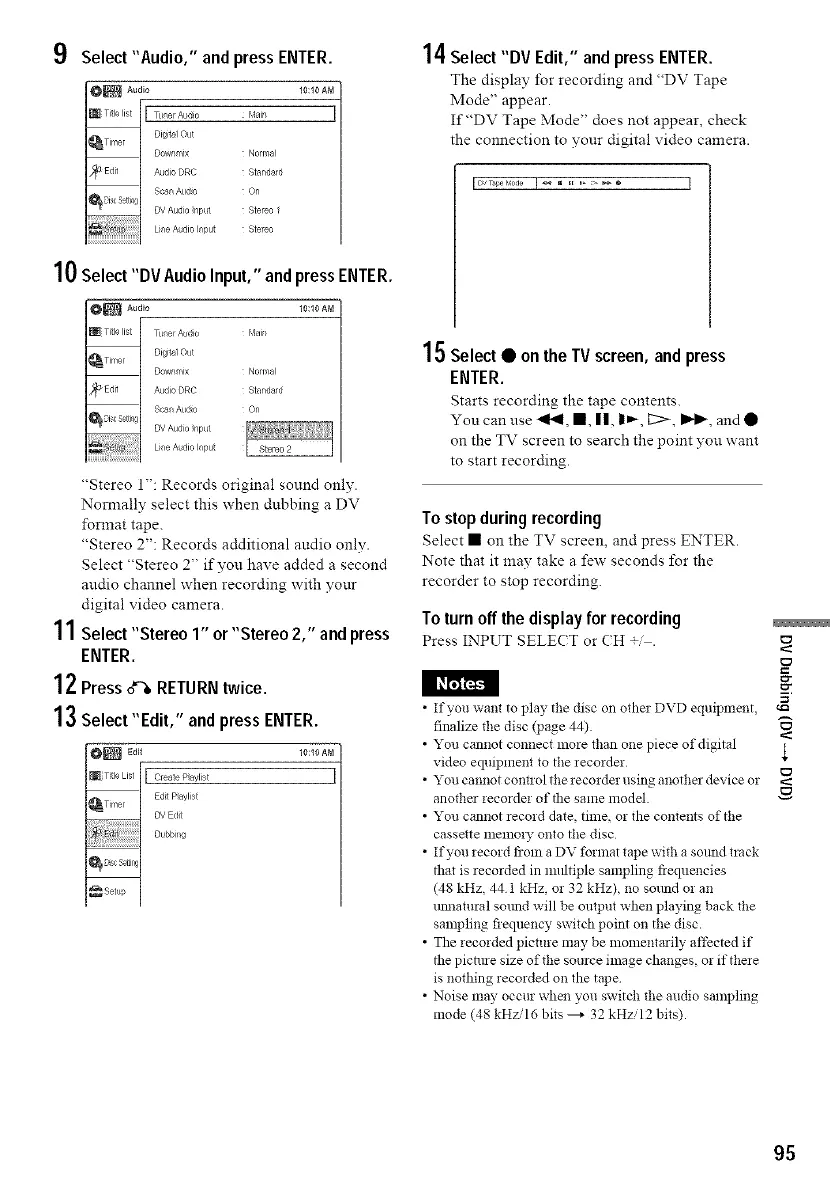
9 Select"Audio," andpress ENTER.
10:10 AM
Mair_
Normal
Standard
On
Stereo f
Stereo
10Select "DV Audio Input," andpressENTER.
10:10 AM
Normal
Standard
On
"Stereo 1": Records original sound only.
Nom_ally select this when dubbing a DV
format tape.
"Stereo 2": Records additional audio only.
Select "Stereo 2" if you have added a second
audio charnel when recording with your
digital video camera.
11Select "Stereo 1" or"Stereo 2," and press
ENTER.
12Press o'% RETURNtwice.
13Select "Edit," and press ENTER.
Edit 10:10 AM
[ Create Paylist
Edit P ayl_st
DV Edit
Dubbi g
14Select "DV Edit," and press ENTER.
The display for recording and "DV Tape
Mode" appear.
If"DV Tape Mode" does not appear, check
the connection to your digital video camera.
I Dv_M°_e I _ _ _[ _>_® I
15Select • on the TV screen, and press
ENTER.
Starts recording the tape contents.
You can use "_, •, ||, |_, I2> I_, and •
on the TV screen to search the point you want
to start recording.
To stop during recording
Select • on the TV screen, and press ENTER.
Note that it may take a few seconds for the
recorder to stop recording.
To turnoff the displayfor recording
Press INPUT SELE(T or (H .
• If you want to play the disc on other DVD equipment,
finalize the disc (page 44)
• You cannot connect more than one piece of digital
video equipment to the recorder
• You cannot cont!ol the recorder using another device or
another recorder of the same model.
• You cannot record date, time, or the contents of the
cassette memo! 7 onto the disc
• If you record from a DV format tape with a solmd track
thai is recorded in multiple sampling fiequencies
(48 kHz, 44 1 kHz, or 32 kHz), no sound or an
uimatural sotmd will be output when playing back the
sampling fiequency switdl point on the disc.
• The recorded picture may be momentarily affected if
the pictm e size of the source image changes, or if there
is nothing recorded on the tape
• Noise *nay occur when you switch the audio sampling
mode (48 kHzi16 bits _ 32 kHzi12 bits).
E
95



 To Next Page