ConnectingAnother VCRor Similar Device
After disconnecting the recorder's power cord from an AC outlet, connect other VCR or similar recording
device to the LINE IN jacks of this recorder•
See also the instruction manual supplied with the connected equipment.
To record on this recorder, see "Recording from (onnected Equipment with a Timer (Synchro Rec)" on
page 53 and page 72. Connect the equipment to the LINE 1 IN jacks of the recorder to record using the
Synchro Rec fnnction.
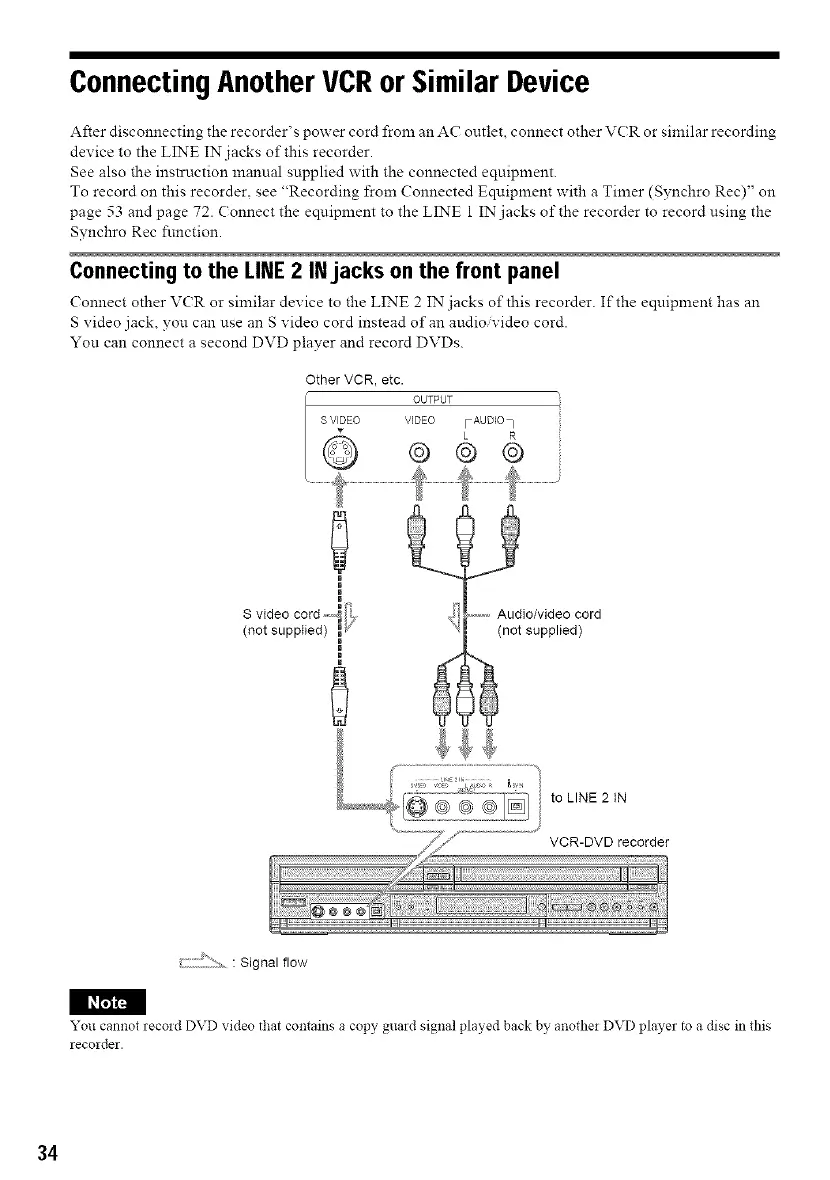
Connecting to the LINE 2 INjacks on the front panel
( onnect other V(R or similar device to the LINE 2 IN jacks o1"this recorder. If the equipment has an
S video jack, you can use an S video cord instead of an audio, video cord.
You can connect a second DVD player and record DVDs.
Other VCR, etc.
OUTPUT
0
• Wf'_
S video cord,-,,_ _,
(not supplied) _'
_z
Q
....... Audio/video cord
(not supplied)
to LINE 2 IN
VCR-DVD recorder
: Signal flow
I_
You cannot recoid DVD video that contains a copy guard signal played back by anothei DVD player to a disc in this
recolder.
34



 To Next Page