1 Turn on the TV.
2 Press I/_.
The recorder turns on.
3 Switch theinputselector onyour IV so that
the signal from the recorder appears on the
TV screen.
When connecting the recorder to the TV using
only the antenna cable, see "Setting the RF
Outpv4 channel" on page 19.
4 Slide the TV/DVDVIDEO switch to
DVDVIDEO, then press VIDEO to control
the VCR.
5
Insert a tape.
The V(R starts playing automatically if you
insert a tape with its safety tab removed.
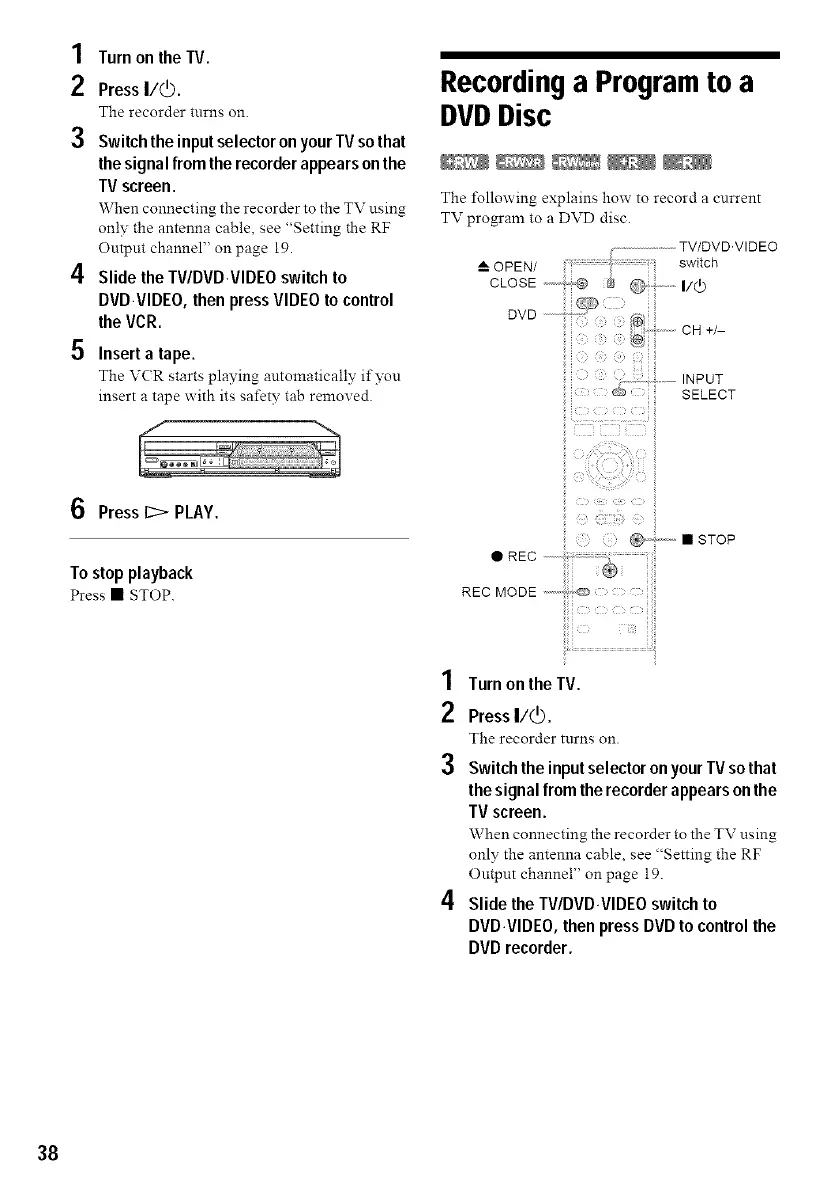
Recordinga Program to a
DVDDisc
The lbllowing explains how to record a current
TV program to a DVD disc.
( ...........................TV/DVD'VIDEO
OPEN/ switch
CCOSE,---:,,®$ ®;,...i/¢
i i i i!
+/-
INPUT
SELECT
t _
!3 Press 1:2> PLAY.
Tostopplayback
Press • STOP.
@2,. • STOP
1 Turn on the TV.
2 Press I/_.
The recorder turns on.
3 Switch theinputselectoronyour TV sothat
the signal from the recorder appears on the
TV screen.
When connecting the recorder to the TV using
only the antenna cable, see "Setting the RF
Output channel" on page 19.
4 Slide the TV/DVD.VIDEO switch to
DVDVIDEO, then press DVD to control the
DVD recorder.
38



 To Next Page