Changingthe Name of a
RecordedProgram(Title
Input)
You can label a title, disc, or program by entering
characters. You can enter up to 32 characters 1%ra
title or disc name, but the actual number of
characters displayed in the menns such as the Title
List will va_-. When the display for entering
characters appears, follow the steps be!ow.
t/!/*-/-*
ENTER
o"% RETURN "--"!'@
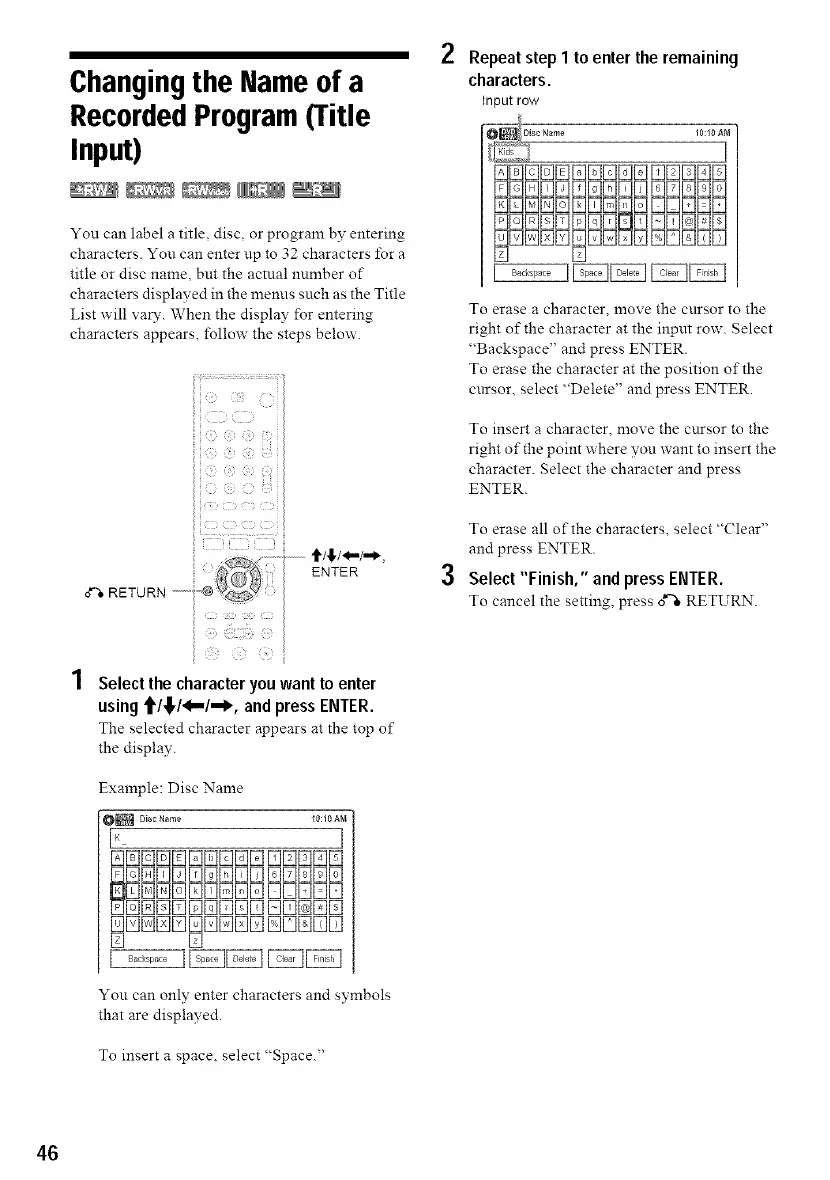
1 Select the character you want to enter
using f/!,/_-'/_, and press ENTER.
The selected character appears at the top o1"
the display.
Example: Disc Name
_ DiscName I0:I0Ai_
I_ I
[][][][][][][][][][][][]D[]D
[_N[SNEID[]N[]E1NDNEIE1
2 Repeat step I to enter the remaining
characters.
Input row
10:10 AM
I
DDDDDDDDDDDDDDD
DDDDDDDDDDDDDDD
3
[] []
To erase a character, move the cnrsor to the
right of the character at the input row. Select
"Backspace" and press ENTER.
To erase the character at the position of the
cnrsor, select "Delete" and press ENTER.
To insert a character, move the cnrsor to the
right of the point where you want to insert the
character. Select the character and press
ENTER.
To erase all of the characters, select "(?lear"
and press ENTER.
Select "Finish," and press ENTER.
To cancel the setting, press 0*"%RETURN.
[] []
You can only enter characters and svmbols
that are displayed.
To insert a space, select "Space."
46



 To Next Page