Usingthe Title List
The titles of programs recorded on a disc are
displayed in the Title List
--_ OPEN/ '
CLOSE
DVD
ORIGINAL/
PLAYLIST
i!
TOP MENU MENU
i
1 Press DVD to control the DVD recorder.
2 Press _-- OPEN/CLOSE, and place a disc on
the disc tray.
3 Press _--OPEN/CLOSEto close the disc
tray.
Wait until "LOAD" disappears from the front
panel display
4 PressTITLE LIST.
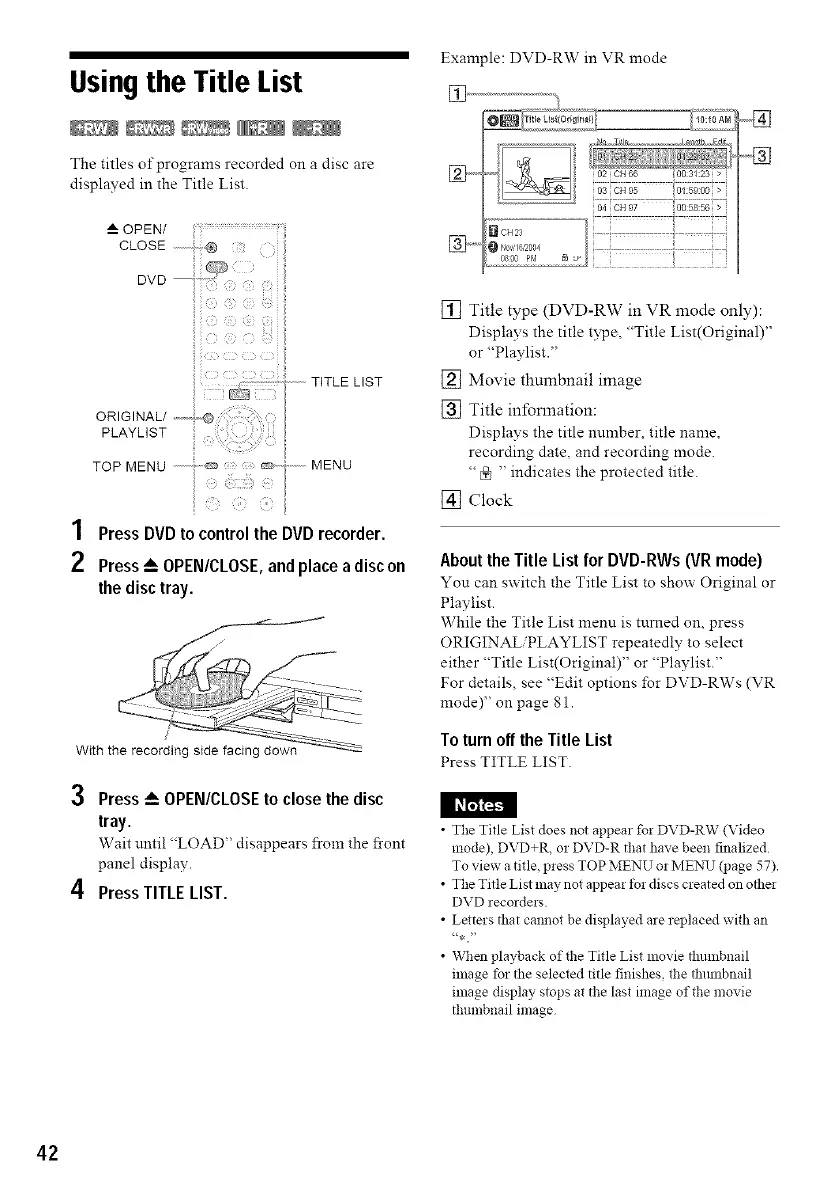
Example: DVD-RW in VR mode
[]
io3icH_,5 o:._:oo
......................... o4cH_7 oo5s:56>
a oH2:, ' : i
0800 prl _ i.
.....]
[] Title type (DVD-RW in VR mode only):
Displays the title type, "Title List(Original)"
or "Playlist "
[] Movie thumbnail image
[] Title inlbnnation:
Displays the title number, title name,
recording date, and recording mode.
" I_ " indicates the protected title.
[] Clock
About the Title List for DVD-RWs (VR mode)
You can switch the Title List to show Original or
Playlist
While the Title List menu is turned on, press
ORIGINALiPLAYLIST repeatedly to select
either "Title List(Original)" or "Playlist."
For details, see "Edit options for DVD-RWs (VR
mode)" on page 81
Toturnoff the Title List
Press TITLE LIST.
I I_I_JFJI_Jl
• The Title List does not appear for DVD-RW (Video
mode), DVD+R, or DVD-R that have been finalized
To view a title, press TOP MENU or ME1Xq.7(page 57)
• The Title List may not appear t_r discs created on other
DVD recorders
• Letters that cannot be displayed are replaced with an
",a."
• When playback of the Title List movie thumbnail
image tbr the selected title finishes, the tlmmbnail
image display stops at the last image of the movie
thumbnail image
42



 To Next Page