BeforeRecording
Before you start recording...
Check that the tape is longer than the recording
time.
"_° Hint
Tilne! lecordings will stair regmdless of wheflle! o! not
the recorder is lsmled on. You cannot tlu_l off the
recorder during a timer recording. Tile recorder
alltomatically tmns off after the timer recording finishes
I I_rollyl
This recorder shares a single timer for both tile DVD
recorder and the VCR. You cannot record different
programs to a DVD and a VHS tape at the same time.
Recordinga stereo/SAPprogram
The recorder can receive and record stereo/SAP
programs.
Stereo programs
When a stereo program is received, the
"STEREO" indicator lights up in the front panel
display. If there is noise in the stereo pro_am,
press AUDIO repeatedly until the "MONO"
indicator disappears from the TV screen. The
sonnd will be recorded in monanral but with less
noise.
SAP (Second Audio Program)
When a SAP (Second Audio Program) is received,
the "SAP" indicator lights up in the front panel
display. To record only SAP sound, set "Tnner
Audio" of"Audio" to "SAP" in the "Setnp"
display (page 102).
VCRRecordingwithoutthe
Timer
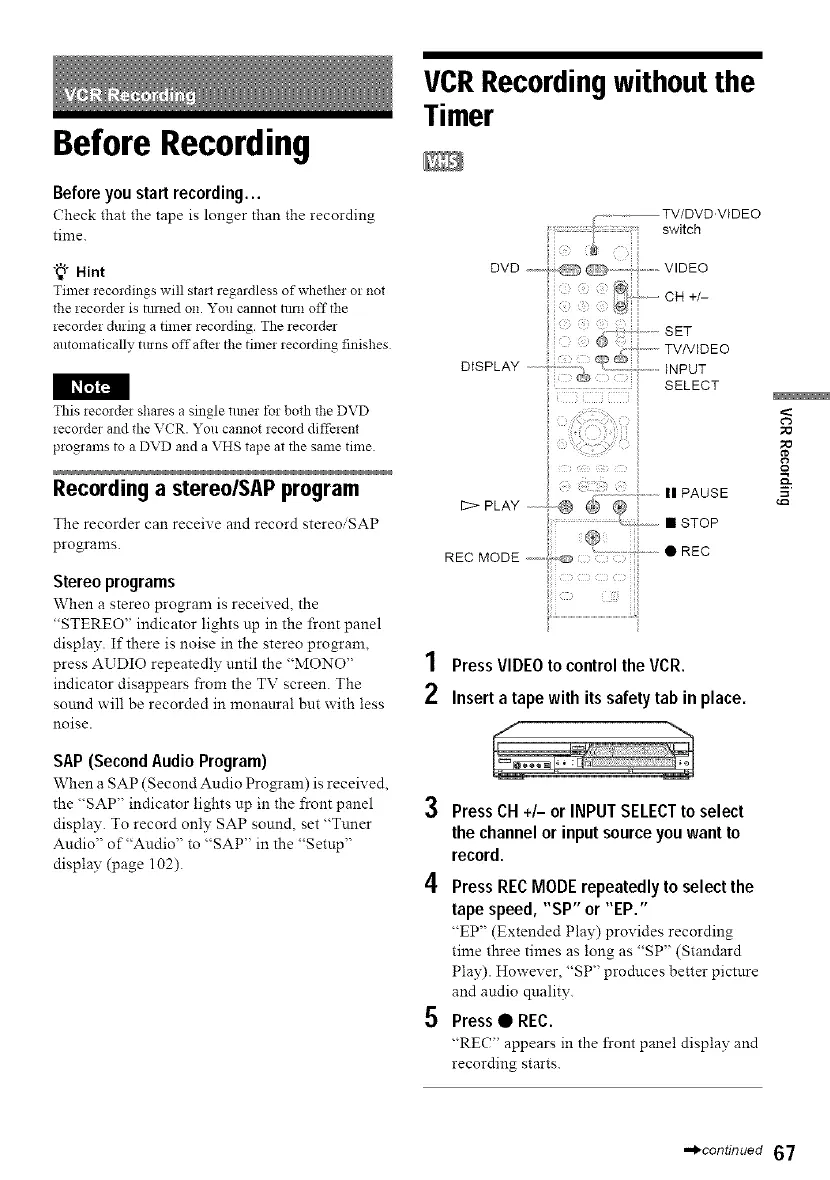
............. TV/DVD'VIDEO
switch
DVD,,,,,,,,,, V,DEO
t®i2
{_ CH +/-
SET
DISPLAY qp TV/VIDEO
INPUT
SELECT
............. II PAUSE
12>PLAY @ @ @
...................................! : • STOP
1
2
PressVIDEOto control the VCR.
Inserta tape with itssafety tab in place.
Press CH +/- or INPUTSELECTto select
the channelor input sourceyou want to
record.
Press REC MODE repeatedly to select the
tape speed, "SP" or "EP."
"EP" (Extended Play) provides recording
time three times as long as "SP" (Standard
Play). However, "SP" produces better pictnre
and audio qnality.
Press • REC.
"REC" appears in the front panel display and
recording starts.
,-_continued 67



 To Next Page