Usingthe Setup Displays
By using the setup displays, you can make various
adiustnrents to items such as picture and sound, as
well as select a language lbr the subtitles.
The setup displays are used in the following way.
Playback settings stored in the disc take priori b, over the
setup display settings, and not all of tile fimcfions
described may work.
2
3
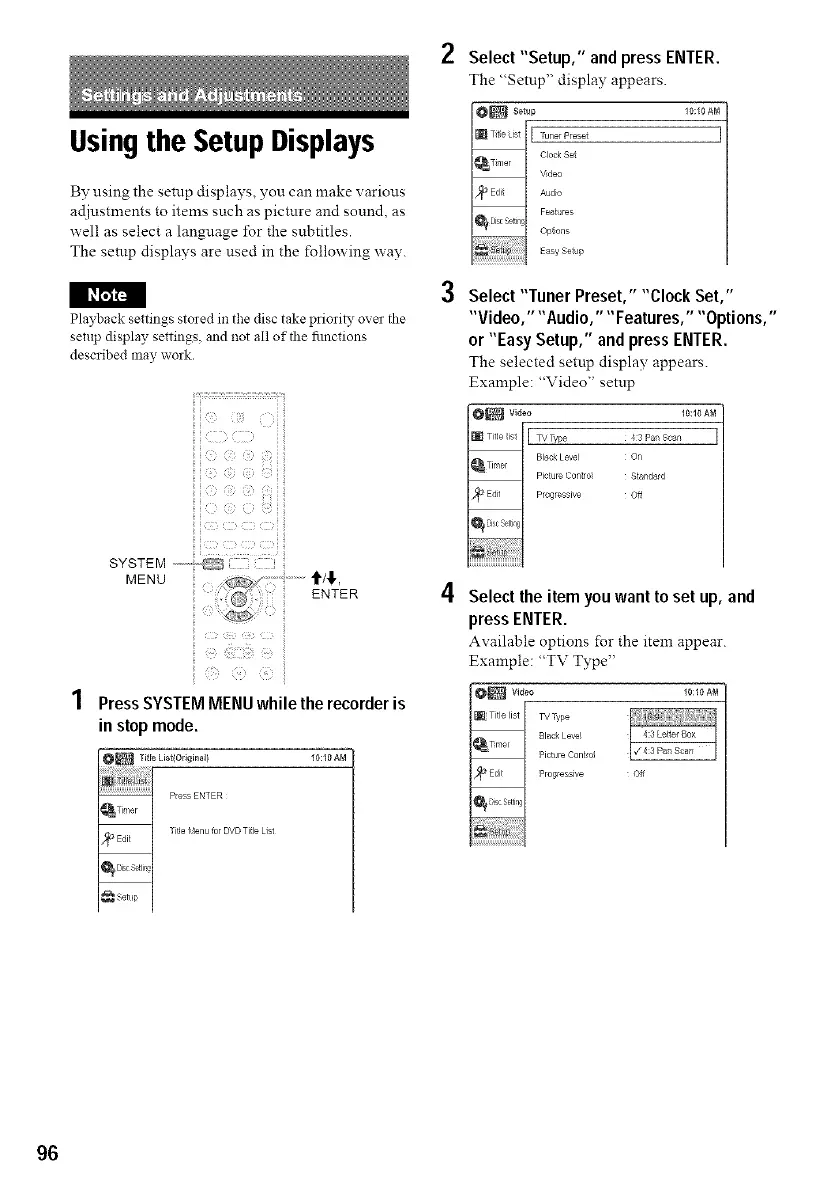
Select "Setup," and press ENTER.
The "Setup" display appears.
8_tup 10:10AM
_ tunerPreset
Clock S_
_/ Video
_ udio
Feat _res
ONions
Easy Seup
Select "Tuner Preset," "Clock Set,"
"Video," "Audio," "Features," "Options,"
or "Easy Setup," and press ENTER.
The selected setup display appears.
Example: "Video" setup
10:10 AM
,3 Pa_ Scan
On
Standard
Off
SYSTEM
MENU
€/€
ENTER
Press SYSTEM MENU while the recorder is
in stop mode.
10:10 AM
4 Select the item you wantto set up, and
press ENTER.
Available options for the item appear.
Example: "TV Type"
10:10 AM
Off
96



 To Next Page