Creating chapters manually
You can manually insert a chapter mark at any
point you like during playback.
Press CHAPTER MARK at the point where you
want to divide the title into chapters.
Each time yon press the bntton, "Marking mark..."
appears on the screen and the scenes before and
after of the mark become sep_ate chapters.
I_
To erase chapter marks
You can combine two chapters by erasing the
chapter mark dnring playback.
During playback, press MARK ERASE.
The current chapter combines with the previous
chapter.
I_
Ifa message appears and indicates that no more chapter
marks ca:: be added, you may not be able to record or edit
Creatinga Playlist
You can add a section of the title to the Playlist
title as one scene without changing the actual
recordings. A Playlist title can contain np to 99
scenes.
For details, see "Edit options lbr DVD-RWs (VR
mode)" on page 81.
If you erase an original title used in a Playlist, that Playlist
is also erased.
i i _b ii_
DVD
:i
................TITLE LIST
SYSTEM ,,,.,,,.,,,,,*,_
<_ >:::............t/!
MENU ii ENTER
ORIGINAL/
PLAYLIST
,,o-,,• STOP
12>PLAY II PAUSE
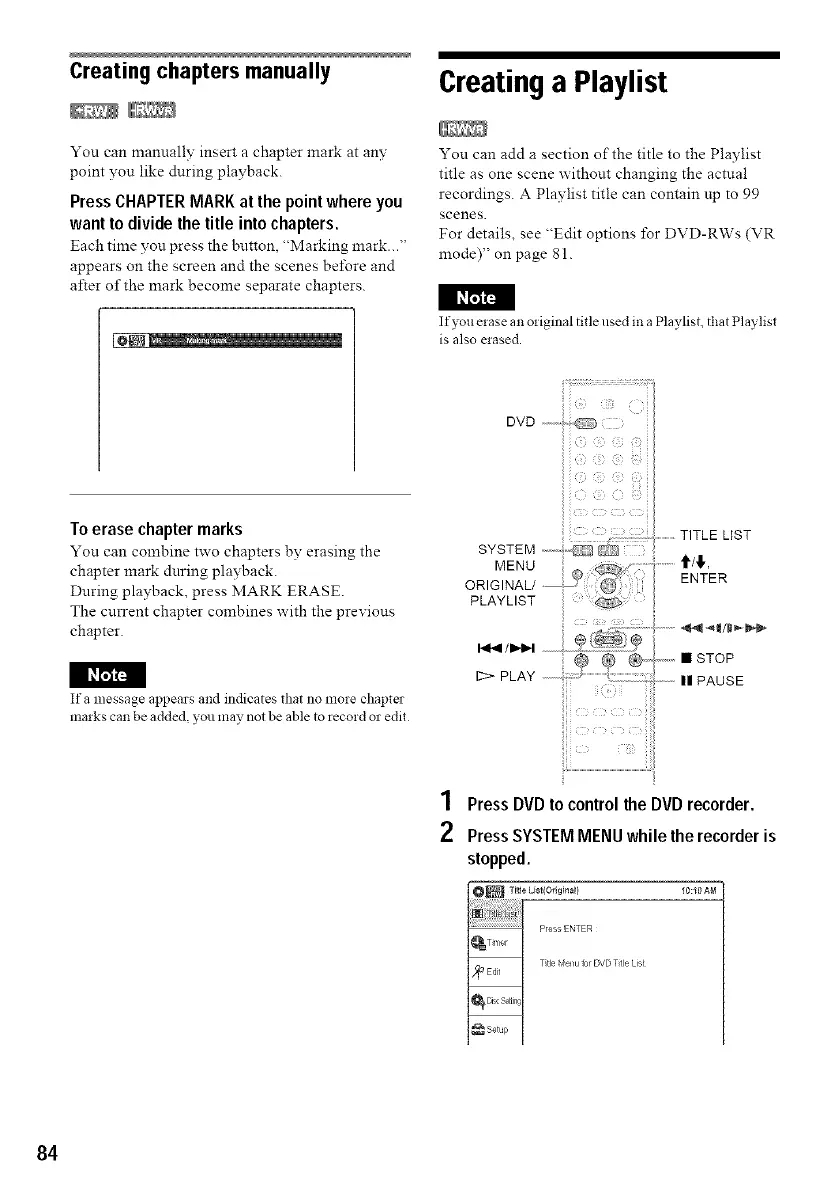
1 Press DVD to control the DVD recorder.
2 Press SYSTEM MENU while the recorder is
stopped.
10:10 AM
84



 To Next Page