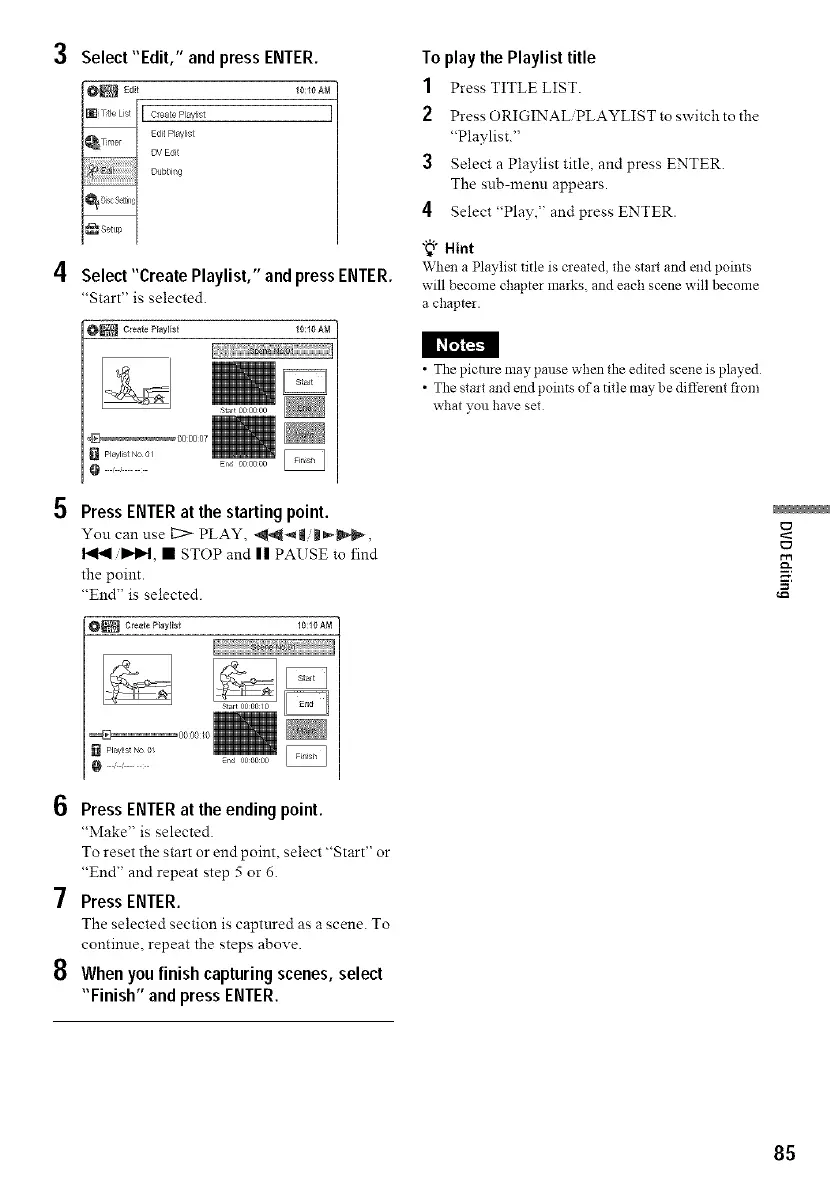
3 Select"Edit," and press ENTER.
I Create P aylist ]
Edit P aylist
DV Ec!it
Uubbi g
4 Select"Create Playlist," and press ENTER.
"Start" is selected.
10:10 AM
I l_I_
5 Press ENTER at the starting point.
You can use L__ PLAY, _-'Iim_,
I'_/1_, • STOP and |1 PAUSE to find
the point.
"End" is selected.
[] playnst No 0_
10:10 A_]
En
6 Press ENTER at the ending point.
"Make" is selected
To reset the start or end point, select "Start" or
"End" and repeat step 5 or 6.
7 Press ENTER.
The selected section is captnred as a scene. To
contimle, repeat the steps above.
8 When you finish capturing scenes, select
"Finish" and press ENTER.
To play the Playlist title
1 Press TITLE LIST.
2 Press ORIGINALiPLAYLIST to switchto the
"Playlist."
3 Select a Playlist title, and press ENTER.
The sub-menn appears.
4 Select"Play," and press ENTER.
"_" Hint
When a Playlist title is cleated the stair and end points
will become chapter marks, and each scene will become
a chapter.
• The pictm-e may pause when the edited scene is played
• The stair and end points of a title may be different flora
what you have set
=
85



 To Next Page