The advanced edit functions available for Plavlist
titles are:
Labeling a title (page 82).
Erasing a title (page 82).
Editing a Playlist scene (page 86).
"_° Hint
You can display the disc's Playlist titles in tile Title List
(Playlist), or the oliginal titles in the Title List (Original).
To switch the two Title Lists, press TITLE LIST and
press ORIGINAL/PLAYLIST
I_tvIF_
• You cannot protect Playlist titles.
• Ifa message appears and indicates that the disc's
control intbrmation is flfll, eiase unnecessmy titles
Editinga Title
This section explains the basic edit functions. Note
that editing is irreversible. To edit a DVD-RW
(VR mode) without changing the original
recordings, create a Playlist title (page 84).
When editing a DVD+R, DVD-R, or DVD-RW (Video
mode), finish all editing before finalizing the disc You
cam_ot edit a finalized disc.
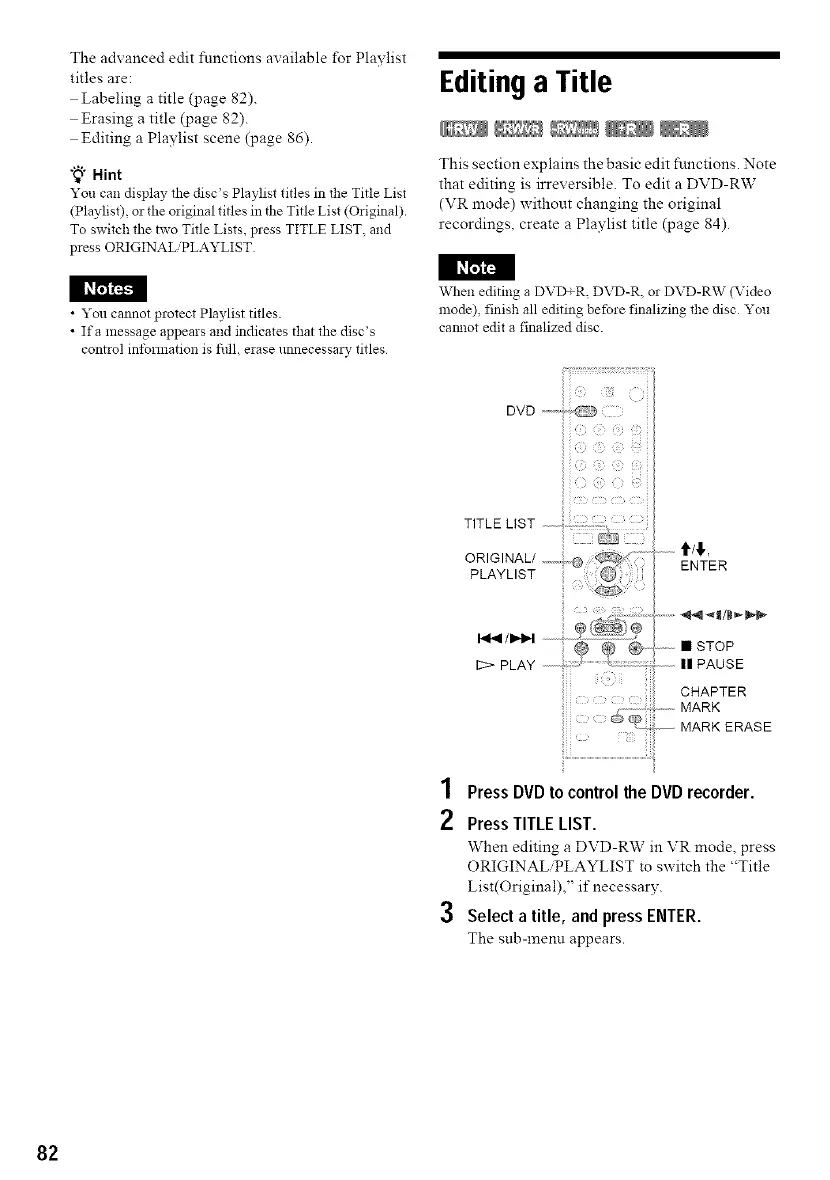
12> PLAY
ENTER
STOP
PAUSE
CHAPTER
ERASE
,4
/ Press DVD to control the DVD recorder.
2 Press TITLE LIST.
When editing a DVD-RW in VR mode, press
ORIGINAL,PLAYLIST to switch the "Title
List(Original)," if necessary.
3 Select a title, and press ENTER.
The sub-meml appears.
82



 To Next Page